
Product Overview
This manual provides instructions for the Retevis H-777 5V 1A USB Charger Adapter. This adapter is designed for charging various compatible devices, including Retevis H-777, RT7, RT19, RT27, RT22, H-777S walkie-talkies, Retekess V112, V115 FM radios, and Retekess T130, TT101 tour guide systems.
It features advanced charging technology with over-power protection, output over-voltage protection, and short-circuit protection to ensure safe charging of your devices.

Image: The Retevis H-777 5V 1A USB Charger Adapter, a compact black wall adapter with a single USB-A port.
Safety Information
- Ensure the adapter is used within its specified voltage range (100-240V).
- Avoid exposing the adapter to moisture or extreme temperatures.
- Do not attempt to disassemble or repair the adapter.
- Keep out of reach of children.
- Unplug the adapter from the wall outlet when not in use.
Setup and Installation
Follow these steps to set up and use your Retevis H-777 Charger Adapter:
- Step 1: Connect USB Cable
Insert the USB cable (not included) of your device into the USB-A port of the Retevis H-777 charger adapter.
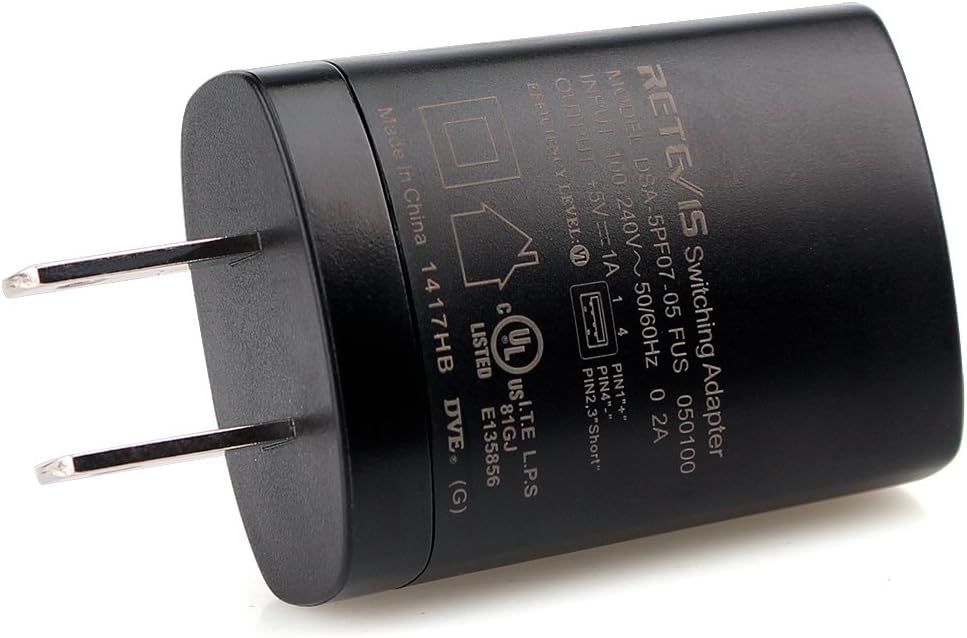
Image: A close-up view of the Retevis charger adapter, showing the USB-A port where a USB cable can be inserted.
- Step 2: Plug into Wall Outlet
Plug the adapter into a standard wall power outlet (100-240V). Ensure the connection is firm.

Image: The Retevis charger adapter plugged into a multi-outlet power strip, with a USB cable connected to a walkie-talkie charging base.
- Step 3: Connect to Device
Connect the other end of the USB cable to your compatible device (e.g., walkie-talkie, radio, or its charging base).

Image: The Retevis charger adapter with a USB cable connected to a walkie-talkie charging base, ready for charging.
Operating Instructions
Once all connections are secure, the adapter will automatically begin charging your device. The charging status (e.g., LED indicators) will typically be displayed on your connected device or its charging base. Refer to your device's specific instruction manual for details on its charging indicators.
The adapter provides a stable 5V 1A output, optimized for efficient and safe charging of compatible electronics.
Maintenance
- Clean the adapter periodically with a dry, soft cloth. Do not use liquid cleaners, aerosols, or harsh chemicals.
- Store the adapter in a cool, dry place away from direct sunlight and moisture when not in use.
- Inspect the adapter and its prongs for any signs of damage, such as cracks or bent prongs, before each use. Discontinue use if damage is observed.
- Avoid wrapping the USB cable too tightly around the adapter, as this can stress the cable and connections.
Troubleshooting
- Device Not Charging:
- Ensure the adapter is securely plugged into a functional wall outlet. Test the outlet with another device if necessary.
- Verify that the USB cable is properly connected to both the adapter and your device/charging base.
- Check if the device itself is functioning correctly and capable of receiving a charge.
- Try using a different USB cable to rule out a faulty cable.
- Test the adapter with another compatible device if possible to determine if the issue is with the adapter or the original device.
- Adapter Overheating:
- Unplug the adapter from the wall outlet immediately.
- Ensure there is adequate ventilation around the adapter during use. Avoid covering it or placing it in enclosed spaces.
- Avoid charging in direct sunlight or excessively warm environments.
- If overheating persists after allowing it to cool and ensuring proper ventilation, discontinue use and contact customer support.
Specifications
| Feature | Detail |
|---|---|
| Model Number | DSA-5PF07-05-FUS 050 100 |
| Input Voltage | 100-240V AC, 50/60Hz |
| Output Voltage | 5V DC |
| Output Current | 1A |
| Dimensions | 1.89 x 1.34 x 0.83 inches (48 x 34 x 21 mm) |
| Weight | 0.92 ounces (26g) |
| Protection | Over Power, Output Over Voltage, Short Circuit |

Image: The Retevis charger adapter with measurements indicating its width (34mm/1.34in) and depth (21mm/0.83in).

Image: The Retevis charger adapter with a measurement indicating its height (48mm/1.89in).
Warranty and Support
For warranty information or technical support regarding your Retevis H-777 Charger Adapter, please contact Retevis customer service. You can typically find their contact information on their official website or through the retailer where the product was purchased.
When contacting support, please have your product model number (DSA-5PF07-05-FUS 050 100) and purchase details readily available to assist with your inquiry.


