
1. Introduction
The Waytronic Microsound Mini PIR Motion Sensor Activated Voice Reminder is a versatile device designed to play pre-recorded audio messages upon detecting motion. It is suitable for various applications such as shop greeters, security reminders, or special sound effects in commercial and residential settings. This manual provides comprehensive instructions for the proper setup, operation, and maintenance of your device.
2. Product Features
- Expanded Memory Storage: Features a built-in 4MB internal memory and includes a 128MB micro SD card for extensive audio storage.
- Configurable Premium Sound: Equipped with an 8Ω 1-watt speaker, offering two volume levels (Low and High) for clear MP3 audio playback.
- Dual Power Options: Can be powered by three AAA batteries (not included) or via USB. Note: Both power sources cannot be used simultaneously.
- Wide Induction Range: Detects motion up to 13 feet (4 meters) with a human body induction angle of up to 120 degrees.
- Multiple Playback Modes: Supports single cycle playback and sequential play of multiple recorded sounds.
- Easy Audio Update: Audio files can be easily replaced and updated via the micro SD card.
3. Components and Controls
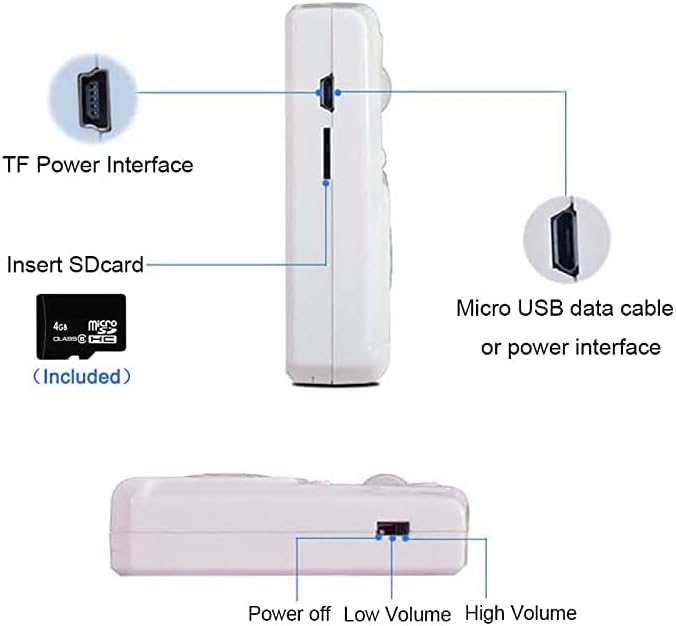
Figure 1: Device Components and Controls
This diagram illustrates the key interfaces and controls of the device. On the side, you will find the TF Power Interface (Micro USB port), the Micro SD card slot, and the Micro USB data cable/power interface. At the bottom, there is a switch for power control and volume settings (Power off, Low Volume, High Volume).

Figure 2: Front View of the Device
The front of the device features the PIR motion sensor lens at the top, an indicator light, and two control buttons labeled 'A' and 'B'. Below these, a prominent speaker grille is visible.
- PIR Motion Sensor: Detects movement within its range.
- Indicator Light: Provides status feedback (e.g., on during audio transfer).
- Buttons A & B: Used for specific functions, such as initiating audio transfer from SD card (long press B).
- Speaker: Outputs the recorded audio.
- Micro SD Card Slot: For inserting the memory card containing audio files.
- Micro USB Port: For power supply or connecting to a computer for audio transfer.
- Power/Volume Switch: Controls power (Off) and sets volume (Low/High).
4. Setup
4.1. Powering the Device
The device offers two methods for power supply:
- AAA Batteries: Insert three AAA batteries (not included) into the battery compartment located on the back of the device. Ensure correct polarity.
- USB Power: Connect a Micro USB cable (not included) to the Micro USB port on the side of the device and to a 5V USB power source (e.g., USB wall adapter, computer USB port).
Important: Do not use both AAA batteries and USB power simultaneously.

Figure 3: Battery Compartment and Wall Mounting Holes
This image displays the rear of the device, highlighting the compartment where three AAA batteries are inserted and the designated holes for wall mounting.
4.2. Audio Management (Updating Audio Files)
The device supports MP3 audio format with a bit rate of 8~320Kbps. Audio files can be updated via the included micro SD card.
- Format Micro SD Card: If necessary, format the micro SD card on your computer.
- Copy MP3 Files: Copy your desired MP3 audio files to the micro SD card using your computer. Ensure the total size of audio files does not exceed 4MB if you intend to transfer them to the device's internal memory.
- Insert Micro SD Card: Insert the micro SD card into the designated slot on the device.
- Power On: Turn on the power switch. The indicator light will illuminate.
- Transfer Audio (Optional): To copy audio files from the micro SD card to the device's internal 4MB flash memory, long press the 'B' button. The indicator light will flash. Release the button when the light turns off, indicating the copy process is complete. If the total audio size exceeds 4MB, no audio will be transferred to the device's internal memory.
Alternatively, you can connect the device to a computer via the Micro USB port (with the SD card inserted). The device will appear as a USB storage device, allowing direct drag-and-drop of MP3 files to the SD card. Eject the device safely from your computer before disconnecting.
5. Installation Guidance
The installation position depends on your specific application needs. For optimal performance and to avoid false triggers, avoid installing the device in areas with direct sunlight, large temperature variations, or near air conditioners and heaters. This device is designed for indoor use only.
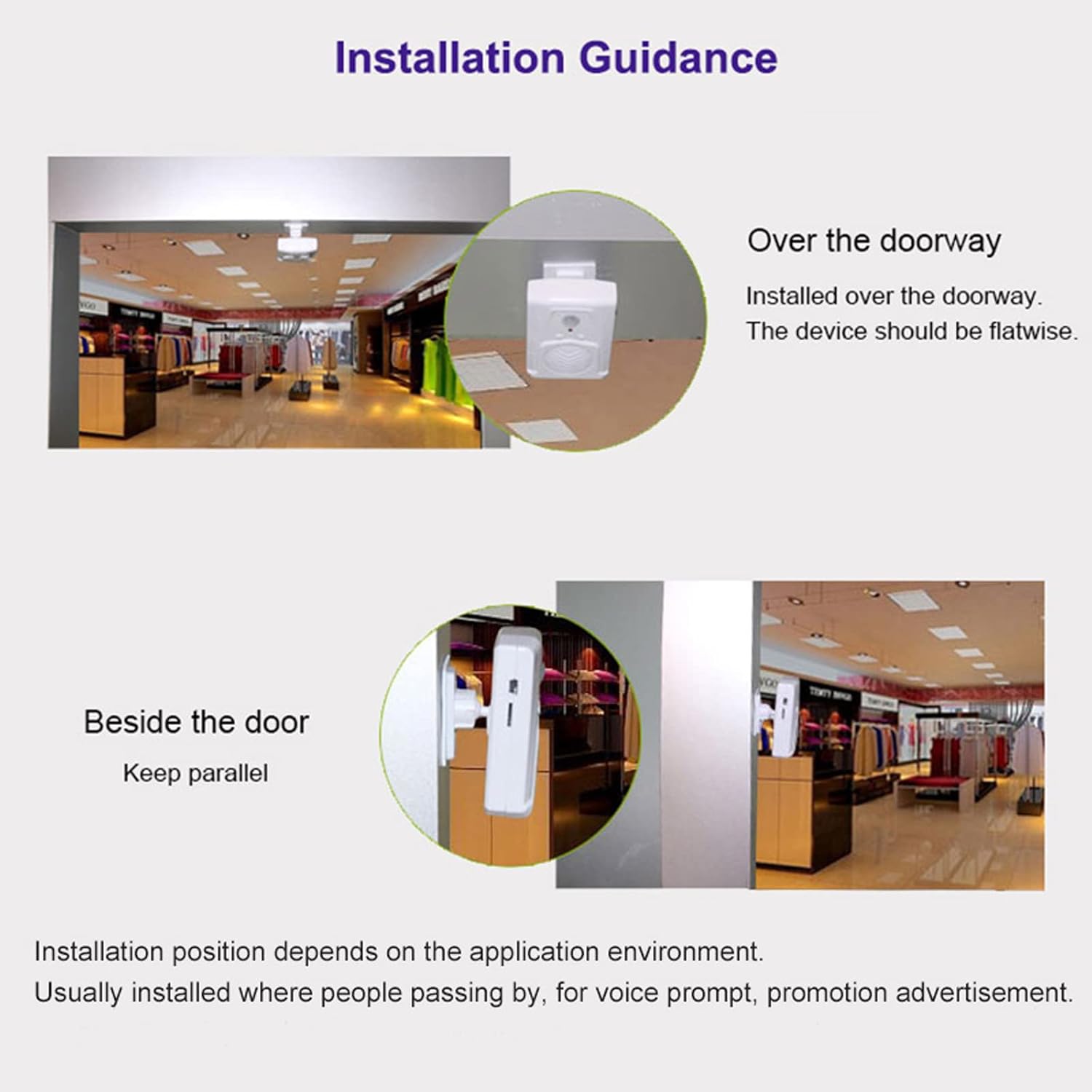
Figure 4: Recommended Installation Positions
This image provides visual guidance for installing the device. It suggests mounting it flatwise over a doorway or keeping it parallel when placed beside a door. The ideal placement ensures effective motion detection for voice prompts or advertisements.
- Over the Doorway: Install the device flatwise above the doorway.
- Beside the Door: Install the device parallel to the door frame.
- Mounting: The device can be placed on a tabletop or mounted using the wall mounting holes on the back. An adjustable wall bracket may be used for flexible positioning (optional).
6. Operation
6.1. Motion Detection
The device utilizes a Passive Infrared (PIR) motion sensor to detect movement. When motion is detected within its induction range, the device will automatically play the pre-recorded audio.
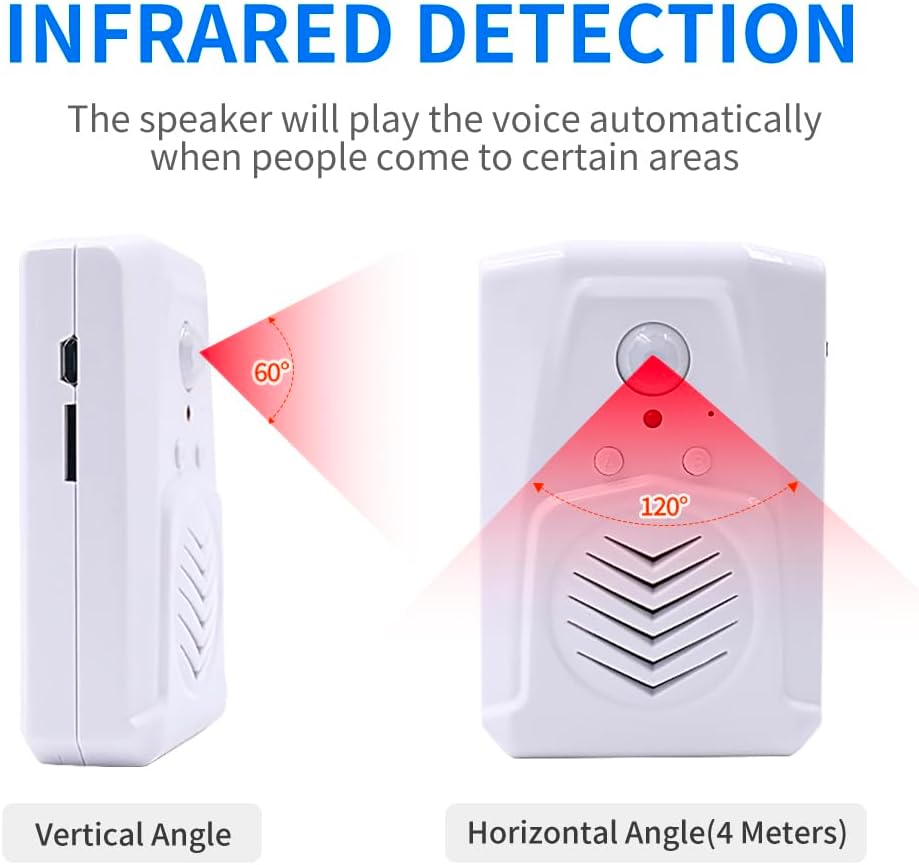
Figure 5: Infrared Detection Angles
This diagram illustrates the detection capabilities of the PIR sensor. It has a vertical detection angle of 60 degrees and a horizontal detection angle of 120 degrees, with an effective range of up to 4 meters.
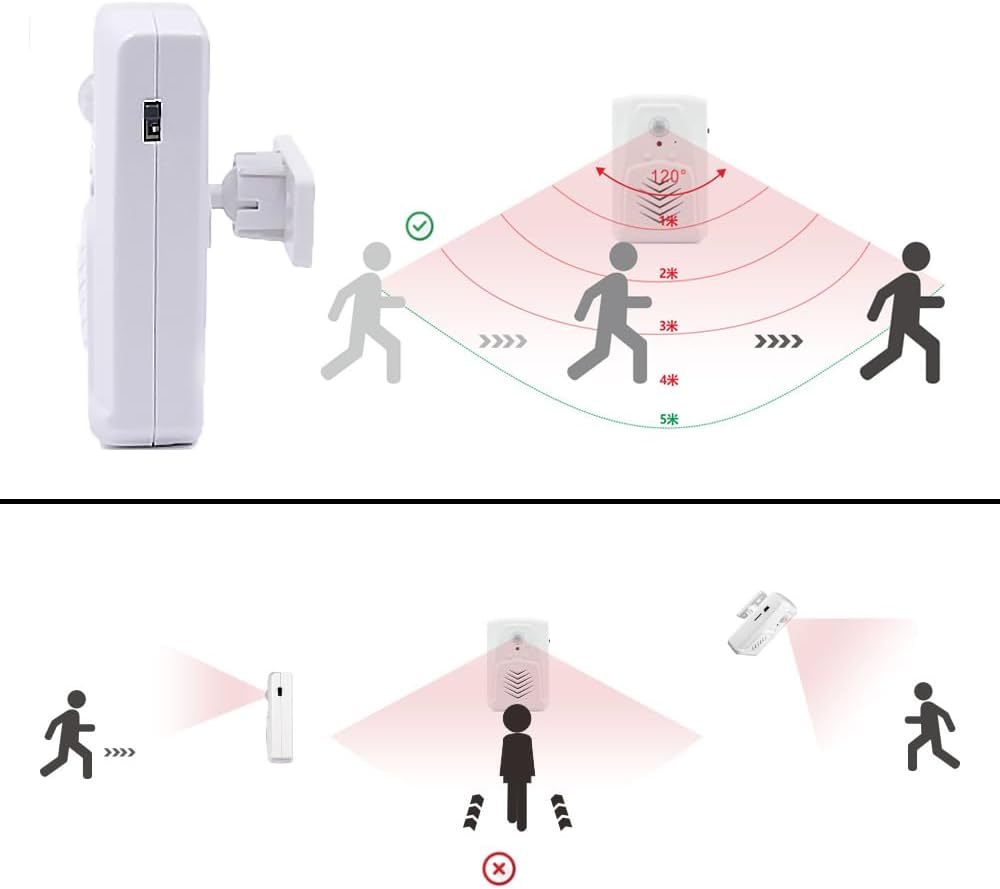
Figure 6: Motion Detection Scenarios
This illustration demonstrates how the motion sensor works best. Optimal detection occurs when a person moves across the sensor's field of view. Detection is less effective when a person moves directly towards or away from the sensor.
6.2. Play Modes
The device supports the following playback modes:
- Single Cycle Playback: Plays a single audio file repeatedly upon each detection.
- Sequential Play: Plays multiple recorded sounds in sequence upon successive detections.
The specific play mode depends on how the audio files are arranged on the SD card and the device's internal programming.
7. Care and Maintenance
- Cleaning: Use a soft, dry cloth to clean the device. Do not use liquid cleaners or aerosols.
- Environment: This device is for indoor use only. Exposure to moisture or extreme temperatures can damage internal components.
- Battery Replacement: Replace AAA batteries when the device's performance degrades or it stops functioning.
- Storage: If storing the device for an extended period, remove the batteries to prevent leakage.
8. Troubleshooting
| Problem | Possible Cause | Solution |
|---|---|---|
| Device does not power on. | No batteries or depleted batteries; USB cable not connected or faulty; power switch in 'Off' position. | Ensure fresh AAA batteries are inserted correctly or USB power is connected. Check power switch is set to 'Low Volume' or 'High Volume'. |
| No audio playback upon motion detection. | No audio files on SD card/internal memory; incorrect audio format; motion sensor obstructed or out of range; volume set to 'Off' or too low. | Verify MP3 files are correctly loaded. Ensure files are within 4MB if transferring to internal memory. Check sensor line of sight and range. Adjust volume switch. |
| Cannot transfer audio files to device. | Total audio file size exceeds 4MB for internal memory; incorrect transfer procedure; faulty SD card. | Ensure total audio size is within 4MB for internal transfer. Follow the 'Long press B button' procedure. Try a different micro SD card. Ensure SD card is properly inserted. |
| Audio quality is poor or distorted. | Low quality MP3 files; volume too high causing clipping. | Use higher quality MP3 files. Adjust volume to 'Low Volume' setting. Consider editing audio files to normalize volume or reduce gain using audio software. |
| Device triggers too often or not at all. | Improper installation location; environmental factors (direct sunlight, temperature changes). | Relocate the device to an area free from direct sunlight, rapid temperature fluctuations, or air vents. Ensure proper line of sight for motion detection. |
9. Specifications
Figure 7: Product Dimensions
This image provides the physical dimensions of the device, indicating a height of 90mm, a width of 60mm, and a depth of 26.6mm.
- Model: WT-M13
- Color: White
- Material: Plastic
- Product Dimensions: 1.05"D x 2.36"W x 3.54"H (approx. 26.6mm D x 60mm W x 90mm H)
- Item Weight: 3.84 Ounces
- Power Source: Battery Powered (3x AAA Alkaline) or USB (5V)
- Audio Format: MP3 (8~320Kbps)
- Audio Output Power: 8Ω/1W
- Internal Memory: Built-in 32Mbit (4MByte) flash memory
- External Memory: Supports Micro SD card (128MB included)
- Induction Range: ≤4m (13 feet)
- Induction Angle: 120° (Horizontal)
- Working Temperature: 0~30℃
- Usage: Indoor
10. Warranty and Support
For warranty information and customer support, please refer to the product packaging or contact Waytronic customer service directly. Keep your purchase receipt for any warranty claims.