1. Introduction
This manual provides instructions for the setup, operation, and maintenance of your BESTISAN S6520 80W 34-Inch Soundbar. This soundbar is designed to enhance your audio experience for televisions, offering various connectivity options and sound modes.
2. Package Contents
Verify that all items listed below are included in your package:
- BESTISAN S6520 Soundbar
- Power Adapter
- Digital Optical Cable
- Stereo RCA to 3.5mm Audio Cable
- Remote Control (with 2 AAA batteries)
- User Manual
- Service Card

Image: Contents of the BESTISAN S6520 Soundbar package, including the soundbar, remote control, power adapter, optical cable, RCA cable, user manual, and service card.
3. Product Overview
The BESTISAN S6520 is an 80W 34-inch soundbar designed for home audio systems. It features multiple connectivity options and sound modes to optimize your listening experience.
3.1 Soundbar Components
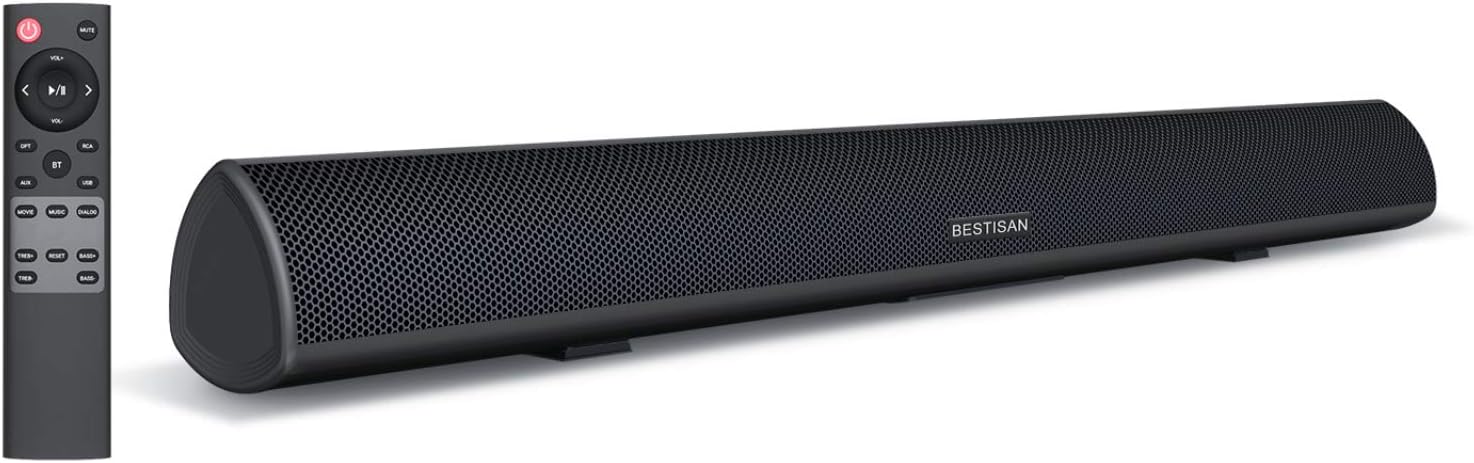
Image: The BESTISAN S6520 Soundbar shown alongside its remote control. The soundbar is black with a mesh grille, and the remote has various function buttons.

Image: An exploded view of the soundbar's internal components, highlighting two bass reflex tubes, two 25W range drivers, and two 15W tweeter drivers.
3.2 Remote Control and On-Unit Buttons
The soundbar can be controlled using the included remote or the buttons located on the unit's side panel.

Image: A detailed view of the remote control and the right-side control panel of the soundbar, showing buttons for power, volume, input selection (USB, AUX, ARC, OPT, BT), and sound modes (Movie, Music, Dialog).
4. Setup
4.1 Placement
The soundbar can be placed on a flat surface in front of your television or wall-mounted. Ensure the soundbar is positioned centrally for optimal audio distribution. The product dimensions are 4"D x 34"W x 4"H.
4.2 Connections
The soundbar supports various audio input methods:
- HDMI-ARC: Connect an HDMI cable (not supplied) from the soundbar's HDMI-ARC port to your TV's HDMI-ARC port.
- Optical: Use the included optical cable to connect the soundbar to your TV's optical audio output.
- AUX: Connect devices using a 3.5mm audio cable (not supplied) to the AUX input.
- RCA: Use the included Stereo RCA to 3.5mm audio cable to connect devices with RCA outputs.
- USB: Insert a USB drive for audio playback.
- Bluetooth: For wireless connection with Bluetooth-enabled devices.
5. Operating Instructions
5.1 Power On/Off
Press the power button on the remote control or the soundbar's side panel to turn the unit on or off.
5.2 Input Selection
Press the 'Input' button on the remote or the corresponding input button on the soundbar (e.g., OPT, ARC, BT, USB, AUX) to switch between audio sources. The LED indicator on the soundbar will change color to reflect the selected input mode.
5.3 Volume Control
Use the 'VOL+' and 'VOL-' buttons on the remote control or the soundbar's side panel to adjust the volume level.
5.4 Sound Modes
The soundbar features three distinct sound modes optimized for different content:
- Movie Mode: Provides an expansive audio experience suitable for films.
- Music Mode: Delivers balanced audio for music playback.
- Dialogue Mode: Enhances vocal clarity for TV shows and news.
Select these modes using the dedicated buttons on the remote control.

Image: Visual representation of the three distinct sound modes: Music, Movie, and Dialogue, available on the soundbar.

Image: A television displaying content with the soundbar below, illustrating the Clear Voice function which clarifies dialogue and commentary.
5.5 Bluetooth Pairing
To connect a Bluetooth device:
- Press the 'BT' button on the remote control or soundbar to enter Bluetooth pairing mode. The LED indicator will flash.
- On your device (e.g., smartphone, tablet), enable Bluetooth and search for 'BESTISAN S6520'.
- Select the soundbar from the list of available devices to pair. Once connected, the LED indicator will glow solid blue.

Image: A smartphone displaying a music player interface, with sound waves emanating towards the BESTISAN S6520 Soundbar, indicating a Bluetooth 5.0 wireless connection.
6. Maintenance
To ensure the longevity and optimal performance of your soundbar, follow these maintenance guidelines:
- Cleaning: Use a soft, dry cloth to clean the surface of the soundbar. Avoid using liquid cleaners or abrasive materials.
- Placement: Keep the soundbar away from direct sunlight, heat sources, and moisture. Ensure adequate ventilation around the unit.
- Handling: Avoid dropping or subjecting the soundbar to strong impacts.
- Power: Disconnect the power adapter during electrical storms or when the unit will be unused for extended periods.
7. Troubleshooting
If you encounter issues with your soundbar, refer to the following common problems and solutions:
| Problem | Possible Solution |
|---|---|
| No power | Ensure the power adapter is securely connected to the soundbar and a working power outlet. |
| No sound | Check that the correct input source is selected. Verify all audio cables are securely connected. Ensure the soundbar and TV volume are not muted or set too low. |
| Bluetooth not connecting | Ensure the soundbar is in Bluetooth pairing mode. Turn off and on Bluetooth on your device. Move your device closer to the soundbar (within 10 meters). |
| Remote control not working | Check if the batteries are correctly inserted and not depleted. Ensure there are no obstructions between the remote and the soundbar's sensor. |
| Distorted sound | Reduce the volume level. Check audio cable connections for damage. Try a different audio source or input mode. |
8. Specifications
| Feature | Detail |
|---|---|
| Model Name | S6520 |
| Speaker Type | Soundbar |
| Speaker Maximum Output Power | 80 Watts |
| Product Dimensions | 4"D x 34"W x 4"H |
| Item Weight | 6.6 Pounds |
| Connectivity Technology | Bluetooth, RCA, Optical, HDMI-ARC, AUX, USB |
| Wireless Communication Technology | Bluetooth 5.0 |
| Bluetooth Range | 10 Meters (33 feet) |
| Audio Output Mode | Surround |
| Surround Sound Channel Configuration | 2.1 |
| Frequency Response | 10200 Hz |
| Control Method | Remote |
| Mounting Type | Wall Mount |
| Power Source | Corded Electric |
| UPC | 656699979280, 702940163509 |
9. Warranty and Support
The BESTISAN S6520 Soundbar comes with a limited warranty. For specific warranty terms and conditions, please refer to the service card included in your package.
For technical support, troubleshooting assistance, or any inquiries regarding your product, please contact BESTISAN customer service:
- Email: service@bestisan.com
- Facebook: Visit the official BYL Facebook page and send a direct message.
A 90-day home trial period is offered for this product. Please contact customer service if you experience any dissatisfaction or defects during this period.


