
Fanvil Fanvil X5S
Fanvil X5S IP Phone
User Manual
Introduction
This manual provides comprehensive instructions for the setup, operation, maintenance, and troubleshooting of your Fanvil X5S IP Phone. The Fanvil X5S is an enterprise-grade IP phone designed for professional communication, featuring intelligent DSS Key-Mapping LCDs, HD voice capabilities, and Power over Ethernet (PoE) support.
Setup
1. Unpacking and Component Check
Carefully unpack all components from the box. Ensure the following items are present:
- Fanvil X5S IP Phone Unit
- Handset
- Handset Cord
- Ethernet Cable
- Phone Stand
- (Optional) Power Adapter (Note: PoE enabled, power adapter may not be included)
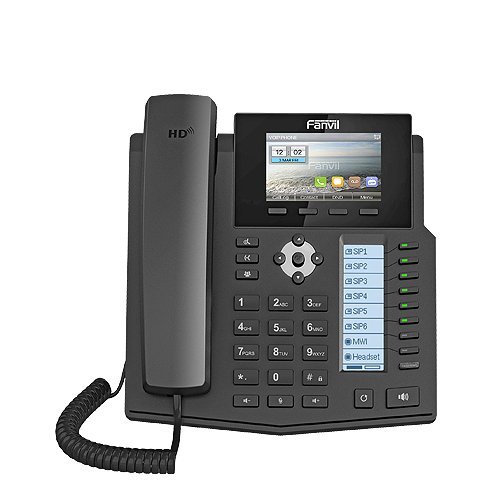
Figure 1: Front view of the Fanvil X5S IP Phone, showing the main LCD, DSS keys, and keypad.
2. Physical Connections
- Attach the Phone Stand: Align the stand with the slots on the back of the phone unit and push firmly until it clicks into place.
- Connect the Handset: Plug one end of the coiled handset cord into the handset and the other end into the handset port on the phone unit (usually marked with a handset icon).
- Connect to Network:
- If using Power over Ethernet (PoE): Connect one end of the Ethernet cable to the LAN port on the phone (marked with a network icon) and the other end to a PoE-enabled network switch or router.
- If not using PoE: Connect one end of the Ethernet cable to the LAN port on the phone and the other end to your network switch/router. Then, connect the optional power adapter (if supplied) to the power port on the phone and a power outlet.
- Connect to PC (Optional): If you wish to connect a computer through the phone, connect an Ethernet cable from your PC to the PC port on the phone.
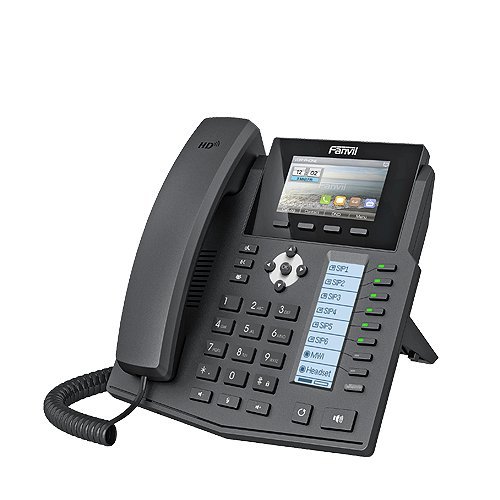
Figure 2: Side view of the Fanvil X5S IP Phone, illustrating the phone stand and general profile.
3. Initial Boot-up
Once connected, the phone will automatically power on and begin its boot sequence. The main LCD will display the Fanvil logo and then proceed to load the operating system. This process may take a few moments. Upon successful boot-up, the phone will attempt to obtain an IP address and register with your SIP server.
Operating Instructions
1. Basic Call Functions
- Making a Call:
- Pick up the handset or press the Speakerphone button.
- Dial the desired number using the keypad.
- Press the Dial soft key or wait for the automatic dialing timeout.
- Answering a Call: When the phone rings, pick up the handset or press the Speakerphone button.
- Ending a Call: Replace the handset or press the End Call soft key.
2. DSS Key-Mapping LCD
The Fanvil X5S features a dedicated DSS Key-Mapping LCD (64x92 dot-matrix) alongside the main LCD (128x64 dot-matrix). The DSS keys are programmable buttons that can be configured for various functions such as speed dial, busy lamp field (BLF), intercom, or line appearances. Refer to your system administrator for specific configurations of these keys.
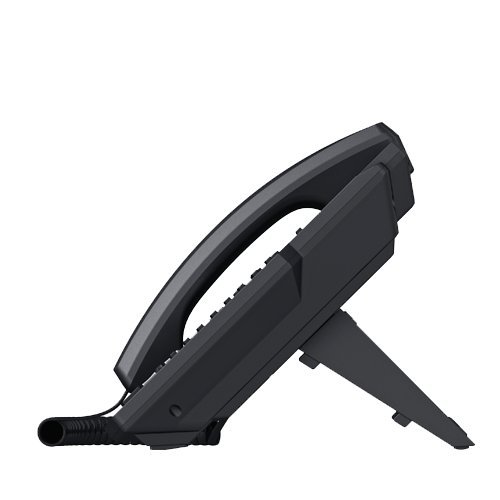
Figure 3: Side profile of the Fanvil X5S IP Phone, highlighting its ergonomic design.
3. SIP Accounts and Features
The phone supports up to 6 SIP lines, allowing for multiple active calls or registrations. Key features include:
- HD Voice: Utilizes HD Codec, HD Speaker, and HD Handset for superior audio quality.
- SIP2.0 (RFC3261) & Correlative RFCs: Ensures broad compatibility with various SIP platforms.
- Bluetooth Support: Connect a Bluetooth USB dongle (sold separately) for wireless headset connectivity.
- Two Network Interfaces: Equipped with 10M/100M/1000M Ethernet ports for high-speed network connectivity.
Maintenance
To ensure the longevity and optimal performance of your Fanvil X5S IP Phone, follow these maintenance guidelines:
- Cleaning: Use a soft, dry, lint-free cloth to clean the phone's surface. For stubborn marks, slightly dampen the cloth with water. Avoid using harsh chemicals, abrasive cleaners, or solvents, as these can damage the phone's finish and internal components.
- Environmental Conditions: Keep the phone away from direct sunlight, excessive heat sources, and high humidity. Ensure proper ventilation around the device.
- Cable Management: Periodically check all connected cables (handset, Ethernet, power) to ensure they are securely plugged in and free from damage.
Troubleshooting
If you encounter issues with your Fanvil X5S IP Phone, try the following basic troubleshooting steps:
| Problem | Possible Cause | Solution |
|---|---|---|
| Phone does not power on. | No power supply; PoE not active or power adapter not connected. | Ensure Ethernet cable is connected to a PoE-enabled port, or verify power adapter is securely plugged into phone and outlet. |
| No dial tone. | SIP account not registered; network connectivity issue. | Check network cable connection. Verify SIP account registration status on the phone's display. Contact your IT administrator if registration fails. |
| Cannot hear caller / Caller cannot hear me. | Handset/speaker volume too low; faulty handset cord; network audio issues. | Adjust volume during a call. Re-seat or replace handset cord. Check network quality. |
| Display is blank or frozen. | Software error; power issue. | Unplug the power/Ethernet cable, wait 10 seconds, then plug it back in to restart the phone. |
If these steps do not resolve the issue, please contact your system administrator or Fanvil technical support.
Specifications
| Brand | Fanvil |
| Model | Fanvil X5S |
| Product Dimensions | 28.5 x 27 x 6.5 cm |
| Item Weight | 950 g |
| Display Type | LCD (Main: 128x64 Dot Matrix, DSS: 64x92 Dot Matrix) |
| Power Source | Corded Electric / Power over Ethernet (PoE) |
| Network Interfaces | Two (10M/100M/1000M) |
| SIP Lines | 6 SIP lines |
| HD Voice | HD Codec, HD Speaker, HD Handset |
| Bluetooth Support | Yes (with USB Dongle) |
| Colour | Black |
| Telephone Type | Corded |
| Dialer Type | Single Keypad |
Warranty Information
The Fanvil X5S IP Phone comes with a 1 Year Warranty from the date of purchase. This warranty covers manufacturing defects and malfunctions under normal use. Please retain your proof of purchase for warranty claims. For detailed terms and conditions, refer to the warranty card included with your product or contact Fanvil customer service.
Support
For technical assistance, product inquiries, or further support, please contact your vendor, system integrator, or visit the official Fanvil website. Ensure you have your product model number (Fanvil X5S) and any relevant purchase details ready when seeking support.
Related documentsFanvil X5S


Ask a question about this manual
Ask about setup, troubleshooting, compatibility, parts, safety, or missing instructions. Manuals+ will review the question and use this page’s manual context to help answer it.