
Introduction
This manual provides detailed instructions for the SMAEL 1531 Analog Digital Sport Watch. This timepiece features an original Japan Time Module Quartz Movement, an environmental IPS electroplating case, and a durable stainless steel backcase. It combines analog and digital displays, offering functions such as time, second, month, and date, controlled by intuitive buttons. The watch is designed with 3ATM water resistance, suitable for daily use but not for underwater button operation.
Setup
Before using your SMAEL 1531 watch, please familiarize yourself with its components and initial setup procedures.
Watch Components Overview
- Crown: Used for setting analog time.
- Buttons (A, B, C, D): Control digital functions such as mode switching, setting, and light. (Specific button functions will be detailed in the Operating Instructions section).
- Analog Display: Traditional hour, minute, and second hands.
- Digital Display: Shows time, date, day, and other digital functions.
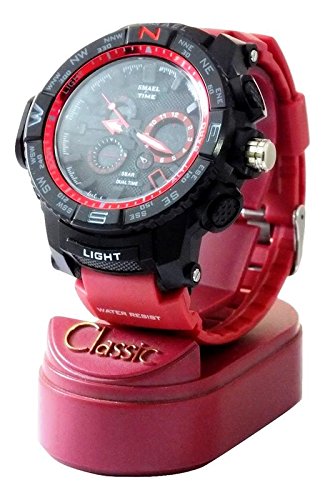
Image: Front view of the SMAEL 1531 watch, showcasing its analog and digital displays, buttons, and red strap, presented on a red display stand.
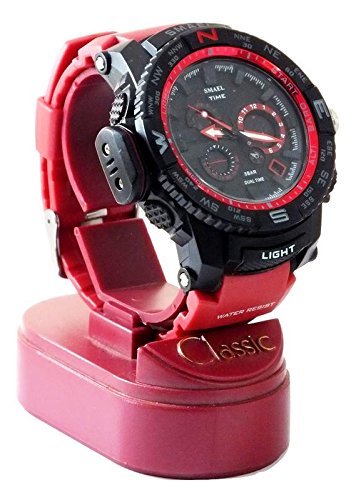
Image: Side view of the SMAEL 1531 watch, highlighting the crown and control buttons on the side of the case, with the red strap and display stand visible.
Setting Analog Time
- Pull the crown out to the first position.
- Rotate the crown to adjust the hour and minute hands to the desired time.
- Push the crown back in to start the analog timekeeping.
Initial Digital Time and Date Setting
Refer to the "Operating Instructions" section for detailed steps on setting the digital time, date, and other functions, as these are typically controlled by the side buttons.
Operating Instructions
Your SMAEL 1531 watch offers various digital functions. The specific button layout and functions are typically as follows (refer to your watch for exact button labels if present):
Button Functions (General)
- LIGHT Button: Activates the backlight for the digital display.
- MODE Button: Cycles through different digital modes (Time, Alarm, Stopwatch, Date).
- START/RESET Button: Used to start/stop the stopwatch, or adjust settings in setting mode.
- ADJUST Button: Used to enter setting mode for time, date, and alarm.
Setting Digital Time and Date
- In normal time display mode, press the MODE button until you reach the time setting screen (often indicated by flashing digits).
- Press the ADJUST button to select the digit you wish to change (e.g., hours, minutes, year, month, day).
- Use the START/RESET button to increase the selected value.
- Repeat steps 2 and 3 until all desired settings are made.
- Press the MODE button to exit the setting mode.
Using the Alarm Function
- Press the MODE button until you reach the Alarm mode.
- Press the ADJUST button to enter alarm setting mode.
- Use the START/RESET button to set the alarm time.
- Press ADJUST to confirm and move to the next setting (e.g., alarm on/off).
- Press the MODE button to exit.
Using the Stopwatch
- Press the MODE button until you reach the Stopwatch mode.
- Press the START/RESET button to start the stopwatch.
- Press the START/RESET button again to stop it.
- Press the ADJUST button to reset the stopwatch to zero.
Water Resistance
The SMAEL 1531 watch is 3ATM water resistant. This means it is suitable for daily use, splashes, and rain. Do not press any buttons underwater. It is not suitable for swimming, diving, or showering with hot water.
Maintenance
Proper care will ensure the longevity and performance of your SMAEL 1531 watch.
Cleaning
- Wipe the watch case and strap regularly with a soft, dry cloth.
- For stubborn dirt, a slightly damp cloth can be used, followed by immediate drying.
- Avoid using chemical cleaners, solvents, or abrasive materials, as these can damage the watch's finish and seals.
Battery Replacement
When the digital display dims or the watch stops functioning, the battery may need replacement. It is recommended to have the battery replaced by a qualified watch technician to ensure the water resistance seal is properly maintained.
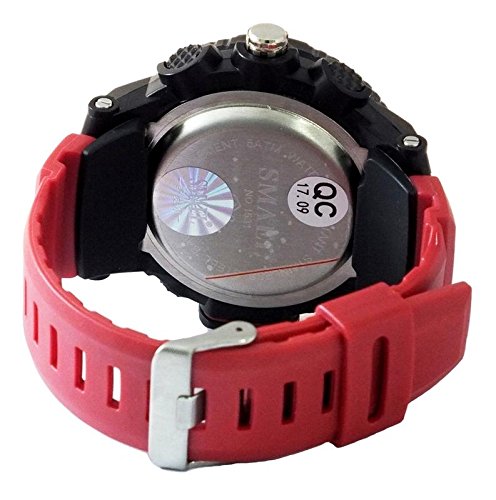
Image: Rear view of the SMAEL 1531 watch, highlighting the stainless steel back case with laser logo and water resistance markings. The red rubber strap is also visible.
Water Resistance Care
- Ensure the crown is always pushed in completely to maintain water resistance.
- Avoid exposing the watch to extreme temperature changes, which can affect the seals.
- If the watch is exposed to saltwater, rinse it gently with fresh water and dry thoroughly.
Troubleshooting
If you encounter issues with your SMAEL 1531 watch, refer to the following common problems and solutions:
Digital Display Not Working or Dim
- Possible Cause: Low battery.
- Solution: Replace the battery. It is recommended to have this done by a professional.
Analog Hands Not Moving
- Possible Cause: Crown is pulled out, or battery is depleted.
- Solution: Ensure the crown is pushed in. If it still doesn't move, the analog movement's battery may need replacement (some watches have separate batteries for analog and digital).
Buttons Unresponsive
- Possible Cause: Watch is in a specific mode that locks buttons, or internal issue.
- Solution: Try pressing the MODE button repeatedly to cycle through modes. If unresponsive, a battery replacement might resolve minor electronic glitches.
- Note: Ensure buttons are not pressed underwater, as this can cause water ingress and damage.
Condensation Inside Watch
- Possible Cause: Water ingress due to damaged seal or improper use.
- Solution: Stop using the watch immediately and take it to a professional watch repair service. Do not attempt to dry it yourself.
Specifications
| Brand | SMAEL |
| Model Number | 1531 |
| Movement Type | Japan Time Module Quartz (Analog & Digital) |
| Display Type | Analog-Digital |
| Case Material | Environmental IPS Electroplating Case, Stainless Steel Back |
| Case Diameter | 50 Millimetres |
| Band Material Type | Rubber |
| Water Resistance Depth | 30 Metres (3ATM) |
| Special Features | Alarm, Back Light, Stopwatch, Calendar (Date, Month) |
| Item Weight | 68 Grams |
| Crystal Material | Hardlex |
| Clasp Type | Buckle |
Note on Water Resistance: 3ATM (30 meters) water resistance means the watch is protected from splashes and rain. It is not suitable for swimming, diving, or showering. Do not press any buttons while the watch is wet or submerged.
Warranty
The SMAEL 1531 watch comes with a 6 Months Manufacturer Warranty from the date of purchase. This warranty covers manufacturing defects under normal use. It does not cover damage resulting from improper use, accidents, unauthorized repairs, normal wear and tear, or battery depletion.
Please retain your proof of purchase for any warranty claims.
Support
For further assistance, technical support, or warranty claims, please contact the retailer where you purchased the watch or refer to the official SMAEL website for contact information. When contacting support, please have your watch model number (1531) and proof of purchase readily available.

