
1. Introduction
The EWA A106 Pro is a compact and powerful portable Bluetooth speaker designed for on-the-go audio. Featuring a custom bass radiator and IP67 waterproof rating, it delivers clear sound with enhanced bass in a durable, mini design. This manual provides essential information for setting up, operating, and maintaining your speaker.
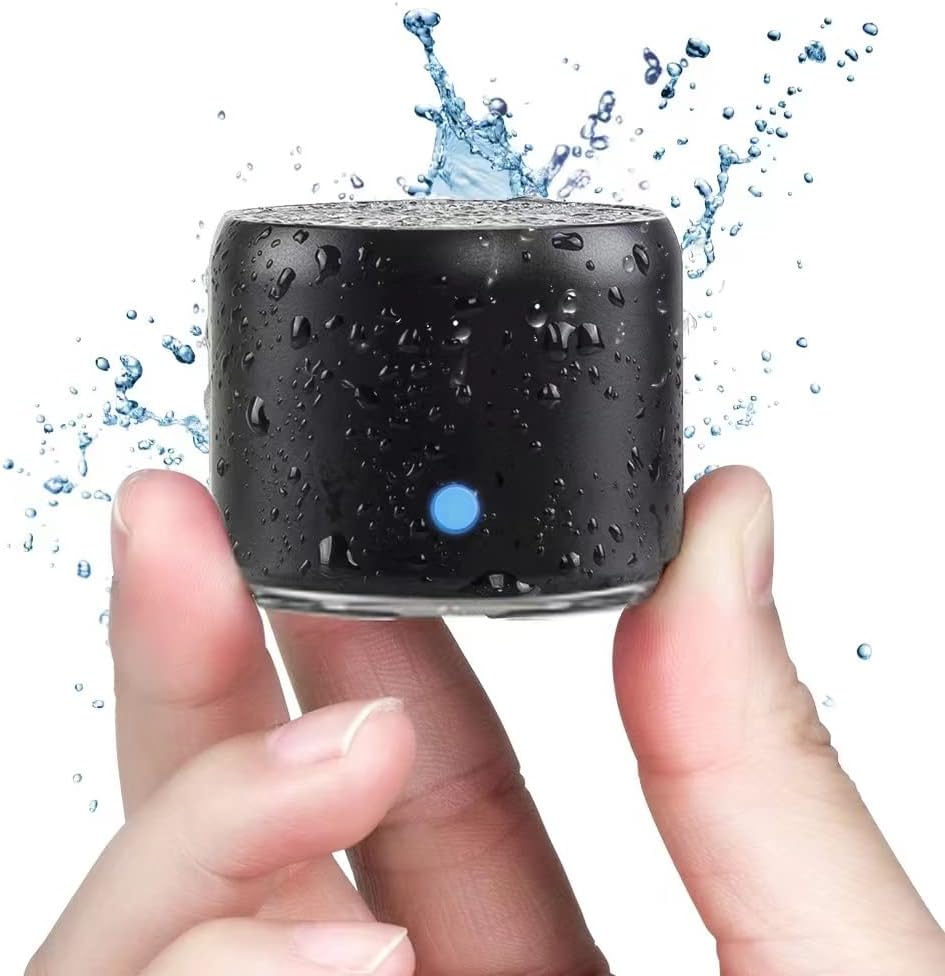
Image: The EWA A106 Pro speaker, showcasing its compact size and water resistance.
2. What's Included
Your EWA A106 Pro package includes the following items:
- 1x EWA A106 Pro Bluetooth Speaker
- 1x USB C Charging Cable
- 1x Carrying Case
- 1x Metal Hook
- 1x User Manual (this document)

Image: All items included with the EWA A106 Pro speaker.
3. Product Overview
The EWA A106 Pro speaker is designed for simplicity and performance. It features a single multi-function button and an LED indicator for easy operation.
Acoustic Design
Equipped with a high-performance 3W neodymium driver and a passive subwoofer, the A106 Pro delivers crystal clear sound with surprising bass for its size.

Image: Internal view highlighting the bass radiator for deep lows.

Image: Internal view highlighting the 3W high performance driver for loud and clear sound.
Controls and Indicators
The speaker features a single silicone button and an LED indicator for all essential functions.
- LED Indicator: Displays charging status and pairing mode.
- Multi-function Button: Controls power, playback, and track selection.

Image: Visual guide to the single button control and LED indicator.
4. Setup
Bluetooth Pairing
- Power On: Press and hold the silicone button for 2 seconds until the blue LED indicator flashes, indicating it's in pairing mode.
- Enable Bluetooth: On your smartphone or audio device, enable Bluetooth.
- Select Device: Look for "EWA A106 Pro" in the list of available Bluetooth devices and select it.
- Confirm Connection: Once successfully paired, the blue LED will remain solid. You are now ready to play audio.
5. Operating Instructions
Basic Controls
- Power On/Off: Press and hold the silicone button for 2 seconds.
- Play/Pause: Single-tap the silicone button.
- Next Track: Double-tap the silicone button.
- Previous Track: Triple-tap the silicone button.
Note: Volume control is managed directly from your connected audio device. The speaker itself does not have dedicated volume buttons.
Waterproof Usage (IP67)
The EWA A106 Pro is IP67 waterproof, making it suitable for use in various environments, including showers, by the pool, or during outdoor activities. Ensure the charging port cover is securely closed before exposing the speaker to water.

Image: The EWA A106 Pro speaker being used in a shower.
Video: A demonstration of the EWA A106 Pro's waterproof capabilities, showing it playing music while submerged in water.
6. Charging
To charge your EWA A106 Pro speaker, use the included USB C charging cable.
- Connect the USB C end of the cable to the speaker's charging port.
- Connect the other end of the cable to a USB power source (e.g., computer, wall adapter).
- The red LED indicator will illuminate during charging and turn off when fully charged.
A full charge provides approximately 5 hours of playtime, and up to 8 hours at 50% volume. A 30-minute charge with a 1A charger can provide up to 3 hours of playtime.

Image: The EWA A106 Pro speaker being charged via its USB C port.
7. Maintenance
To ensure the longevity and optimal performance of your EWA A106 Pro speaker, follow these maintenance guidelines:
- Cleaning: Use a soft, damp cloth to clean the speaker's exterior. Avoid using harsh chemicals or abrasive cleaners.
- Storage: Store the speaker in a cool, dry place when not in use. Utilize the provided carrying case for protection during travel or storage.
- Water Resistance: Always ensure the charging port cover is fully sealed before exposing the speaker to water. After exposure to water, dry the speaker thoroughly before charging.
- Battery Care: For best battery life, avoid fully discharging the speaker frequently. Charge it regularly, even if not in constant use.
8. Troubleshooting
If you encounter any issues with your EWA A106 Pro speaker, refer to the following common solutions:
| Problem | Possible Solution |
|---|---|
| Speaker does not power on. | Ensure the battery is charged. Connect to a power source and try again. |
| Cannot pair with Bluetooth device. | Make sure the speaker is in pairing mode (flashing blue LED). Ensure Bluetooth is enabled on your device and it's within range (10 meters). Forget previous pairings on your device and try again. |
| No sound or low volume. | Increase the volume on your connected device. Ensure the speaker is properly paired. Check if the audio source is playing. |
| Charging indicator not working. | Check the USB C cable and power source. Ensure the cable is fully inserted into the speaker's port. |
9. Specifications
| Feature | Detail |
|---|---|
| Model Name | A106 Pro |
| Product Dimensions | 1.89"D x 1.54"W x 1.89"H |
| Item Weight | 4.2 ounces (0.12 Kilograms) |
| Speaker Maximum Output Power | 3 Watts |
| Battery Life | 5 Hours (up to 8 hours at 50% volume) |
| Wireless Communication Technology | Bluetooth |
| Bluetooth Range | 10 Meters |
| Water Resistance Level | IP67 Waterproof |
| Control Method | Touch (Single Button) |
| Connectivity Protocol | Bluetooth |
| Audio Driver Size | 38 Millimeters |
| Frequency Response | 20 KHz |
10. Warranty and Support
EWA products are manufactured to high-quality standards. For warranty information or technical support, please refer to the documentation included with your purchase or contact EWA customer service directly through their official channels. Keep your proof of purchase for warranty claims.
For further assistance, visit the EWA Store on Amazon.


