
MOOER CPT2
Contents
MOOER Black Truck Guitar Combined Effects Pedal
Instruction Manual
Model: CPT2 | Brand: MOOER
Introduction
The MOOER Black Truck is an all-in-one solution for guitarists, combining six essential effects into a single, compact unit. Designed for hard rock and heavy metal, it offers a comprehensive suite of tones including Compressor, Overdrive, Distortion, EQ, Modulation, Delay, and Reverb. This manual provides detailed instructions for setting up, operating, and maintaining your Black Truck pedal.

Image: Top view of the MOOER Black Truck pedal, showcasing its various controls and footswitches.
Setup
Before using your MOOER Black Truck, ensure all connections are made correctly. The unit is designed for versatile integration into various setups.
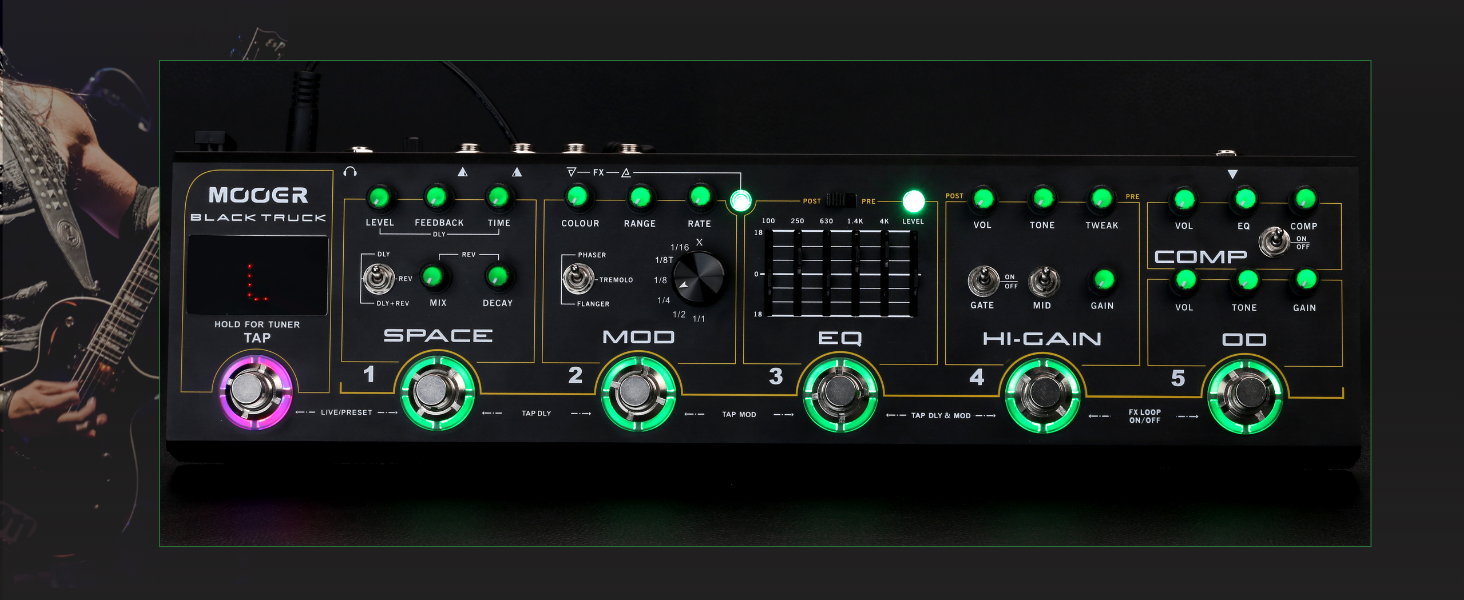
Image: Rear view of the MOOER Black Truck, showing input, output, FX loop, and power connections.
Connections:
- Input: Connect your guitar to the INPUT jack.
- Output: Connect the OUTPUT (L/MONO) jack to your amplifier or audio interface. Use the R output for stereo applications.
- FX Loop (Send/Return): Integrate external effects pedals into the Black Truck's signal chain. Connect the SEND to the input of your external pedal and the RETURN to its output.
- Phone Output: For silent practice, connect headphones to the PHONE output. This output includes integrated speaker cabinet simulation.
- Power: Connect a 9V DC, 2A power supply (center negative) to the DC IN jack. (Note: Power supply not included, MOOER PDNW-9V2A-US recommended).
Operating
The MOOER Black Truck offers two primary operation modes: Live Mode and Preset Mode, allowing for flexible control over your effects.

Image: The MOOER Black Truck pedal with a foot pressing a footswitch, illustrating the Live/Preset mode functionality.
Operation Modes:
- Live Mode: Each footswitch toggles its respective effects module on and off, providing immediate control.
- Preset Mode: Allows you to save and recall combinations of effects settings. Pressing the first two footswitches simultaneously accesses this mode.
Effect Modules:
The Black Truck integrates six distinct effect modules, each with dedicated controls.

Image: Diagram illustrating the six integrated effects modules: Space, Mod, EQ, Hi-Gain, Comp, and OD.
1. Tuner
The Black Truck features a high-precision built-in tuner. To activate, press and hold the TAP footswitch. This will mute your output and activate the tuner display.
2. Space (Delay & Reverb)
The Space module provides high-quality digital delay and stereo reverb effects. Controls include Level, Feedback, Time, Mix, and Decay. A toggle switch allows selection between Delay (DLY), Reverb (REV), or both (DLY+REV).
3. MOD (Modulation)
Choose between three different types of modulation: Phaser, Tremolo, and Flanger. Adjust the Colour, Range, and Rate to sculpt your desired modulation effect. The TAP footswitch can be used to set the tempo for modulation effects.
4. EQ (Equalizer)
A 5-band graphic equalizer allows for precise tonal shaping. It can be set to Pre or Post the Hi-Gain module using the dedicated switch, offering flexibility in your signal chain.

Image: Close-up view of the 5-band EQ section on the MOOER Black Truck, highlighting the sliders and Pre/Post switch.
5. HI-GAIN (Distortion)
This analog distortion circuit is designed for hard rock and heavy metal, delivering amp-like distortion with significant gain. Features include a Gate control for noise reduction and a Mid switch to boost or scoop middle frequencies. Controls for Volume, Tone, Tweak, and Gain are provided.
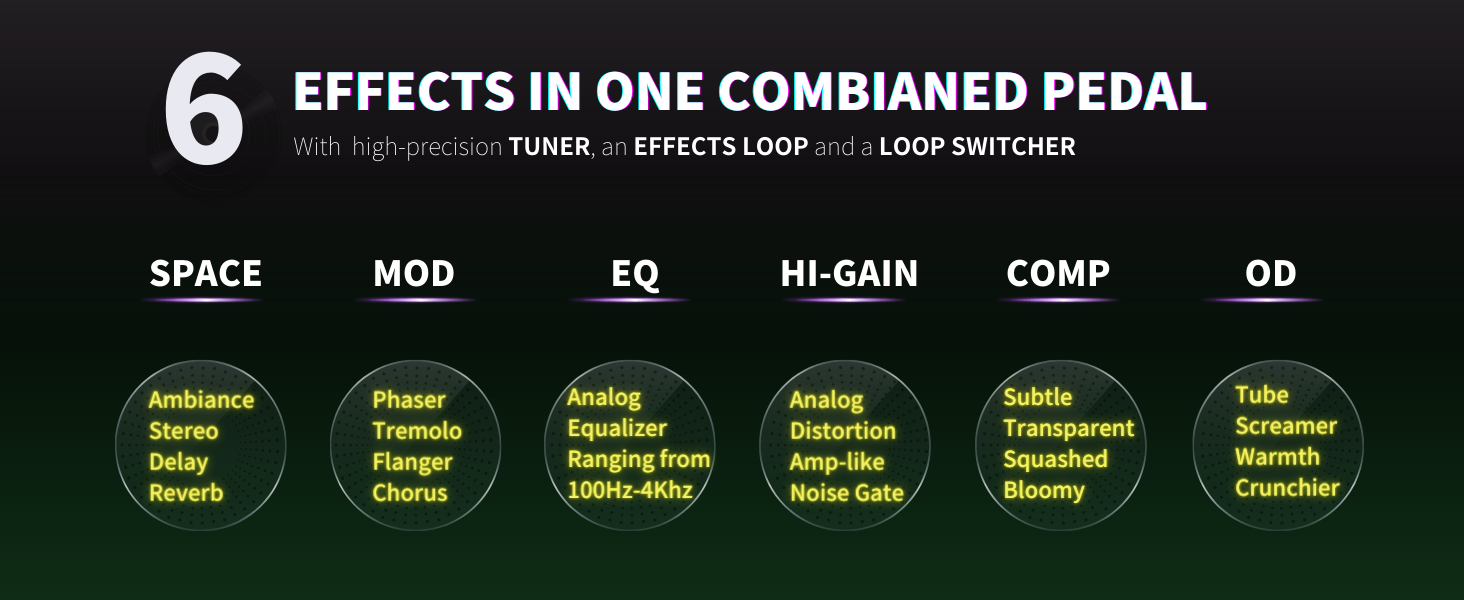
Image: Close-up view of the Hi-Gain section, showing the controls for distortion, gate, and mid-frequency shaping.
6. COMP (Compressor) & OD (Overdrive)
The Compressor provides subtle, transparent squashed tones, while the Overdrive offers a warm and natural analog sound with a distinct mid-hump, ideal for pushing the Hi-Gain module or as a warm boost. Both modules have controls for Volume, Tone, and Gain.
Advanced Features:
- FX Loop: The integrated loop switcher allows for easy programming of one-step presets when used in conjunction with external pedals.
- DI Output: Provides a dedicated direct output with integrated speaker simulation and an independent volume control, perfect for connecting to a mixing desk, computer, or headphones.
- Stereo Output: Connect to L and R outputs using standard 1/4" Jack cables for true stereo output. Connect to L only for mono output.
Official Product Video:
Watch the official MOOER Black Truck product video for a detailed demonstration of its features and sound capabilities.
Video: An official demonstration of the MOOER Black Truck Guitar Combined Effects Pedal, showcasing its various effects, modes, and connectivity options.
Maintenance
To ensure the longevity and optimal performance of your MOOER Black Truck, follow these maintenance guidelines:
- Cleaning: Use a soft, dry cloth to clean the pedal's surface. Avoid abrasive cleaners or solvents.
- Storage: Store the pedal in a cool, dry place away from direct sunlight and extreme temperatures. Use the included carry case for transportation.
- Power: Always use the recommended 9V DC, 2A (center negative) power supply. Disconnect power when not in use for extended periods.
- Connections: Periodically check all cable connections for wear and tear. Ensure jacks are free of dust and debris.
Troubleshooting
If you encounter issues with your MOOER Black Truck, refer to the following common troubleshooting steps:
| Problem | Possible Cause | Solution |
|---|---|---|
| No Sound Output | Incorrect cable connections, faulty cables, incorrect power supply, tuner active. | Check all input/output cables. Ensure power supply meets specifications. Deactivate tuner by pressing TAP footswitch. |
| Unwanted Noise/Hum | Ground loop, interference from other electronics, high gain settings without noise gate. | Use isolated power supply. Move pedal away from power sources. Engage the built-in noise gate on the Hi-Gain module. |
| Effects Not Engaging | Incorrect mode (e.g., Preset Mode when expecting Live Mode), individual effect module off. | Toggle between Live and Preset modes. Ensure individual effect footswitches are engaged (LEDs lit). |
| Pedal Freezes/Unresponsive | Temporary software glitch. | Disconnect power, wait 10 seconds, then reconnect power to reset the unit. |
Specifications
| Feature | Detail |
|---|---|
| Item Weight | 3.43 pounds |
| Product Dimensions | 14.57 x 3.78 x 2.01 inches |
| Item Model Number | CPT2 |
| Body Material | Metal |
| Color | Black |
| Connector Type | 1/4 inch (6.35mm) audio jack |
| Hardware Interface | 1/4-inch Audio |
| Signal Format | Analog |
| Power Source | Corded Electric |
| Voltage | 9 Volts |
| Amperage | 2 Amps |
What's in the Box
Upon unboxing your MOOER Black Truck, you should find the following items:
- MOOER Black Truck Effects Pedal
- Carry Case
Warranty and Support
The MOOER Black Truck comes with a 2-year warranty from the manufacturer. For technical support, warranty claims, or additional product information, please contact MOOER directly through their official website or authorized retailers.
Each item has a unique code that MOOER verifies before shipping, ensuring product authenticity.
Ask a question about this manual
Ask about setup, troubleshooting, compatibility, parts, safety, or missing instructions. Manuals+ will review the question and use this page’s manual context to help answer it.