
Easytry123 Easytry1371
Instruction Manual for Easytry123 Replacement Remote Control
Model: Easytry1371
Introduction
This manual provides essential information for the proper setup, operation, and maintenance of your Easytry123 Replacement Remote Control. This remote is designed as a replacement for various Samsung LED HDTV models, including BN59-01199G, UA32J4303, UA40J5200, UA48J5200, UE46H7000ST, UE55H6700SL, UE48H6700SL, and UE40H6700SL. Please note that as a replacement item, some functions may differ or not be fully supported compared to the original remote.

Image: Front view of the Easytry123 Replacement Remote Control, showing its ergonomic design and button layout.
Safety Information
- Do not expose the remote control to direct sunlight, heat sources, or extreme temperatures.
- Avoid dropping the remote control or subjecting it to strong impacts.
- Do not mix old and new batteries, or different types of batteries.
- Remove batteries if the remote control will not be used for an extended period to prevent leakage.
- Dispose of used batteries according to local regulations.
Package Contents
Please check that your package contains the following item:
- 1 x Easytry123 Replacement Remote Control (Model: Easytry1371)
Note: Batteries are not included and must be purchased separately.
Setup
Battery Installation
The Easytry123 Replacement Remote Control requires two (2) AAA batteries for operation.
- Locate the battery compartment on the back of the remote control.
- Slide the battery cover downwards or press the latch and lift to open.
- Insert two AAA batteries, ensuring the positive (+) and negative (-) terminals align correctly with the markings inside the compartment.
- Replace the battery cover by sliding it back into place until it clicks securely.
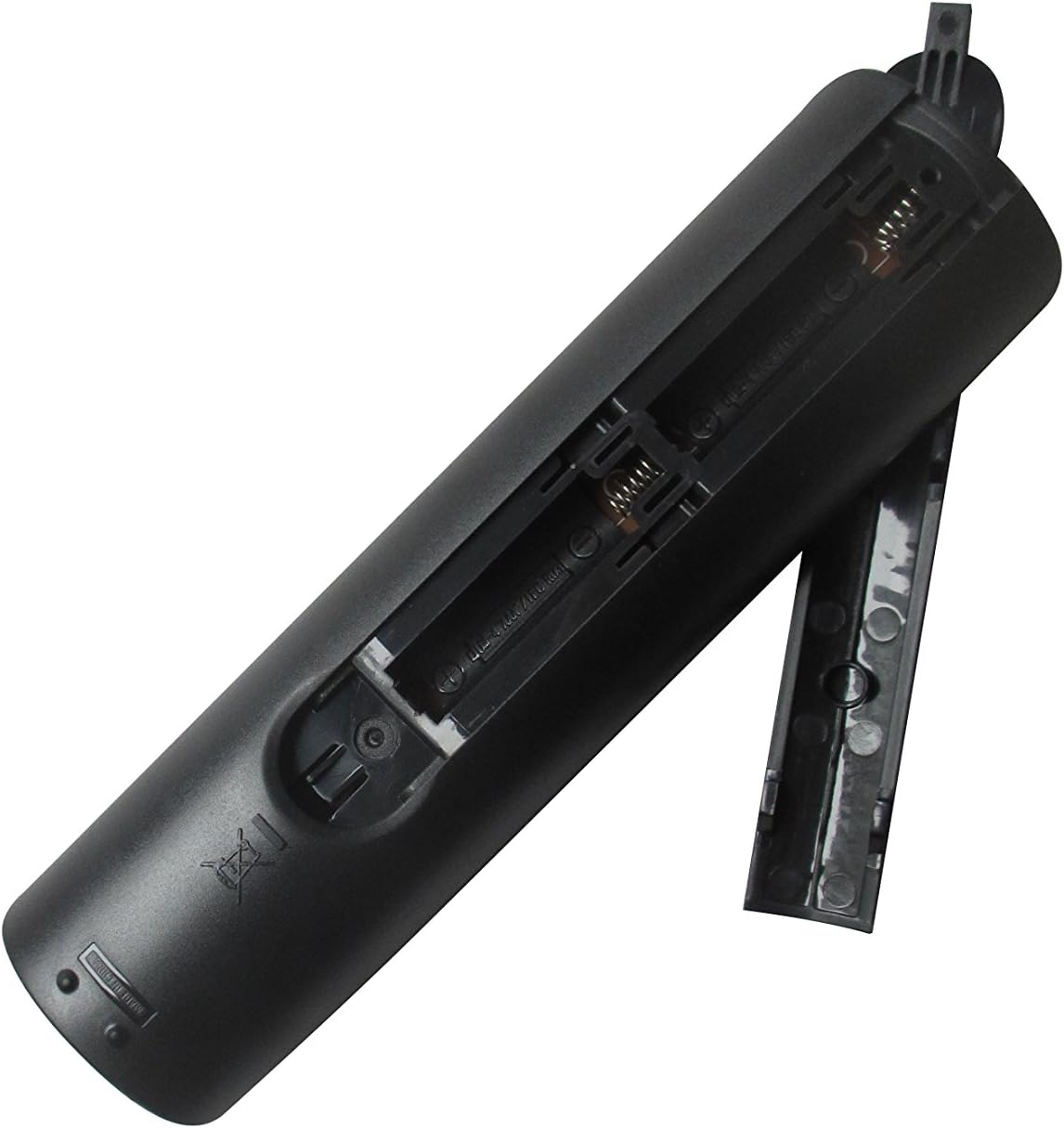
Image: Rear view of the Easytry123 Replacement Remote Control with the battery compartment open, showing where to insert AAA batteries.
Once batteries are installed, the remote control is ready for use with compatible Samsung LED HDTVs. No programming is typically required for this replacement remote.
Operating the Remote Control
This remote control provides standard functions for navigating and controlling your compatible Samsung LED HDTV. Below are common button functions:
- Power (Red Button): Turns the TV on or off.
- Number Pad (0-9): Directly input channel numbers.
- Volume (+/-): Adjusts the volume level.
- Channel (Up/Down): Changes the TV channel.
- Mute: Mutes or unmutes the TV audio.
- Source: Cycles through available input sources (HDMI, AV, etc.).
- Menu: Accesses the TV's main menu.
- Guide: Displays the electronic program guide (EPG).
- Directional Pad (Up/Down/Left/Right) & Enter: Navigates through menus and confirms selections.
- Return/Exit: Goes back to the previous screen or exits a menu.
- Tools: Accesses quick settings or context-sensitive options.
- Media.P: Likely for media playback controls.
- Colored Buttons (A, B, C, D): Often used for specific functions within smart TV apps or teletext.
Note: Specific functionality may vary depending on your TV model and its firmware. As a replacement remote, some advanced or smart TV specific functions might not be fully supported.
Maintenance
Cleaning
To maintain the performance and appearance of your remote control:
- Wipe the surface with a soft, dry cloth.
- For stubborn dirt, lightly dampen the cloth with water or a mild, non-abrasive cleaner.
- Do not use harsh chemicals, solvents, or abrasive cleaning pads.
- Ensure no liquid enters the remote control's interior.
Troubleshooting
Remote Control Not Responding
- Check Batteries: Ensure batteries are inserted correctly with the correct polarity (+/-). Replace old or depleted batteries with new ones.
- Line of Sight: Make sure there are no obstructions between the remote control and the TV's infrared sensor.
- Distance: Ensure you are within the effective operating range of the TV's IR receiver.
- TV Compatibility: Verify that your TV model is listed as compatible with this replacement remote.
Certain Functions Not Working
- Replacement Limitations: As a replacement remote, some specific or advanced functions of your original TV remote may not be replicated. This is normal for universal or replacement remotes.
- TV Model Specifics: Some buttons might be designed for specific TV series or firmware versions.
Specifications
| Brand | Easytry123 |
| Item Model Number | Easytry1371 |
| Compatible Devices | Television (Samsung LED HDTVs: BN59-01199G, UA32J4303, UA40J5200, UA48J5200, UE46H7000ST, UE55H6700SL, UE48H6700SL, UE40H6700SL) |
| Connectivity Technology | Infrared (IR) |
| Controller Type | Button Control |
| Special Feature | Ergonomic |
| Batteries Required | 2 x AAA batteries (not included) |
| Manufacturer | Easytry123 |
| Country of Origin | China |
Warranty and Support
Specific warranty information for this Easytry123 Replacement Remote Control is not provided in the product details. For any support inquiries or questions regarding compatibility and functionality, please contact the manufacturer, Easytry123, or your point of purchase.
Ask a question about this manual
Ask about setup, troubleshooting, compatibility, parts, safety, or missing instructions. Manuals+ will review the question and use this page’s manual context to help answer it.