
Introduction
The RovyVon A5 G4 Keychain Flashlight is a compact, multi-functional illumination tool designed for everyday carry. Featuring high lumen output, multiple lighting modes, and convenient recharging, it is an ideal companion for various outdoor activities and daily tasks. This manual provides detailed instructions for its proper use and maintenance.

Figure 1: RovyVon A5 G4 Keychain Flashlight
Package Contents
Upon opening the package, please ensure all the following items are present:
- RovyVon A5 G4 Keychain Flashlight
- Battery (pre-installed)
- User Manual (this document)
Note: A USB-C charging cable is not included in the package.
Features
- Lockout Mode: Prevents accidental activation.
- USB-C Rechargeable: Quick charging in approximately one hour.
- Versatile Lighting: Main LED (up to 650 lumens), two warm white side lights, and one red side light for various applications.
- Glow-in-the-Dark Housing: Aids in locating the flashlight in low-light conditions.
- Magnetic Base: Allows attachment to metal surfaces for hands-free operation.
- Magnetic Pocket Clip: Provides secure attachment to pockets, belts, or hats.
- Durable Construction: Made from Polycarbonate and Stainless Steel.
- Water Resistance: IPX6 rated for protection against strong jets of water.

Figure 2: Key Features of the A5 G4 Flashlight
Setup
Initial Charging
Before first use, it is recommended to fully charge the flashlight. The A5 G4 features a USB-C charging port. Connect a USB-C cable (not included) to the flashlight and a power source. The charging indicator light will show the charging status:
- Red light: Low battery
- Blue light: Charging
- Green light: Fully charged

Figure 3: USB-C Charging Port

Figure 4: Magnetic Base and Charging Indicators
Unlocking/Locking the Flashlight
The flashlight is equipped with a lockout mode to prevent accidental activation. To unlock the flashlight for first use or after locking:
- Rapidly click the main button 5 times.
To lock the flashlight:
- Rapidly click the main button 5 times.

Figure 5: Lock-out Mode for secure carrying
Operating Instructions
Main Light Operation
The main light offers multiple brightness levels. To activate and cycle through modes:
- Double Click: Turns on the main light. Subsequent single clicks will cycle through Moonlight, Low, Medium, and High brightness levels.
- Press and Hold: Activates the highest lumen output (Momentary On). Release to turn off.
- Single Click (when on): Cycles through brightness levels.
- Long Press (when on): Turns off the main light.

Figure 6: Main Light Brightness Modes (Moonlight, Low, Med, High)

Figure 7: High Brightness Output
Side Light Operation
The side lights include two warm white lights and one red light. To activate and cycle through modes:
- Triple Click: Turns on the side lights. Subsequent single clicks will cycle through Low Warm White, High Warm White, Red Light, and Red Flash modes.
- Long Press (when on): Turns off the side lights.
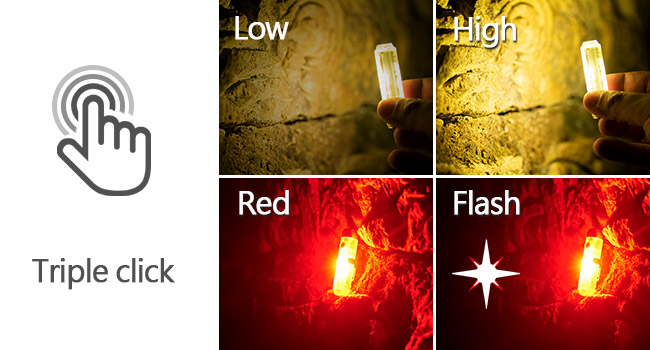
Figure 8: Side Light Modes (Low, High, Red, Flash)

Figure 9: Red Sidelight for night reading or signaling
Maintenance
- Cleaning: Wipe the flashlight with a soft, damp cloth. Do not use harsh chemicals or abrasive materials.
- Charging: Recharge the battery regularly to maintain optimal performance, even if not frequently used.
- Storage: Store the flashlight in a cool, dry place away from direct sunlight and extreme temperatures.
- Water Resistance: While IPX6 rated, avoid prolonged submersion. Ensure the USB-C port cover is securely closed before exposure to water.
Troubleshooting
- Flashlight not turning on: Ensure the flashlight is unlocked (rapidly click 5 times). Check battery level and recharge if necessary.
- Charging issue: Verify the USB-C cable is properly connected and the power source is active.
- Dim light output: Recharge the battery. Ensure the lens is clean.
Specifications
| Feature | Detail |
|---|---|
| Model | RovyVon A5x |
| White Brightness | Up to 650 Lumens |
| Power Source | Battery Powered (Lithium Polymer) |
| Charging Port | USB-C |
| Material | Polycarbonate, Stainless Steel |
| Dimensions (D x W x H) | 0.59" x 0.59" x 2.36" |
| Item Weight | 0.621 ounces (17.6 Grams) |
| Runtime | Up to 66 hours (Moonlight mode) |
| Water Resistance | IPX6 |

Figure 10: Compact Dimensions of the A5 G4
Warranty and Support
RovyVon products are designed for durability and performance. For warranty information, technical support, or service inquiries, please refer to the official RovyVon website or contact their customer service directly. Please retain your proof of purchase for warranty claims.