
Panasonic H-FS1442A
Panasonic LUMIX G Vario 14-42mm F3.5-5.6 II ASPH. MEGA O.I.S. Lens User Manual
Model: H-FS1442A
Introduction
This manual provides essential instructions for the proper use and care of your Panasonic LUMIX G Vario 14-42mm F3.5-5.6 II ASPH. MEGA O.I.S. Digital Interchangeable Zoom Lens. This lens is designed for Micro Four Thirds camera systems, offering a versatile zoom range suitable for various photographic situations, from wide-angle landscapes to portraits. It features aspherical elements for improved optical performance and MEGA O.I.S. (Optical Image Stabilizer) to reduce blur caused by camera shake.
Setup
Attaching the Lens
- Ensure both the camera and the lens are powered off.
- Remove the rear lens cap and the camera body cap.
- Align the white mounting mark on the lens barrel with the corresponding white mounting mark on the camera body.
- Insert the lens into the camera mount and rotate it clockwise until it clicks into place. Do not force the lens.
Detaching the Lens
- Ensure the camera is powered off.
- While pressing the lens release button on the camera body, rotate the lens counter-clockwise until it stops.
- Carefully remove the lens from the camera body.
- Attach the rear lens cap to the lens and the body cap to the camera to protect the sensors and lens elements.

Image: The Panasonic LUMIX G Vario 14-42mm lens, showing the front element, zoom ring, and focus ring. This is the primary view of the lens.
Operating the Lens
Zoom Operation
To adjust the focal length, rotate the zoom ring on the lens barrel. The lens offers a focal range from 14mm (wide-angle) to 42mm (telephoto). The current focal length is indicated by markings on the lens barrel.
Focusing
- Autofocus (AF): When the camera is set to autofocus mode, the lens will automatically adjust focus. Ensure the AF/MF switch on your camera body (if present) is set to AF.
- Manual Focus (MF): To focus manually, set your camera to manual focus mode. Rotate the focus ring on the lens barrel until the subject appears sharp in the viewfinder or on the LCD screen.
Image Stabilization (MEGA O.I.S.)
This lens is equipped with MEGA O.I.S. (Optical Image Stabilizer) to compensate for camera shake, helping to produce sharper images, especially in low light or when shooting handheld. The image stabilization function is typically controlled via a setting on your camera body. Refer to your camera's instruction manual for details on enabling or disabling O.I.S.
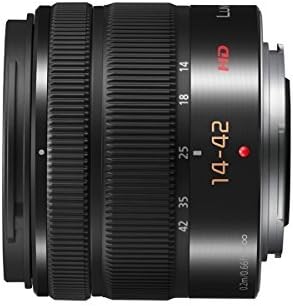
Image: Side view of the Panasonic LUMIX G Vario 14-42mm lens, highlighting the zoom and focus rings and focal length markings.
Maintenance
Cleaning the Lens
- Use a blower brush to remove dust and loose particles from the lens surface.
- For smudges or fingerprints, use a clean, soft lens cloth specifically designed for optical surfaces. Apply a small amount of lens cleaning solution to the cloth, not directly to the lens.
- Never use abrasive materials, solvents, or harsh chemicals to clean the lens.
Storage
- Always attach the front and rear lens caps when the lens is not in use.
- Store the lens in a cool, dry place, away from direct sunlight and extreme temperatures.
- If storing for an extended period, consider using a moisture-absorbing desiccant to prevent mold growth.
Troubleshooting
| Problem | Possible Cause / Solution |
|---|---|
| Lens not attaching to camera | Ensure alignment marks are matched and rotate until a click is heard. Do not force. |
| Autofocus not working | Check if the camera is set to AF mode. Ensure there is sufficient light and contrast for the camera's autofocus system. |
| Images are blurry | Check focus settings (AF/MF). Ensure MEGA O.I.S. is enabled if shooting handheld in low light. Verify shutter speed is appropriate for the focal length. Clean the lens elements. |
| Dust or spots visible in images | Clean the front and rear lens elements. If spots persist, check the camera's image sensor for dust. |
Technical Specifications
- Model Number: H-FS1442A
- Focal Length: 14-42mm (35mm equivalent: 28-84mm)
- Maximum Aperture: F3.5 (at 14mm) - F5.6 (at 42mm)
- Minimum Aperture: Not specified (typically F22)
- Lens Construction: 9 elements in 8 groups (including 2 aspherical lenses)
- Image Stabilization: MEGA O.I.S. (Optical Image Stabilizer)
- Mount Type: Micro Four Thirds
- Minimum Focus Distance: 0.2m (0.66ft) at 14-20mm, 0.3m (0.98ft) at 21-42mm
- Filter Size: 46mm
- Number of Diaphragm Blades: 7 (circular aperture diaphragm)
- Dimensions (Max. Diameter x Length): Approximately 60.6mm x 49mm (2.39 inches x 1.93 inches)
- Weight: Approximately 110g (3.88 oz)
- Material: Plastic
Warranty and Support
Warranty Information
This product is a Certified Refurbished item and typically comes with a minimum 90-day warranty. The refurbishing process includes functionality testing, basic cleaning, inspection, and repackaging. For specific warranty terms and conditions, please refer to the documentation provided with your purchase or contact the seller directly.
Customer Support
For technical assistance, service, or inquiries regarding your Panasonic LUMIX G Vario 14-42mm lens, please contact Panasonic customer support or the authorized retailer from whom you purchased the product. You may also find additional resources and FAQs on the official Panasonic website.
Related Documents - H-FS1442A
 |
Panasonic LUMIX G VARIO 45-150mm Lens Instruction Manual Instruction manual for the Panasonic LUMIX G VARIO 45-150mm F4.0-5.6 ASPH. MEGA O.I.S. interchangeable lens, covering usage, safety, specifications, and support. |
 |
Panasonic H-FS45150 LUMIX G VARIO Lens Operating Instructions Operating instructions for the Panasonic LUMIX G VARIO 45-150mm F4.0-5.6 ASPH. MEGA O.I.S. interchangeable lens for digital cameras. Learn about safety, precautions, lens care, attaching and detaching the lens, components, and specifications. |
 |
Panasonic H-X1025 LEICA DG VARIO-SUMMILUX 10-25mm f/1.7 ASPH. Lens Operating Instructions Comprehensive operating instructions for the Panasonic H-X1025 LEICA DG VARIO-SUMMILUX 10-25mm f/1.7 ASPH. interchangeable lens. Learn about safe usage, features, installation, maintenance, and specifications. |
 |
Panasonic LUMIX G X VARIO 12-35mm F2.8 II ASPH./POWER O.I.S. Lens Operating Instructions Comprehensive operating instructions for the Panasonic LUMIX G X VARIO 12-35mm F2.8 II ASPH./POWER O.I.S. interchangeable lens, covering setup, usage, care, and specifications. Includes safety precautions and troubleshooting. |
 |
Panasonic H-RS100400 LEICA DG VARIO-ELMAR 100-400mm F4.0-6.3 ASPH. POWER O.I.S. Interchangeable Lens Operating Instructions Operating instructions for the Panasonic H-RS100400 LEICA DG VARIO-ELMAR 100-400mm F4.0-6.3 ASPH. POWER O.I.S. interchangeable lens for digital cameras. Covers safety, components, usage, precautions, troubleshooting, and specifications. |
 |
Panasonic LUMIX G X VARIO PZ 45-175mm F4.0-5.6 ASPH./POWER O.I.S. Operating Instructions Comprehensive operating instructions for the Panasonic LUMIX G X VARIO PZ 45-175mm F4.0-5.6 ASPH./POWER O.I.S. interchangeable lens, covering safety, care, usage, and specifications for digital cameras. |
Ask a question about this manual
Ask about setup, troubleshooting, compatibility, parts, safety, or missing instructions. Manuals+ will review the question and use this page’s manual context to help answer it.