
Introduction
Thank you for choosing the Zerone 2-PIN Dual PTT Shoulder Speaker Microphone. This device is designed to enhance your communication experience with compatible two-way radios, offering convenience and clear audio transmission and reception. This manual provides essential information for the proper setup, operation, and maintenance of your speaker microphone.
This speaker microphone is specifically compatible with Baofeng UV-82 series two-way radios.
Product Overview
Key Features
- Dual PTT (Push-To-Talk) Buttons: Allows for easy communication with two accessible buttons.
- Integrated Speaker and Microphone: Enables hands-free communication without needing to hold the radio.
- Rotatable Clip: Features a durable clip on the backside for secure attachment to clothing or gear.
- Lightweight and Portable Design: Ensures comfortable use during extended periods.
- 2-PIN Connector: Compatible with specific two-way radio models, such as the Baofeng UV-82.
Package Contents
- 1 x Zerone 2-PIN Dual PTT Shoulder Speaker Microphone
Note: The two-way radio is not included and must be purchased separately.
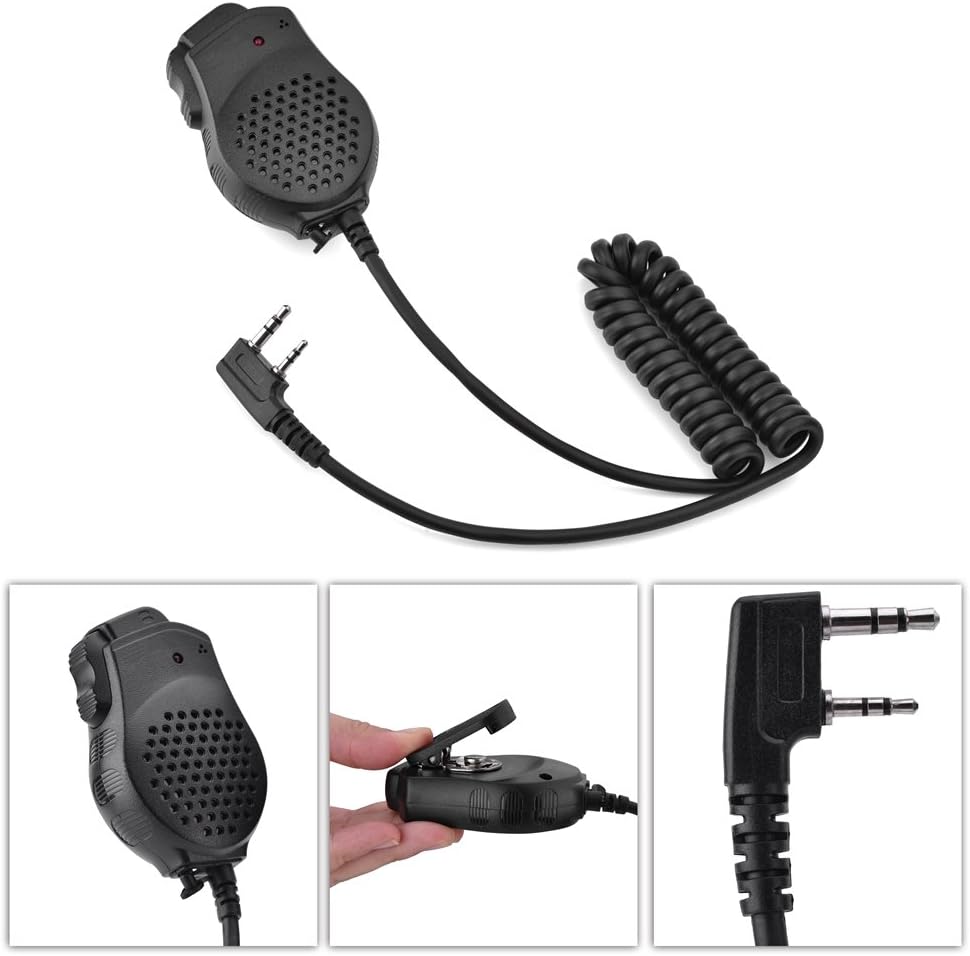
Image 1: Zerone 2-PIN Dual PTT Shoulder Speaker Microphone. This image shows the overall design of the speaker microphone, including the coiled cable and the 2-pin connector.
Setup
- Identify the Connector: Locate the 2-pin audio jack on your compatible two-way radio (e.g., Baofeng UV-82).
- Connect the Microphone: Align the 2-pin connector of the speaker microphone with the radio's audio jack. Gently push the connector firmly into the radio's port until it is fully seated. Ensure a secure connection to prevent audio interruptions.
- Secure the Microphone: Use the rotatable clip on the back of the speaker microphone to attach it to your collar, shoulder, or other convenient location on your clothing or gear. This allows for easy access and hands-free operation.

Image 2: Close-up of the 2-pin connector. This image highlights the specific 2-pin configuration required for compatibility with your radio.

Image 3: Close-up of the rotatable clip. This image shows the clip mechanism used to secure the microphone to clothing or gear.
Operating Instructions
Receiving Audio
- Once connected, audio from your radio will be routed through the speaker microphone.
- Adjust the volume on your two-way radio to a comfortable listening level.
Transmitting Audio (Push-To-Talk)
- To transmit, press and hold one of the PTT buttons located on the side of the speaker microphone.
- Speak clearly into the microphone grille, which is typically located on the front face of the unit.
- Release the PTT button when you have finished speaking to return to receive mode.

Image 4: Back view of the speaker microphone. This image shows the location of the dual PTT buttons for transmitting.

Image 5: Front view of the speaker microphone. This image displays the speaker grille and the integrated microphone for clear audio capture.
Maintenance
- Cleaning: Wipe the speaker microphone with a soft, dry cloth to remove dust and dirt. Do not use harsh chemicals or abrasive cleaners.
- Storage: Store the device in a cool, dry place away from direct sunlight and extreme temperatures when not in use.
- Cable Care: Avoid sharp bends or excessive pulling on the cable to prevent internal wire damage.
- Water Exposure: This device is not waterproof. Avoid exposing it to rain, splashes, or immersion in water.
Troubleshooting
- No audio from speaker microphone:
-
- Ensure the 2-pin connector is fully and securely inserted into the radio's audio jack.
- Check the volume level on your two-way radio; increase if necessary.
- Verify that your radio is powered on and functioning correctly.
- Cannot transmit (PTT not working):
-
- Ensure the 2-pin connector is fully and securely inserted.
- Confirm that you are pressing and holding the PTT button firmly while speaking.
- Check your radio's settings to ensure external microphone input is enabled, if applicable.
- Poor audio quality (static, muffled sound):
-
- Ensure the connector is clean and free of debris.
- Check for any damage to the cable or connector.
- Test the speaker microphone with another compatible radio, if available, to rule out radio issues.
- Ensure you are speaking directly into the microphone grille and not covering it.
Specifications
| Feature | Detail |
|---|---|
| Model | Zeronemhr496nzay (2 PTT) |
| Material | Plastic |
| Sound Pressure Level | 94dB ± 3dB |
| Frequency Response | 20-16000 Hz |
| Speaker Impedance | 8 Ω ± 15% |
| Microphone Sensitivity | -38 dB ± 2dB |
| Audio Input | 100mW |
| Microphone Impedance | 2.2K Ω |
| Color | Black |
| Weight | Approx. 100g |
| Connector Type | 2-pin |
| Compatible Devices | Baofeng UV-82 Two Way Radios |
Warranty and Support
For warranty information and customer support, please refer to the documentation provided with your purchase or contact your retailer. Keep your proof of purchase for any warranty claims.
For further assistance, you may also visit the official Zerone brand store or contact their customer service channels.