
Easytry123 Easytry1111
User Manual
Easytry123 Replacement Remote Control for Daikin Air Conditioners
Model: Easytry1111
1. Introduction
This manual provides essential information for the proper use and maintenance of your Easytry123 replacement infrared remote control. This remote is designed to function as a direct replacement for various Daikin Room Air Conditioner remote models, including BRC4C65, BRC4C151, BRC4C66, BRC7E531W, BRC7E530W8, BRC7E532W8, BRC4C61, BRC4C62, and BRC4C63. Please ensure your original remote matches the appearance of this replacement for full compatibility.
2. Product Overview
The Easytry123 replacement remote control is an infrared (IR) device designed for ease of use. It features a clear LCD display and tactile buttons for controlling your Daikin air conditioner. The remote's design includes a sliding cover to protect less frequently used buttons and prevent accidental presses.

Figure 2.1: Front view of the remote control with the protective cover slid open, showing the main control buttons and LCD display.
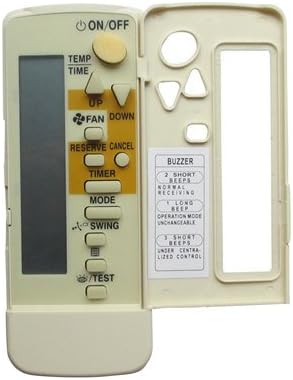
Figure 2.2: Front view of the remote control with the protective cover closed, displaying the primary ON/OFF, Temperature, and Fan buttons.

Figure 2.3: Rear view of the remote control, illustrating the battery compartment with the cover removed.
3. Setup
3.1 Battery Installation
- Locate the battery compartment on the back of the remote control (refer to Figure 2.3).
- Slide the battery cover downwards and lift it off.
- Insert two (2) AAA batteries into the compartment, ensuring the positive (+) and negative (-) terminals align correctly with the markings inside.
- Replace the battery cover by sliding it back into place until it clicks securely.
Note: Always use new batteries and replace both batteries at the same time. Do not mix old and new batteries or different types of batteries.
4. Operating Instructions
Point the remote control directly at the infrared receiver on your Daikin air conditioner unit. Ensure there are no obstructions between the remote and the unit.
4.1 Basic Functions
- ON/OFF Button: Press to turn the air conditioner unit on or off.
- TEMP UP/DOWN Buttons: Use the ▲ (Up) and ▼ (Down) arrows to adjust the desired temperature setting.
- FAN Button: Press to cycle through fan speed settings (e.g., Auto, Low, Medium, High).
- MODE Button: Press to select the operating mode (e.g., Cool, Heat, Fan, Dry, Auto).
- SWING Button: Activates or deactivates the automatic swing function of the air conditioner's louvers.
4.2 Advanced Functions (Under Sliding Cover)
Slide the cover down to access additional functions:
- TIMER Button: Used to set the on/off timer for the air conditioner. Refer to your air conditioner's main manual for detailed timer programming.
- RESERVE CANCEL Button: Typically used to cancel a set timer or reservation.
- TEST Button: For service or diagnostic purposes only. Do not press during normal operation.
4.3 Buzzer Indications
The remote may provide audible feedback. Refer to the label under the sliding cover for buzzer indications:
- 2 Short Beeps: Normal Receiving.
- 1 Long Beep: Operation Mode Unchangeable (e.g., if the unit is in a mode that cannot be changed remotely).
- 3 Short Beeps: Under Centralized Control (indicates the unit is being controlled by a central system, not the remote).
5. Maintenance
- Cleaning: Wipe the remote control with a soft, dry cloth. Do not use liquid cleaners or abrasive materials.
- Battery Replacement: Replace batteries when the remote's range decreases or the display becomes dim. Always replace both batteries simultaneously.
- Storage: If the remote will not be used for an extended period, remove the batteries to prevent leakage and damage.
6. Troubleshooting
- Remote not responding:
- Check if batteries are inserted correctly with correct polarity.
- Replace old batteries with new ones.
- Ensure there is a clear line of sight between the remote's IR emitter and the air conditioner's receiver.
- Verify that this replacement remote is compatible with your specific Daikin air conditioner model. Refer to the product title for compatible models.
- Limited functionality:
- This is a replacement remote and may not offer all functions present on your original remote, especially advanced or unique features.
- Some functions might be specific to certain Daikin unit models.
7. Specifications
| Feature | Detail |
|---|---|
| Model Number | Easytry1111 |
| Connectivity Technology | Infrared (IR) |
| Controller Type | Button Control |
| Power Source | 2 x AAA Batteries (not included) |
| Color | White |
| Manufacturer | Easytry123 |
| Country of Origin | China |
8. Warranty and Support
As a replacement product, specific warranty details may vary. Please refer to the seller's return policy or contact the seller directly for any issues or questions regarding this remote control. It is crucial to ensure your original remote matches the appearance of this replacement for optimal compatibility.
For further assistance, please contact the seller through the platform where the purchase was made. No separate manual is included with the product; this document serves as the primary guide.
Ask a question about this manual
Ask about setup, troubleshooting, compatibility, parts, safety, or missing instructions. Manuals+ will review the question and use this page’s manual context to help answer it.