
1. Introduction
Thank you for choosing the Guess W1168G3 Analog Watch. This timepiece combines classic design with modern functionality, featuring a precise quartz movement and a chronograph function. This manual provides essential information for proper setup, operation, and maintenance to ensure long-lasting performance and enjoyment of your watch.
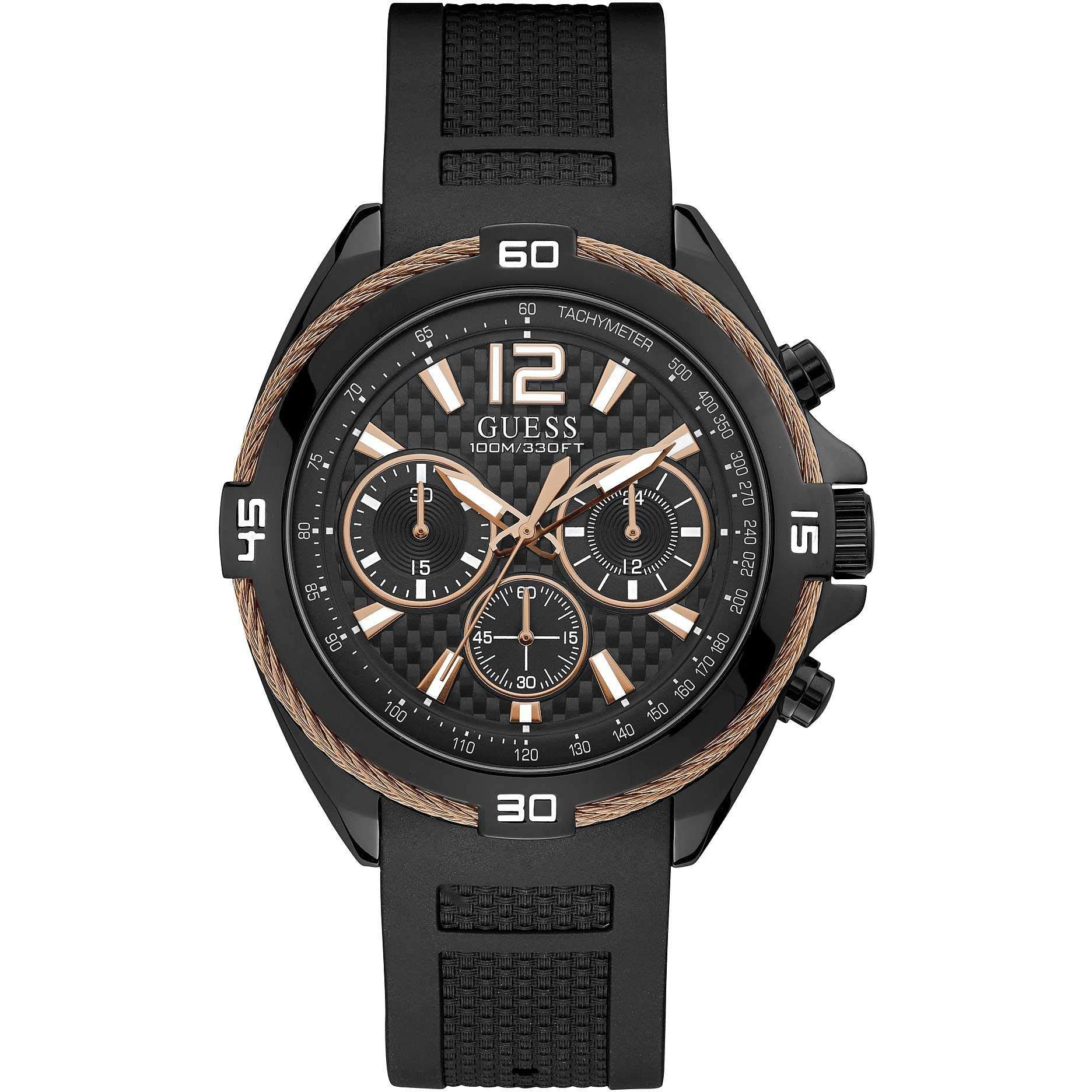
Figure 1: Guess W1168G3 Analog Watch, front view.
2. Safety Information
- Water Resistance: This watch is water-resistant up to 10 ATM (100 meters). It is suitable for swimming and snorkeling but not for diving. Do not operate the crown or pushers while the watch is wet or submerged.
- Temperature: Avoid exposing the watch to extreme temperatures (above 60°C / 140°F or below 0°C / 32°F) or sudden temperature changes.
- Chemicals: Keep the watch away from solvents, detergents, perfumes, and cosmetics, as these can damage the case, strap, or gaskets.
- Impact: Protect the watch from strong impacts or shocks.
- Battery: Battery replacement should be performed by a qualified watch technician to maintain water resistance and ensure proper function.
3. Components
Familiarize yourself with the main components of your Guess W1168G3 watch:
- Crown: Used for setting the time.
- Pushers (A and B): Used to operate the chronograph function.
- Dial: Displays the time and chronograph sub-dials.
- Hands: Hour, minute, and second hands for timekeeping; chronograph hands for timing.
- Strap: Black silicone strap with a buckle clasp.

Figure 2: Side view illustrating the crown and pushers.
4. Setup
4.1 Setting the Time
- Pull the crown out to the first position.
- Rotate the crown clockwise or counter-clockwise to set the hour and minute hands to the correct time.
- Once the time is set, push the crown back into its normal position.
4.2 Using the Chronograph
The chronograph function allows you to measure elapsed time.
- Start: Press Pusher A (top pusher) to start the chronograph. The chronograph second hand and sub-dials will begin to move.
- Stop: Press Pusher A again to stop the chronograph. The elapsed time will be displayed on the sub-dials.
- Reset: After stopping the chronograph, press Pusher B (bottom pusher) to reset all chronograph hands to their zero positions.
- Intermediate Time (Split Time): While the chronograph is running, press Pusher B to measure an intermediate time. The chronograph hands will stop, but timing continues internally. Press Pusher B again to display the current elapsed time.
5. Operating
Your Guess W1168G3 watch operates continuously once the time is set and the battery is functional. The quartz movement ensures accurate timekeeping.
- Time Reading: Read the time directly from the main hour, minute, and second hands.
- Chronograph Use: Refer to section 4.2 for detailed instructions on using the chronograph for timing events.
6. Maintenance
6.1 Cleaning
To maintain the appearance of your watch:
- Wipe the case and crystal with a soft, dry cloth.
- For the silicone strap, use a mild soap solution and a soft brush, then rinse thoroughly with clean water and dry completely.
6.2 Water Resistance
The watch is water-resistant to 10 ATM. To preserve water resistance:
- Ensure the crown is always pushed in completely.
- Do not operate the crown or pushers underwater.
- Avoid exposing the watch to hot water or steam, as this can compromise the seals.
- Have the water resistance seals checked periodically, especially after battery replacement.
6.3 Battery Replacement
When the watch stops or the second hand moves erratically (indicating a low battery), it's time for a battery replacement. This watch uses one Lithium-ion battery. It is recommended to have the battery replaced by an authorized Guess service center or a professional watchmaker to ensure the watch's integrity and water resistance are maintained.
7. Troubleshooting
- Watch Not Running: Check if the crown is pushed in completely. If it is, the battery may need replacement.
- Incorrect Time: Reset the time as described in section 4.1. If the time continues to be inaccurate, the battery may be low or the movement may require service.
- Chronograph Not Resetting to Zero: If the chronograph hands do not reset to the 12 o'clock position, consult a professional watchmaker for adjustment.
8. Specifications
| Feature | Specification |
|---|---|
| Model Number | W1168G3 |
| Brand | Guess |
| Movement Type | Quartz |
| Display Type | Analog |
| Special Features | Chronograph |
| Case Material | Stainless Steel |
| Case Diameter | 47 mm |
| Dial Window Material | Mineral Crystal |
| Strap Material | Silicone |
| Clasp Type | Buckle |
| Water Resistance | 10 ATM (100 meters) |
| Power Source | Battery Powered (1 Lithium-ion battery included) |
| Weight | 150 Grams |
9. Warranty and Support
Your Guess W1168G3 watch comes with a manufacturer's warranty. Please refer to the warranty card included with your purchase for specific terms and conditions. For technical support, service, or warranty claims, please contact Guess customer service or an authorized Guess service center. Keep your proof of purchase for any warranty-related inquiries.

Figure 3: Watch packaging, typically includes warranty information.

