
Bozily BZ-1000Y
Bozily Golf & Hunting Laser Rangefinder User Manual
Model: BZ-1000Y
Introduction
Thank you for choosing the Bozily Golf & Hunting Laser Rangefinder. This device is engineered for precision, offering 6X magnification and accurate distance measurements up to 1000 yards. It features advanced slope compensation technology and fast flag-lock capabilities, making it an essential tool for golf, hunting, and various outdoor activities. This manual provides detailed instructions for setup, operation, maintenance, and troubleshooting to ensure optimal performance and longevity of your rangefinder.

Image: The Bozily Golf and Hunting Laser Rangefinder, showcasing its compact design with white, red, and black accents. The device features two optical lenses on the front and a textured grip for comfortable handling.
Included Components
- 1x Bozily Golf Rangefinder
- 1x Carrying Case
- 2x CR2 Battery (one for use, one spare)
- 1x Lanyard
- 1x Cleaning Cloth
- 1x User Manual (this document)
- 1x Color Box
Setup
Battery Installation
The Bozily Rangefinder uses one CR2 battery. A spare battery is included.
- Locate the battery compartment cover, typically on the side or bottom of the device.
- Twist or slide the cover to open the compartment.
- Insert one CR2 battery, ensuring the positive (+) and negative (-) terminals align correctly with the indicators inside the compartment.
- Close the battery compartment cover securely.
Note: Ensure the battery is seated firmly to prevent intermittent power issues.
Operating Instructions
Power On/Off
- To power on the device, press the Power/Measurement button (usually located on top).
- The device will automatically power off after a period of inactivity to conserve battery.
Adjusting Focus
Rotate the eyepiece (diopter adjustment) to achieve a clear view of the display and target.
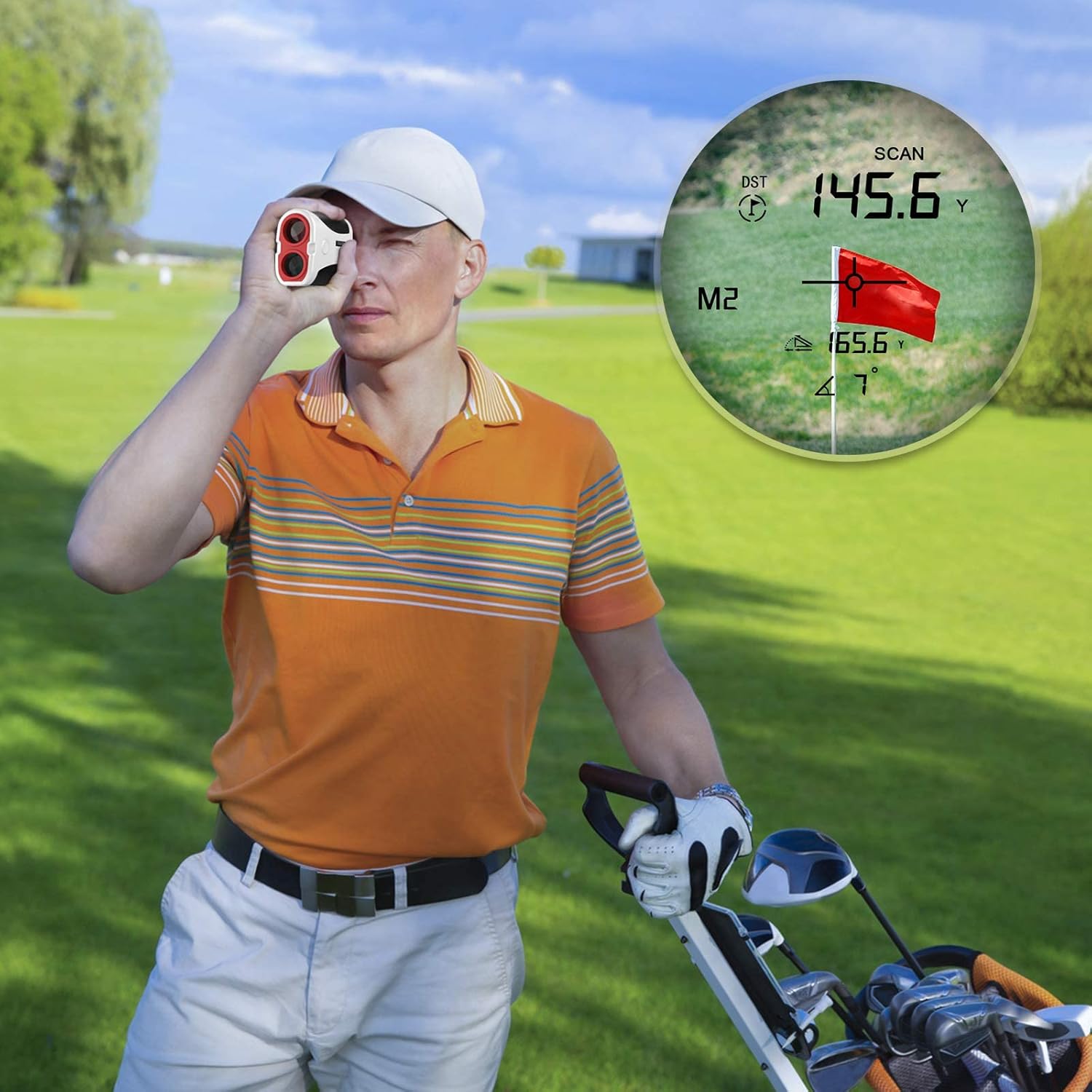
Image: A person using the Bozily rangefinder, with an overlay showing the internal display. The display indicates distance (DST), scan mode (SCAN), and a flag target, demonstrating how measurements are presented to the user.
Changing Measurement Units (Yards/Meters)
To switch between yards (Y) and meters (M), press and hold the "MODE" button for approximately 3 seconds. The unit displayed on the LCD will change.
Scan Modes
The rangefinder offers two primary scan modes:
- General Mode (Mode 1): Fast Continuous Scan
This mode is designed for quick and continuous measurement of distances to various objects. Press and hold the Power/Measurement button, and slowly pan the rangefinder across different targets. The distance readings will update continuously in real-time. This mode provides the actual linear distance to the target.

Image: An illustration of the Bozily rangefinder's Mode 1, demonstrating continuous scan. Three separate views through the eyepiece show different distance readings (55.6 Y, 125.6 Y, 95.6 Y) as the user scans across a golf course, highlighting the real-time measurement capability.
- Slope Mode (Mode 2): Slope Compensation & Flag-Lock with Vibration
This mode is ideal for golf, providing both the actual distance and a slope-adjusted distance, along with the angle of elevation or depression. When targeting a flag, the Flag-Lock feature will identify the closest object (the flagstick) and vibrate to confirm the lock, ensuring you get the precise distance to the pin. This mode is suitable for practice rounds and general play where slope compensation is desired.

Image: A golfer using the Bozily rangefinder in Mode 2, which supports slope and flag vibration. The image shows two views through the eyepiece: one displaying the direct distance (DST) and another showing the slope-adjusted distance (M2) along with the angle, illustrating the device's advanced measurement capabilities for golf.
Accuracy: The rangefinder provides an accuracy of ±1 yard for distances up to 1000 yards.

Image: A person holding the Bozily rangefinder to their eye, with text overlay emphasizing "High-Speed Reading, Laser Rangefinder With Accuracy Of ±1 Yard." This image highlights the user experience and the precision of the device.
Maintenance
Cleaning
- Use the provided cleaning cloth to gently wipe the lenses and the body of the rangefinder.
- Do not use abrasive materials, alcohol, or organic solvents, as these can damage the optical coatings and surface finish.
- For stubborn dirt, a small amount of lens cleaning fluid designed for optics can be applied to the cloth, not directly to the lens.
Storage
- When not in use, store the rangefinder in its carrying case to protect it from dust, moisture, and physical impact.
- Store in a cool, dry place, away from direct sunlight and extreme temperatures.
- If storing for extended periods, it is recommended to remove the battery to prevent leakage.
Troubleshooting
| Problem | Possible Cause | Solution |
|---|---|---|
| Device does not power on. | Battery is dead or incorrectly installed. | Replace the CR2 battery or ensure it is inserted with correct polarity. Check for firm contact. |
| Inaccurate or inconsistent readings. | Unstable aiming; environmental factors (fog, heavy rain); target too small or reflective; battery low. | Ensure stable aiming. Avoid using in severe weather. Target a larger object if possible. Replace battery. |
| Display is blurry or unclear. | Eyepiece not adjusted; lenses are dirty. | Rotate the eyepiece to adjust diopter. Clean the lenses with the provided cloth. |
| Flag-Lock not working effectively. | Multiple objects in line of sight; flag too far. | Ensure the flag is the primary target and there are no closer objects. Try scanning slowly around the flag. |
Specifications
| Feature | Detail |
|---|---|
| Magnification | 6X |
| Distance Range | 5-1000 yards |
| Accuracy | ±1 yard |
| Laser Type | Class 1, 905nm |
| Field Angle | 7 degrees |
| Display Type | LCD Digital Display |
| Scan Modes | General (Continuous Scan), Slope (Slope Compensation & Flag-Lock) |
| Unit of Measure | Yards / Meters (switchable) |
| Dimensions (L x W x H) | 103mm x 39mm x 72mm (4.06 x 1.54 x 2.83 inches) |
| Weight | 185g (6.53 oz) |
| Material | PC+ABS |
| Battery Type | 1x CR2 (included) |
| Water Resistance | Water Resistant (IP65) |
Warranty and Support
Warranty Information
Your Bozily Golf & Hunting Laser Rangefinder comes with a 12-month warranty covering any product defects and customer dissatisfaction.
Return Policy
A 30-day return policy is available via Amazon for eligible purchases. Please refer to Amazon's return policy for specific details.
Customer Support
For any questions, technical support, or warranty claims, please contact Bozily customer service. When contacting support, please provide your order number and a detailed description of your inquiry.
Bozily aims to provide a 24-hour reply to all customer inquiries.
Ask a question about this manual
Ask about setup, troubleshooting, compatibility, parts, safety, or missing instructions. Manuals+ will review the question and use this page’s manual context to help answer it.