
Introduction and Overview
The Caddytek Explorer V8 is a 4-wheel golf push cart designed for golfers who prioritize compact folding, stable handling, and efficient storage. Its lightweight aluminum frame ensures easy lifting, while the four maintenance-free EVA wheels provide a smooth and stable roll across various terrains.
Key features include:
- Easy Fold & Portability: A two-step locking-buckle design allows for a compact fold, making it convenient for transport and storage. Weighing approximately 15 lbs, it is lightweight and easy to handle.
- Wheels & Stability: Equipped with four EVA wheels (9.5" front x2, 10.5" rear x2) and a wide wheelbase for balance and smooth tracking. The adjustable front wheel width helps center different bag sizes for optimal balance.
- Ergonomic Handle & Brake: An adjustable TPR handle accommodates golfers of various heights, offering comfort and control. A secure foot brake ensures the cart remains stationary on slopes.
- Convenient Storage & Accessories: Features a covered scorecard console, mesh net, umbrella holder, drink holder, magnetic steel pad, and an integrated cooler basket for organizing essentials.
- Durability: Constructed with a strong aluminum frame for stability and long-lasting use.

Image: The Caddytek Explorer V8 golf push cart with a golf bag, ready for use on a green golf course.
Video: An overview of the CaddyTek SuperLite Explorer 4 Wheel Golf Push Cart, demonstrating its features and ease of use. (Duration: 1:45)
Setup Instructions
The Caddytek Explorer V8 is designed for quick and easy setup. Follow these steps to prepare your cart for use:
- Unfolding the Cart: Release the two-step locking buckles. Carefully unfold the cart, ensuring all frame components click into their locked positions. The handle assembly will swing into place.
- Attaching Wheels (if necessary): The wheels are typically pre-installed. If not, align each wheel with its axle and push until it locks securely. Ensure all four wheels are firmly attached.
- Adjusting the Handle: Use the adjustment mechanism on the TPR handle to set it to your preferred height for comfortable pushing.
- Adjusting Front Wheel Width: If needed, adjust the width between the front wheels (approximately 11.5 to 12.5 inches) to center your golf bag for optimal balance and straight tracking.
- Securing Your Golf Bag: Place your golf bag onto the cart. Use the auto-deploy bag wings and elastic straps to firmly secure both stand and cart bags.
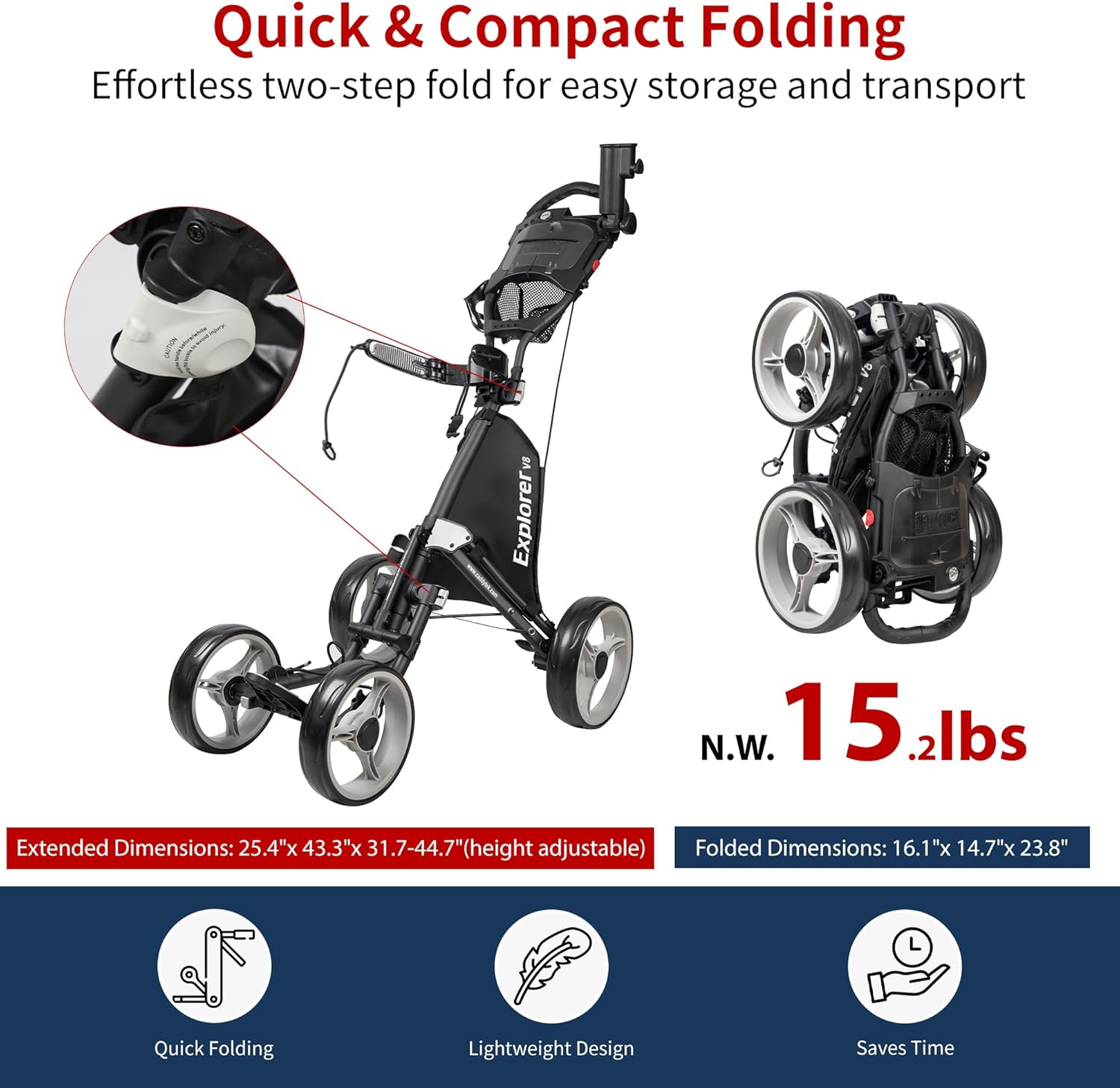
Image: Visual guide to the quick and compact folding of the Caddytek Explorer V8, highlighting its folded dimensions.
Video: A demonstration of the Explorer Version 8 SuperLite 4 Wheel Golf Push Cart, focusing on its folding and unfolding process. (Duration: 0:40)
Operating Instructions
Operating your Caddytek Explorer V8 is straightforward, designed for ease of use on the golf course.
- Pushing the Cart: Grip the adjustable TPR handle and push the cart forward. The four-wheel design provides stability and smooth maneuverability.
- Engaging the Foot Brake: To secure the cart on inclines or when stationary, press down firmly on the foot brake lever located near one of the rear wheels. Ensure the brake is fully engaged to prevent unintended movement.
- Releasing the Foot Brake: To resume movement, lift the foot brake lever until it disengages.
- Adjusting Handle Height: If you need to change the handle height during your round, use the quick-release mechanism on the handle to adjust it to a comfortable position, then secure it.
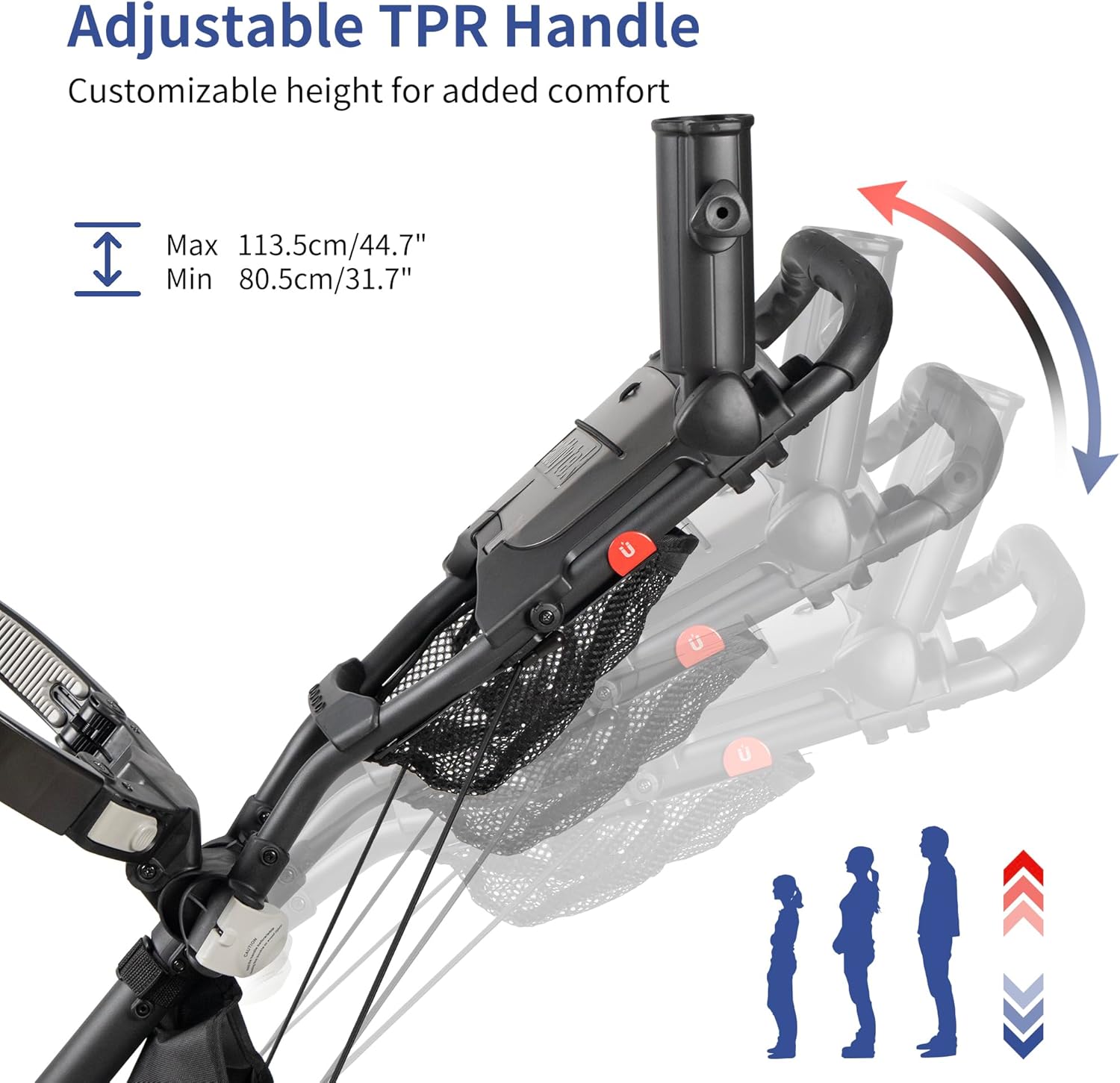
Image: The adjustable TPR handle, illustrating its customizable height for user comfort.
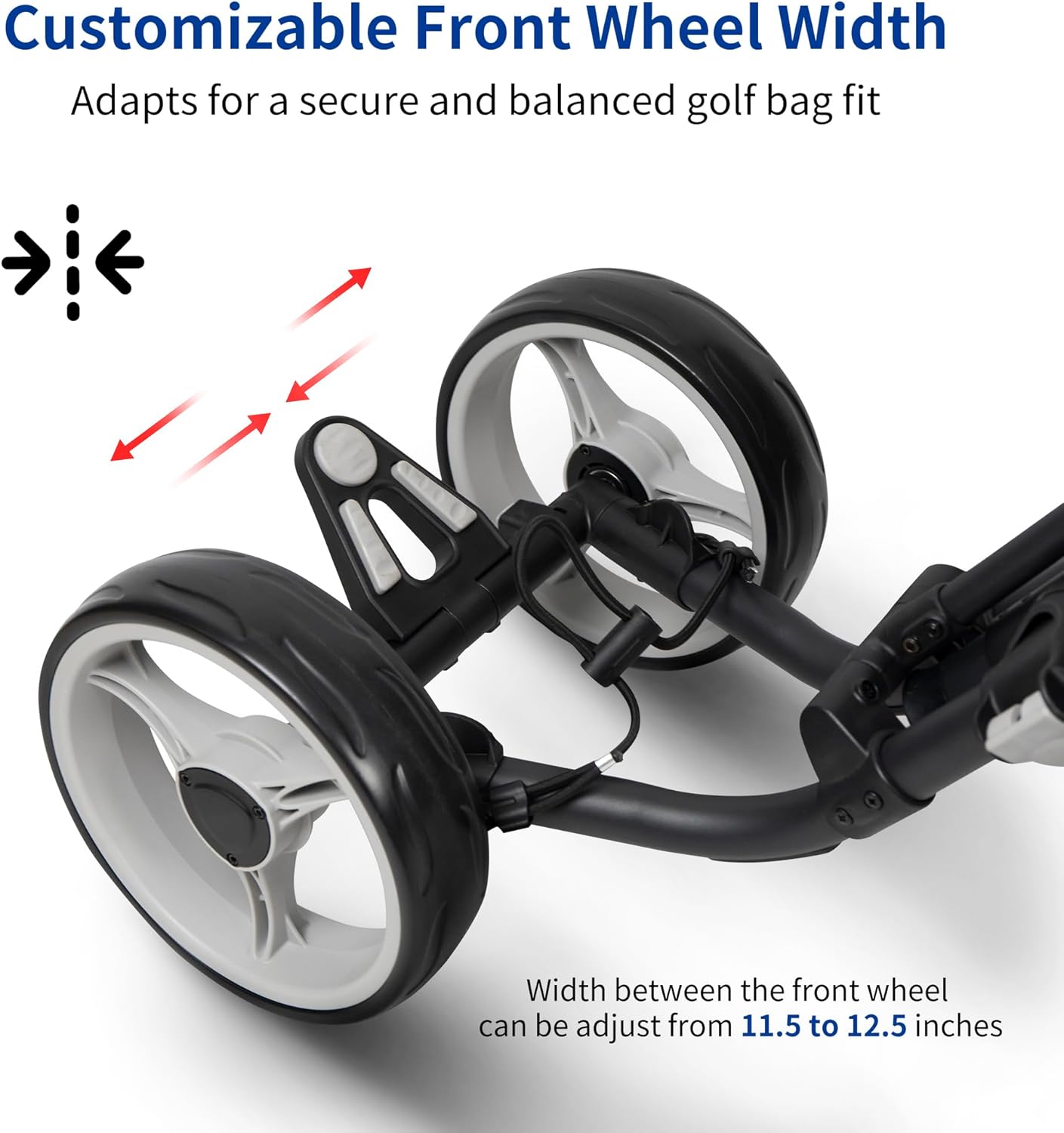
Image: The customizable front wheel width, allowing adaptation for different golf bag sizes and improved balance.
Storage and Accessories
The Explorer V8 is equipped with multiple storage options and accessories to enhance your golfing experience:
- Scorecard Console: A covered console provides a secure place for your scorecard, pencil, and other small items.
- Mesh Net: Located conveniently, the mesh net offers additional storage for golf balls, gloves, or other quick-access items.
- Umbrella Holder: An integrated holder keeps your umbrella readily accessible for unexpected weather changes.
- Drink Holder: Designed to hold your beverage, ensuring hydration throughout your round.
- Magnetic Steel Pad: A magnetic pad allows for easy attachment and quick access to rangefinders or towels.
- Integrated Cooler Basket: A built-in cooler basket helps keep drinks and snacks cool.
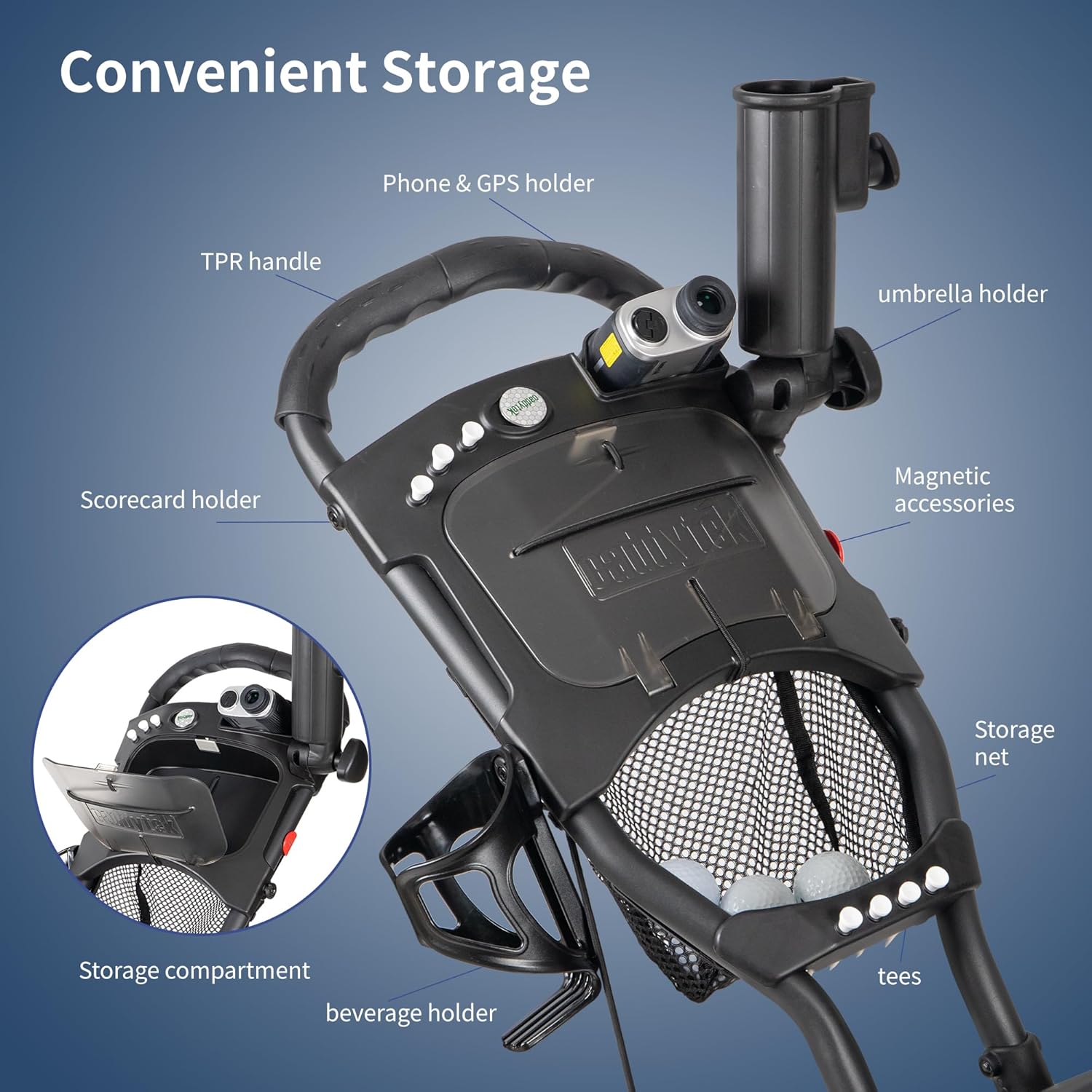
Image: Detailed view of the convenient storage features, including the scorecard holder, phone/GPS holder, umbrella holder, and storage net.
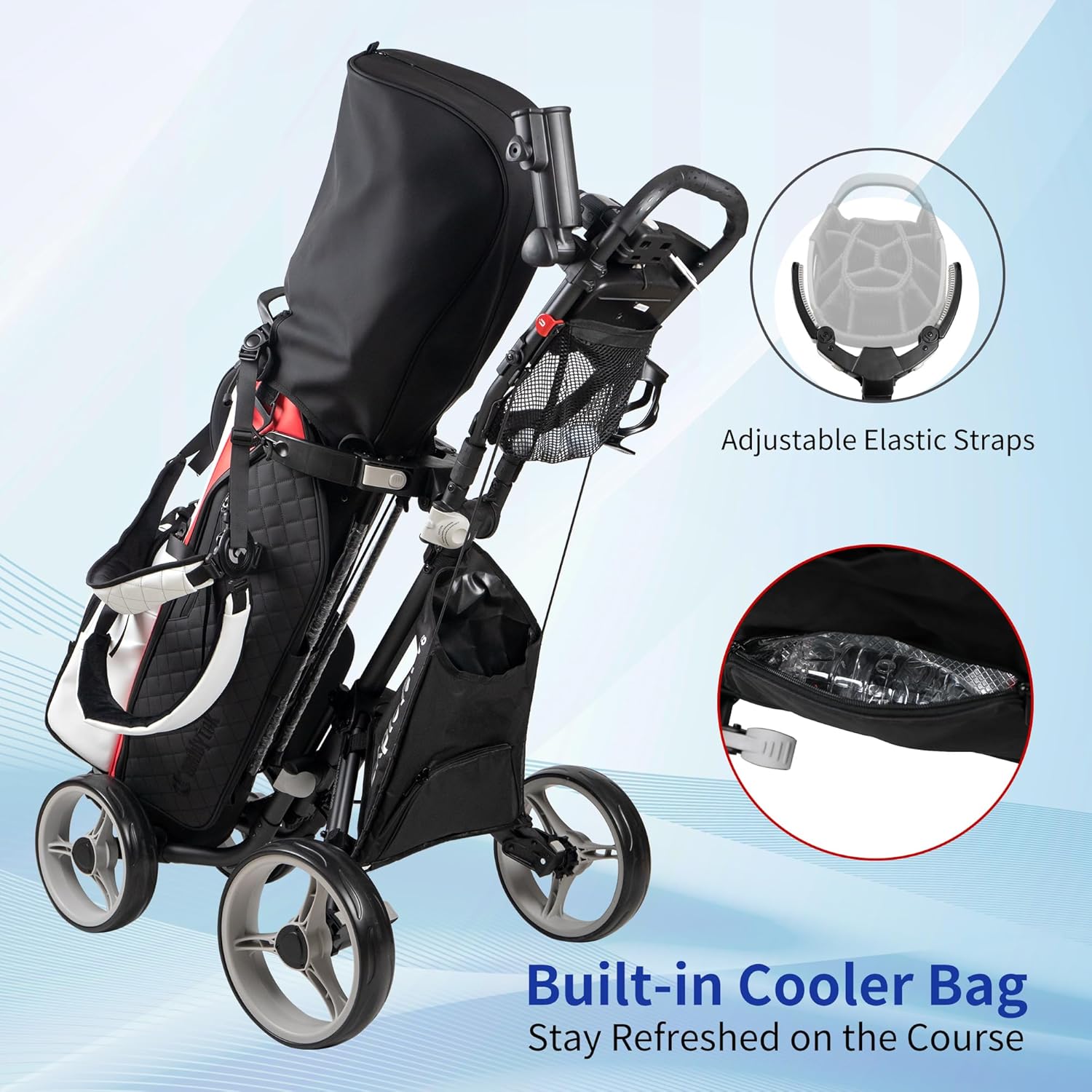
Image: The integrated cooler bag and adjustable elastic straps for securing your golf bag.
Maintenance
The Caddytek Explorer V8 is designed with maintenance-free EVA wheels, minimizing the need for regular upkeep. To ensure the longevity and optimal performance of your golf push cart, consider the following general maintenance tips:
- Cleaning: After each use, wipe down the frame and wheels with a damp cloth to remove dirt, grass, and debris. Avoid using harsh chemicals that could damage the finish.
- Storage: Store the cart in a dry, cool place away from direct sunlight and extreme temperatures when not in use. Ensure it is folded compactly to save space.
- Inspecting Components: Periodically check all nuts, bolts, and moving parts to ensure they are secure. Tighten any loose fasteners as needed.
- Wheel Inspection: Although maintenance-free, occasionally inspect the wheels for any signs of wear or damage. Ensure they spin freely.
Troubleshooting
If you encounter any issues with your Caddytek Explorer V8, refer to the following common troubleshooting tips:
- Cart Does Not Fold/Unfold Smoothly: Ensure all locking buckles and release mechanisms are fully disengaged or engaged as required. Check for any obstructions in the folding joints.
- Cart Pulls to One Side: Verify that the front wheel width is correctly adjusted to center your golf bag. Ensure all wheels are securely attached and free of debris. Refer to the setup instructions for front wheel adjustment.
- Foot Brake Not Engaging/Disengaging: Check for any debris obstructing the brake mechanism. Ensure the brake lever is fully depressed or lifted.
- Accessories Not Fitting Securely: Ensure all accessories (umbrella holder, drink holder, etc.) are correctly inserted and tightened according to their design.
If problems persist, please contact Caddytek customer support for assistance.
Specifications
| Feature | Detail |
|---|---|
| Brand Name | Caddytek |
| Model Name | Explorer V8 |
| Item Weight | 14.8 pounds (6.7 kg) |
| Item Dimensions (LxWxH) | 42 x 25.4 x 45.1 inches (Unfolded) |
| Folded Dimensions (LxWxH) | 16.1" x 14.7" x 23.8" (Approximate) |
| Material | Aluminum frame, Nylon components |
| Wheel Type | Maintenance-free EVA wheels (9.5" front x2, 10.5" rear x2) |
| Included Components | Umbrella holder, Drink holder, Integrated cooler basket, Magnetic steel pad, Phone & GPS holder, Scorecard holder with storage compartment, Storage net, Tee holders, Adjustment tools |
| Color | Dark Grey (other colors may be available) |
Warranty and Support
The Caddytek Explorer V8 is backed by a 1-Year Limited Warranty. This warranty covers manufacturing defects and workmanship under normal use conditions.
For warranty claims, technical support, or any inquiries regarding your Caddytek product, please contact Caddytek customer service. Refer to the official Caddytek website or your purchase documentation for the most current contact information.
Manufacturer: Caddytek Inc.