
Elrigs EHFS7WY
Elrigs LED E27 Motion and Light Sensor Bulb - User Manual
Model: EHFS7WY
Introduction
Thank you for choosing the Elrigs LED E27 Motion and Light Sensor Bulb. This bulb integrates advanced radar motion detection and adjustable light sensitivity to provide efficient and convenient lighting. Please read this manual carefully to ensure proper installation and operation.
This bulb is designed for standard E27 sockets and is suitable for various indoor and outdoor covered lighting fixtures. It offers a warm white light at 3000K, with a 7W power consumption equivalent to a 60W incandescent bulb.
Package Contents
- 1 x Elrigs LED E27 Motion and Light Sensor Bulb
- 1 x Mini Screwdriver (for adjustments)
- 1 x User Manual

Image: Elrigs LED E27 Motion Sensor Bulb and its package contents, including the bulb, a mini screwdriver for adjustments, and the user manual.
Setup and Installation
- Power Off: Before installation, ensure the power supply to the light fixture is turned off at the main switch.
- Screw In: Carefully screw the Elrigs LED E27 bulb into a standard E27 socket.
- Power On: Restore power to the light fixture.
- Maintain Switch ON: After installation, ensure the wall switch (if any) connected to the fixture remains in the "ON" position for the bulb's sensor functions to operate correctly.
- Placement Considerations:
- The bulb is suitable for both indoor and outdoor covered fixtures.
- For optimal performance and to avoid interference, maintain a minimum distance of 2 meters (6.56 feet) between two Elrigs motion sensor bulbs if installed in parallel.
- While the radar sensor can detect through some materials like glass or thin walls, enclosed glass covers may reduce detection sensitivity. Adjust the detection range accordingly if using such fixtures.

Image: Two Elrigs motion sensor bulbs installed in parallel outdoor fixtures. It is recommended to maintain at least 2 meters (6.56 feet) between bulbs to avoid mutual interference.

Image: Examples of the Elrigs motion sensor bulb installed in different covered light fixtures. Note that glass covers may reduce detection sensitivity, requiring adjustment of the detection range.
Operating Instructions and Adjustments
The Elrigs motion sensor bulb features three adjustable settings to customize its operation:
- Detection Range: Adjusts the distance at which motion is detected.
- Range: 1 to 8 meters.
- Use the provided mini screwdriver to turn the dial.
- The radar motion sensor can detect movement through glass, wood, and thin walls.
- Illumination Duration: Sets how long the bulb remains lit after motion is detected.
- Duration: 3 seconds to 5 minutes.
- If continuous motion is detected, the illumination period will extend from the last detected movement plus the set duration.
- Light Sensitivity (Lux): Determines the ambient light level below which the bulb will activate upon motion detection.
- Sensitivity: 1 to 3000 Lux.
- The bulb will only turn on if the ambient light is below the chosen Lux value AND motion is detected.
- If ambient light is above the set Lux value, the bulb will remain off, even if motion is detected.

Image: The three adjustable dials on the Elrigs bulb for setting illumination duration, detection range, and light sensitivity. A mini screwdriver is included for these adjustments.
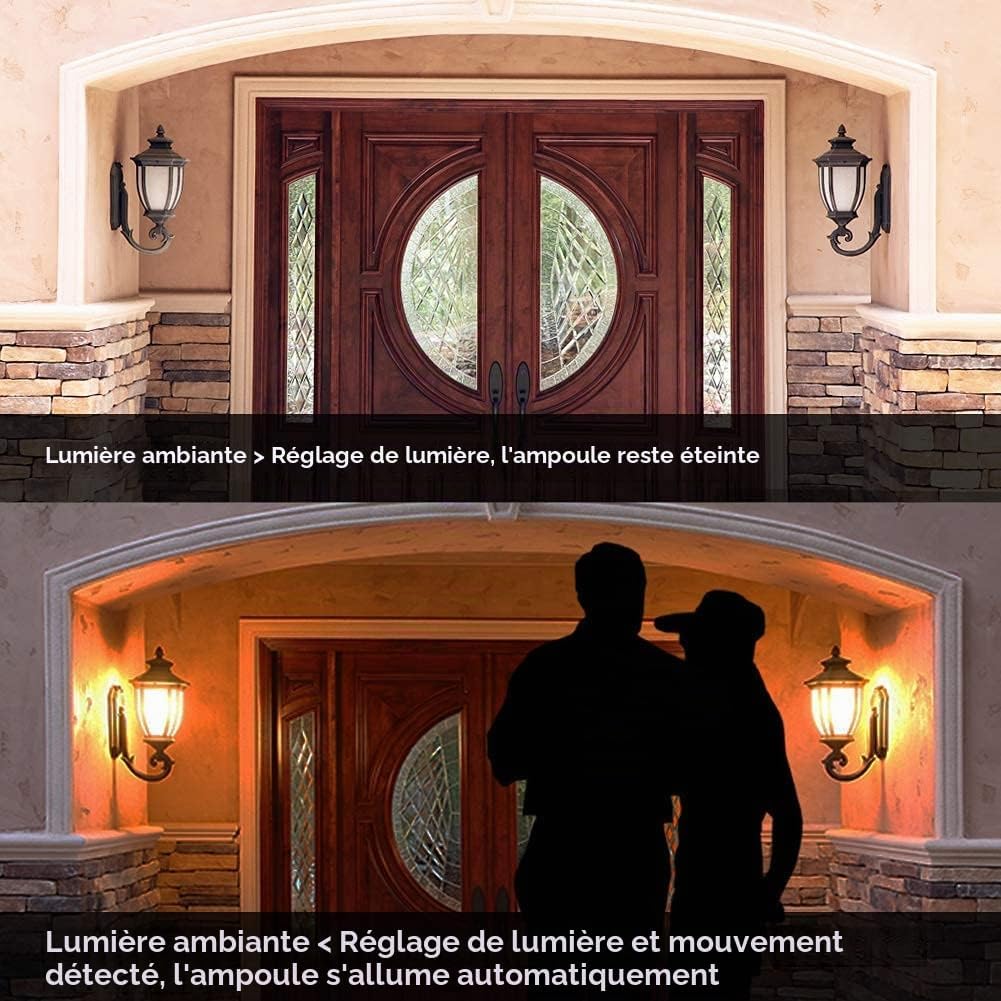
Image: This diagram explains how the light sensor works. The bulb remains off if ambient light is brighter than the set threshold. It activates only when ambient light is below the threshold AND motion is detected.
Maintenance
- Cleaning: Ensure the power is off before cleaning. Wipe the bulb with a soft, dry cloth. Do not use liquid cleaners or abrasive materials.
- Inspection: Periodically check the bulb and fixture for any signs of damage or loose connections.
- Environment: Avoid installing the bulb in areas with extreme temperatures or high humidity, which can affect its lifespan and performance.
Troubleshooting
| Problem | Possible Cause | Solution |
|---|---|---|
| Bulb does not turn on. |
|
|
| Bulb stays on continuously or turns off too slowly. |
|
|
| Bulb is too sensitive, detecting through walls/doors. |
|
|
| Bulb flickers or behaves erratically. |
|
|
Specifications
| Feature | Detail |
|---|---|
| Brand | Elrigs |
| Model Number | EHFS7WY |
| Type of Lighting | LED |
| Special Feature | Motion Sensor (Radar) |
| Power Consumption | 7 Watts |
| Incandescent Equivalent | 60 Watts |
| Bulb Shape Size | A19 (Standard) |
| Bulb Base | E27 |
| Light Color | Warm White |
| Color Temperature | 3000 Kelvin |
| Voltage | 85-265 Volts (AC) / 220-240 Volts (AC) |
| Luminous Flux | 700 Lumens |
| Beam Angle | 230 Degrees |
| Color Rendering Index (CRI) | 85.00 |
| Lifespan | 20,000 Hours |
| Detection Range | 1-8 meters (Adjustable) |
| Illumination Duration | 3 seconds - 5 minutes (Adjustable) |
| Light Sensitivity | 1-3000 Lux (Adjustable) |
| Material | Plastic |
| Dimensions (L x H) | 6 x 11.8 centimeters |
| Usage | Indoor/Outdoor (Covered fixtures) |
| GTIN / UPC | 601707074204 |

Image: Dimensions of the Elrigs LED E27 bulb (60mm diameter, 118mm height).
For detailed product information and energy efficiency, please refer to the EPREL database (QR code link).
Warranty and Support
All Elrigs LED products come with a two-year warranty from the date of purchase.
If you have any questions, encounter issues, or require assistance with your Elrigs LED E27 Motion and Light Sensor Bulb, please contact our customer service department. Refer to your purchase documentation for specific contact details.
Ask a question about this manual
Ask about setup, troubleshooting, compatibility, parts, safety, or missing instructions. Manuals+ will review the question and use this page’s manual context to help answer it.