
1. Introduction
This manual provides essential information for the proper installation, operation, and maintenance of the Yale DC300-D9005 Door Closer Body. Please read these instructions carefully before installation and retain them for future reference. This product is designed for controlled and effective door closure, featuring hydraulic shut-off control valves.
Note: This product is the door closer body only and does not include an articulated arm. An appropriate arm mechanism must be acquired separately if required for your specific application.
2. Safety Information
- Ensure all local building codes and safety regulations are followed during installation.
- Installation should only be performed by qualified personnel.
- Wear appropriate personal protective equipment (PPE) during installation.
- Do not modify the door closer. Unauthorized modifications may compromise safety and void the warranty.
- This door closer is suitable for fire and smoke protection doors. Ensure proper installation to maintain fire rating.
- Keep hands and fingers clear of moving parts during operation and adjustment.
3. Product Overview
The Yale DC300-D9005 is a high-quality door closer body designed for reliable and controlled door closing. It is certified in compliance with EN1154, size 3-6, making it suitable for various door types, including fire and smoke protection doors, and single-action doors up to 1400 mm wide.
Included Components:
- Door Closer Body (DC300)
- Mounting Template
- Screw Bag
Note: An articulated arm is not included with this product.

Figure 1: Yale DC300-D9005 Door Closer Body (Black/White finish). This image shows the main unit of the door closer, which is the hydraulic mechanism responsible for controlling the door's closing action. It is presented without an arm assembly.
4. Setup and Installation
Proper installation is crucial for the optimal performance and safety of the door closer. Refer to the included mounting template for precise drilling locations.
4.1 Mounting Considerations
- Door Type: Suitable for single-action doors.
- Door Width: Up to 1400 mm.
- Installation Type: Screw-In.
- Ensure the mounting surface is strong enough to support the door closer and the forces generated during operation.
- This model is designed for installation without an articulated arm. Ensure you have the correct arm type (e.g., slide channel arm) compatible with this body if needed.
4.2 Installation Steps (General)
- Prepare the Door and Frame: Determine the mounting position based on the door's opening direction and desired closing force. Use the provided mounting template to mark drilling points accurately.
- Drill Holes: Drill pilot holes according to the template.
- Mount the Closer Body: Secure the door closer body to the door or frame using the screws from the screw bag. Ensure it is firmly attached and level.
- Attach Arm Mechanism (if applicable): If using a separate arm mechanism (e.g., slide channel), attach it to the closer body and the door frame according to its specific instructions.
- Initial Adjustment: Perform initial adjustments as described in the "Operating Instructions" section to ensure the door closes smoothly and securely.
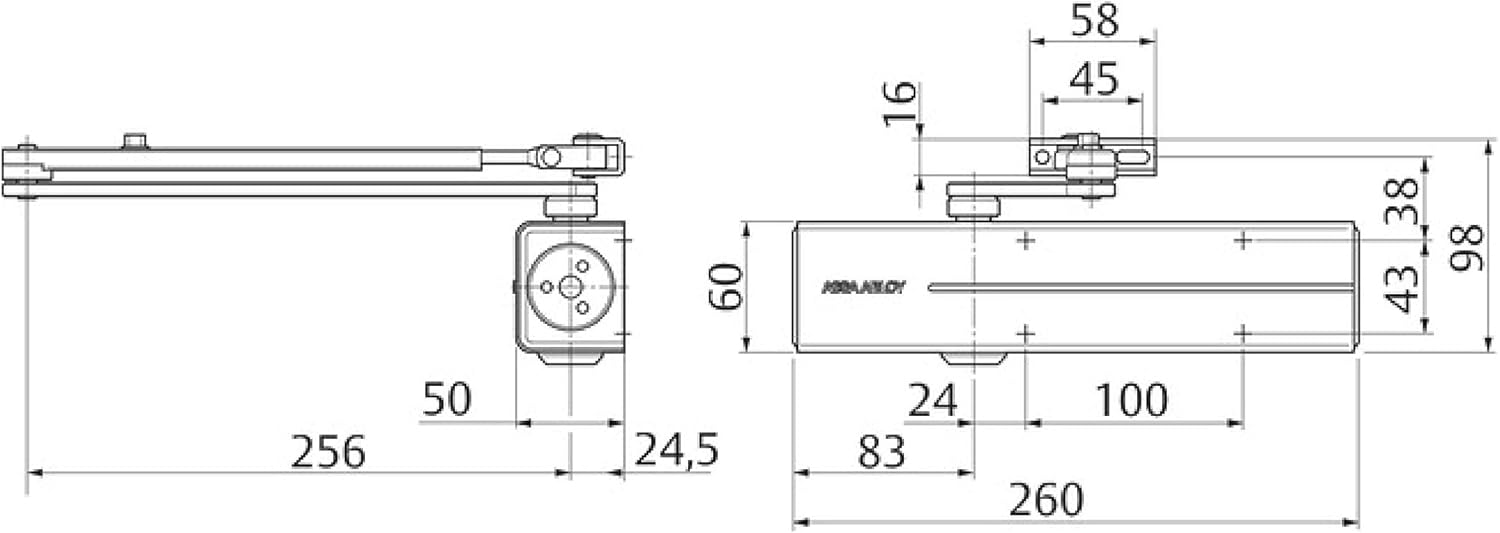
Figure 2: Technical drawing showing dimensions (in millimeters) of the Yale DC300-D9005 door closer body and its mounting points. This diagram is essential for precise installation planning.
5. Operating Instructions and Adjustment
The Yale DC300-D9005 door closer features hydraulic control valves for precise adjustment of closing speed, latch speed, backcheck, and delayed closing.
5.1 Adjustment Valves
The door closer typically has adjustment screws for the following functions:
- Closing Speed (VC): Controls the speed of the door from its maximum opening position down to approximately 15 degrees from closed.
- Latch Speed (GF): Controls the final closing speed from approximately 15 degrees to the fully closed position, ensuring the latch engages properly.
- Backcheck (FA): Provides hydraulic resistance to prevent the door from being violently thrown open, protecting the door and frame. This typically engages after a certain opening angle (e.g., 70 degrees).
- Delayed Closing (RC): Holds the door open for a short period before it begins to close, useful for accessibility or moving objects through the doorway.
- Hold Open Position (PR): If equipped with a hold-open function (not standard for all models, check your specific arm mechanism), this allows the door to be held open at a specific angle.
To Adjust: Use a suitable tool (e.g., screwdriver) to turn the adjustment screws. Turn clockwise to decrease speed/increase resistance, and counter-clockwise to increase speed/decrease resistance. Make small adjustments and test the door's operation after each change.

Figure 3: Diagram illustrating the various adjustment functions of a door closer, including Closing Speed (VC), Latch Speed (GF), Backcheck (FA), Delayed Closing (RC), and Hold Open Position (PR). The angles indicate where each function typically takes effect during the door's movement.
6. Maintenance
The Yale DC300-D9005 door closer is designed for long-term, low-maintenance operation. Regular checks can help ensure its continued performance.
- Periodic Inspection: Annually inspect the door closer and its mounting for any signs of wear, damage, or loose screws.
- Cleaning: Clean the exterior of the closer with a soft, damp cloth. Avoid abrasive cleaners or solvents.
- Lubrication: The internal hydraulic mechanism is factory-sealed and does not require lubrication. Do not attempt to open the closer body.
- Functionality Check: Periodically check the door's closing speed, latching action, and backcheck function. Readjust if necessary.
7. Troubleshooting
If you encounter issues with your door closer, refer to the following common problems and solutions:
| Problem | Possible Cause | Solution |
|---|---|---|
| Door closes too fast/slow | Incorrect closing speed or latch speed adjustment. | Adjust the Closing Speed (VC) and Latch Speed (GF) valves. |
| Door slams shut | Latch speed set too high. | Decrease the Latch Speed (GF) by turning the valve clockwise. |
| Door is difficult to open | Spring power set too high (if adjustable) or backcheck too strong. | Check if spring power is adjustable (not all models). Adjust Backcheck (FA) if it engages too early or too strongly. |
| Door does not close fully | Insufficient latch speed, obstruction, or incorrect installation. | Increase Latch Speed (GF). Check for door/frame obstructions. Verify proper installation and alignment. |
| Oil leakage | Damaged seals or closer body. | Discontinue use and contact Yale customer support for replacement. Do not attempt to repair. |
If the problem persists after attempting these solutions, please contact Yale customer support.
8. Specifications
| Brand | Yale |
| Model Number | DC300-----D9005 |
| Size | DC300 |
| Style | Body (without articulated arm) |
| Color | Black/White |
| Material | Metal |
| Item Weight | 1.84 Kilograms (approx. 4.05 pounds) |
| Product Dimensions | 12.8"L x 2.76"W x 2.95"H (approx. 32.5 cm x 7 cm x 7.5 cm) |
| Installation Type | Screw-In |
| Recommended Uses | For single-action doors up to 1400 mm wide, for fire and smoke protection doors, for doors without an articulated arm. |
| Specification Met | EN1154 (Size 3-6) |
| Included Components | Body, Mounting template, Screw Bag |
| Batteries Required | No |

Figure 4: Certification labels indicating compliance with EN1154 standards and manufacturer details. This confirms the product's adherence to European safety and performance regulations for door closers.
9. Warranty Information
Specific warranty details for the Yale DC300-D9005 Door Closer Body are typically provided at the point of purchase or can be found on the official Yale website. Please retain your proof of purchase for warranty claims.
For detailed warranty terms and conditions, please visit the Yale Official Store or contact Yale customer service directly.
10. Support and Contact
If you require further assistance, have questions regarding installation, operation, or troubleshooting, please contact Yale customer support.
For the most up-to-date contact information, please refer to the official Yale website or the documentation provided with your product.
You can also visit the Yale Official Store on Amazon for more product information.


