
1. Introduction
This manual provides essential information for the setup, operation, and maintenance of your Easytry123 replacement infrared remote control, model Easytry0599. This remote is designed as a direct replacement for specific Toshiba Air Conditioner remote models, including WH-D2B, WH-D6B, R51/E, WH-UB01UJ, WH-UB01NJ, WH-D1P, WH-D28, and WC-K10JE. Please ensure your original remote control matches the appearance of this replacement for full compatibility.
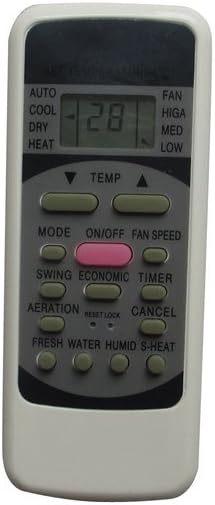
Figure 1: Front view of the Easytry123 Replacement Remote Control. This image shows the full remote with its display screen and various buttons for controlling an air conditioner.
2. Setup
2.1 Battery Installation
The Easytry123 remote control requires two (2) AAA batteries for operation. Follow these steps to install the batteries:
- Locate the battery compartment cover on the back of the remote control.
- Slide the cover downwards or press the latch (if present) to open the compartment.
- Insert two AAA batteries, ensuring the positive (+) and negative (-) terminals align correctly with the markings inside the compartment. Incorrect insertion can prevent the remote from functioning.
- Slide the battery compartment cover back into place until it clicks securely.
Note: Replace batteries when the remote's display dims or its response becomes sluggish. Do not mix old and new batteries, or different types of batteries.
3. Operation
To operate your air conditioner, point the remote control directly at the infrared receiver on the air conditioner unit. Ensure there are no obstructions between the remote and the unit.
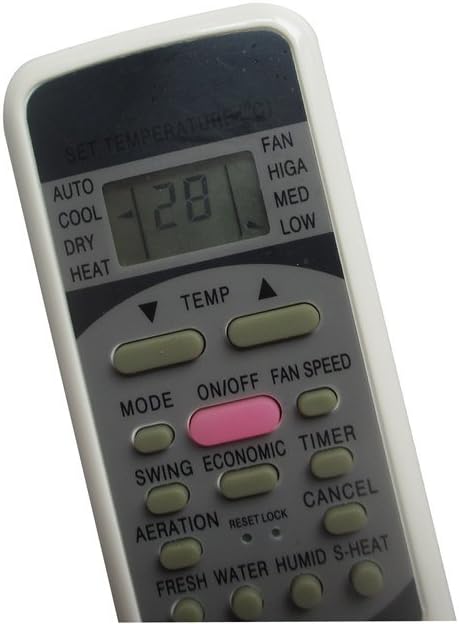
Figure 2: Close-up view of the remote control's display and primary function buttons. This image highlights the temperature display, mode indicators, and various control buttons.
3.1 Button Functions
The remote control features various buttons for controlling your air conditioner. While the exact functionality may vary slightly depending on your specific air conditioner model, the primary functions are as follows:
- ON/OFF: Powers the air conditioner on or off.
- MODE: Cycles through operating modes such as AUTO, COOL, DRY, HEAT.
- TEMP ▲/▼: Adjusts the desired temperature up or down.
- FAN SPEED: Adjusts the fan speed (e.g., HIGH, MED, LOW).
- SWING: Controls the louver swing function.
- TIMER: Sets the on/off timer for the air conditioner.
- ECONOMIC: Activates or deactivates energy-saving mode.
- AERATION: Controls air circulation or fresh air intake.
- RESET/LOCK: Resets settings or locks the remote to prevent accidental changes.
- CANCEL: Cancels current settings or timer.
- FRESH WATER/HUMID/S-HEAT: Additional functions that may be present on some air conditioner models.
Refer to your air conditioner's original manual for detailed explanations of specific functions if needed.
4. Compatibility
This Easytry123 replacement remote control is specifically designed to be compatible with the following Toshiba Air Conditioner remote models:
- WH-D2B
- WH-D6B
- R51/E
- WH-UB01UJ
- WH-UB01NJ
- WH-D1P
- WH-D28
- WC-K10JE
Important: For optimal performance and full functionality, it is crucial that your original remote control looks identical to this replacement remote. While it replaces the listed models, some advanced or less common functions present on your original remote may not be fully replicated by this replacement. If your air conditioner model or original remote is not listed or does not visually match, please contact the seller before purchase to confirm compatibility.
5. Troubleshooting
| Problem | Possible Cause | Solution |
|---|---|---|
| Remote not responding or inconsistent. |
|
|
| Some functions do not work. |
|
|
| Remote display is blank or dim. |
|
|
6. Specifications
- Model Number: Easytry0599
- Brand: Easytry123
- ASIN: B07DXNSRTP
- Power Source: 2 x AAA Batteries (not included)
- Controller Type: Button Control
- Special Feature: Ergonomic design, Infrared Replacement
- Manufacturer: Easytry123
- First Available: June 22, 2018
7. Important Notes and Disclaimer
- This is an infrared replacement remote control. It is designed to function similarly to your original remote.
- Compatibility is primarily based on visual matching with your original remote and the listed compatible models. If your model number is not explicitly listed in the product title, please verify compatibility before use.
- While this remote aims to replicate core functionalities, it cannot be guaranteed to possess all the exact same functions as your original remote, especially for highly specific or advanced features.
- No detailed programming or pairing is typically required for this infrared replacement remote; it should work out of the box with compatible units once batteries are installed.
8. Support and Contact
For any questions, concerns, or assistance regarding your Easytry123 replacement remote control, please contact the manufacturer or seller directly through the platform where you purchased the product. Provide your model number (Easytry0599) and a clear description of your issue for prompt support.
Manufacturer: Easytry123