
Product Overview
The Sena 10U is a discreet Bluetooth communication system designed to integrate seamlessly into specific helmet models, including the Shoei Neotec. It provides high-quality audio for music and conversations, ensuring a clear and connected riding experience without external bulk.
Key features include:
- Invisible design for a clean helmet aesthetic.
- Bluetooth intercom with a range of up to 1.6 kilometers (1 mile) for 4-way communication.
- Integrated FM radio receiver with scan and preset functions.
- Ability to share music with other riders.
- Control via the included Sena Bluetooth Remote or a smartphone app.

Figure 1: Sena 10U system packaging, illustrating the unibody intercom and remote control.
Setup and Installation
The Sena 10U system is specifically designed for internal installation within compatible helmets. This model is tailored for the Shoei Neotec helmet, ensuring a precise fit and optimal performance.
Package Contents:
- Sena 10U Unibody Intercom Unit
- Sena Bluetooth Remote Control
Installation Steps (Shoei Neotec):
- Prepare the Helmet: Carefully remove the helmet's interior padding and cheek pads to access the internal shell.
- Position the Speakers: The 10U unit includes integrated speakers. Place these speakers into the designated ear pockets within the helmet. Ensure they are flat and do not cause discomfort.
- Install the Main Unit: The unibody intercom unit is designed to fit into a specific recess within the Shoei Neotec helmet. Align the unit with the helmet's internal structure and secure it according to the helmet's design. This typically involves tucking wires and securing the main body.
- Route the Microphone: The microphone is integrated into the unibody design. Position it appropriately near your mouth for clear voice transmission, ensuring it does not obstruct your vision or helmet closure.
- Reassemble Helmet: Once the unit is securely in place and wires are neatly tucked away, reattach the helmet's interior padding and cheek pads. Ensure no wires are pinched or exposed.
- Mount the Remote Control: The Sena Bluetooth Remote can be mounted on your motorcycle's handlebar. Choose a position that is easily accessible and does not interfere with riding controls. Use the provided mounting hardware to secure it firmly.
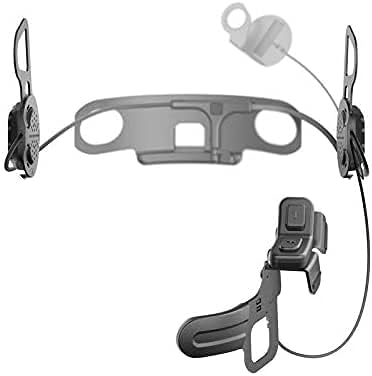
Figure 2: Individual components of the Sena 10U system, showing the main intercom unit with integrated speakers and the separate remote control.

Figure 3: Detailed view of the Sena Bluetooth Remote Control, highlighting its buttons and ergonomic design.
Operating Instructions
Powering On/Off:
Refer to the specific button combinations on the remote control or the main unit (if accessible) for powering the device on and off. A voice prompt will confirm the status.
Bluetooth Pairing:
- Pairing with Smartphone:
- With the 10U powered off, press and hold the Phone Button on the remote control until the LED flashes red and blue, indicating pairing mode.
- On your smartphone, navigate to Bluetooth settings and select "Sena 10U" from the list of available devices.
- Once paired, the LED will turn blue.
- Pairing with Other Sena Devices (Intercom):
- Ensure both Sena devices are powered on.
- On the 10U, press and hold the Intercom Button on the remote control until the LED flashes red.
- On the other Sena device, initiate intercom pairing mode.
- The devices will automatically connect when in range.
Intercom Communication:
To initiate or end an intercom conversation, press the Intercom Button on the remote control. The 10U supports up to 4-way intercom communication with other Sena units within a range of up to 1.6 km (1 mile) in open terrain.
Music and FM Radio:
- Playing Music: Once paired with your smartphone, music can be controlled via the remote control (play/pause, next/previous track) or directly from your phone.
- FM Radio: Activate the built-in FM radio using the remote control. Use the buttons to scan for stations and save presets.
- Audio Multitasking: The 10U supports Audio Multitasking, allowing you to have an intercom conversation while simultaneously listening to music or GPS instructions.
Using the Remote Control:
The Sena Bluetooth Remote provides intuitive control over the 10U system. Buttons are typically assigned for volume adjustment, track navigation, intercom activation, phone calls, and FM radio functions. Familiarize yourself with the button layout and their corresponding actions.

Figure 4: The Sena Bluetooth Remote Control, demonstrating its ergonomic design and the primary control buttons for easy access while riding.
Maintenance
- Cleaning: Use a soft, damp cloth to clean the exterior of the remote control and any accessible parts of the intercom unit. Avoid harsh chemicals or abrasive materials.
- Battery Care: The 10U uses Lithium Polymer batteries. To prolong battery life, avoid fully discharging the unit frequently. Charge the device regularly, especially before long periods of storage. Store in a cool, dry place.
- Firmware Updates: Sena regularly releases firmware updates to improve performance, add features, and fix bugs. It is highly recommended to keep your 10U's firmware up to date.
- Visit the official Sena website (www.sena.com) for the latest firmware and instructions on how to update your device using the Sena Device Manager software.
Troubleshooting
Common Issues and Solutions:
| Problem | Possible Cause | Solution |
|---|---|---|
| Device does not power on. | Low battery. | Charge the device fully. |
| Cannot pair with smartphone/other Sena device. | Incorrect pairing procedure; device not in pairing mode; interference. | Ensure device is in pairing mode. Restart both devices. Move away from other electronic devices. Refer to "Bluetooth Pairing" section. |
| Poor audio quality or no sound. | Speakers improperly positioned; volume too low; loose connection. | Check speaker placement within the helmet. Increase volume. Ensure all internal connections are secure. |
| Intercom connection drops frequently. | Out of range; obstacles; outdated firmware. | Stay within specified intercom range. Avoid physical obstructions. Update firmware. |
| Battery drains quickly. | High usage; old battery; outdated firmware. | Reduce continuous usage. Ensure firmware is updated. If battery life significantly degrades, contact support. |
For more detailed troubleshooting or issues not listed here, please visit the official Sena support website or contact their customer service.
Specifications
| Feature | Detail |
|---|---|
| Model Name | 10U-SH-12 |
| Connectivity Technology | Bluetooth |
| Wireless Communication Technology | Bluetooth |
| Included Components | Unibody Intercom, Remote |
| Compatible Devices | Motorcycle, Smartphone, Tablet, MP3 Player, Helmet |
| Control Type | Noise Control |
| Control Method | App, Remote |
| Special Feature | Lightweight |
| Material | Faux Leather (referring to helmet padding, not the unit itself) |
| Item Weight | 0.1 Kilograms (3.52 ounces) |
| Product Dimensions | 7.09 x 1.97 x 3.15 inches |
| Batteries | 2 Lithium Polymer batteries required (integrated) |
| Manufacturer | SENA Europe GmbH |
| Global Trade Identification Number (GTIN) | 08809277265462 |
| First Available Date | November 5, 2017 |
Warranty and Support
Sena provides a limited warranty for its products. Specific warranty terms and conditions, including duration and coverage, are typically provided with your purchase documentation or can be found on the official Sena website.
For technical support, product registration, firmware updates, and detailed user manuals, please visit the official Sena website:
You may also find helpful resources and frequently asked questions on their support pages.


