
1. Introduction
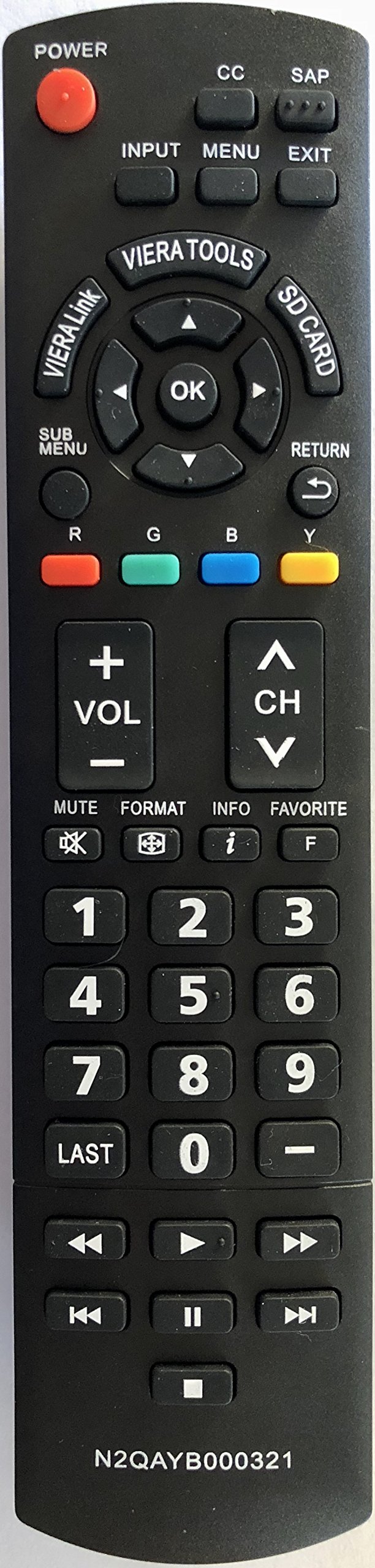
This manual provides essential information for the proper use and maintenance of your USARMT N2QAYB000321 replacement remote control. This remote is designed to be compatible with a wide range of Panasonic LCD and Plasma televisions.
The remote control is pre-programmed and requires no additional setup or programming. Simply insert batteries, and it is ready for use.
2. Setup: Battery Installation
To begin using your remote control, you must first install the batteries. Batteries are not included with this product.
- Locate the battery compartment on the back of the remote control.
- Slide the battery compartment cover downwards or press the latch and lift to open it.
- Insert two AAA batteries (not included), ensuring that the positive (+) and negative (-) terminals align correctly with the markings inside the compartment.
- Replace the battery compartment cover by sliding it back into place until it clicks securely.
3. Operating Instructions
Once batteries are installed, your remote control is ready for immediate use with compatible Panasonic televisions.
- Point and Operate: Aim the remote control directly at your television's infrared receiver.
- Button Functions: Press the desired button for the corresponding function (e.g., Power, Volume Up/Down, Channel Up/Down, Menu, Input).
- No Programming Required: This remote is pre-programmed for Panasonic TVs and does not require any code entry or synchronization steps.
4. Compatibility
This USARMT N2QAYB000321 remote control is compatible with the following Panasonic TV models:
Panasonic LCD TVs:
- TC-26LX14, TC-L26X1
- TC-32LX14, TC-32LX14N
- TC-L32C12, TC-L32C12K, TC-L32C12N
- TC-L32G1, TC-L32S1, TC-L32X1, TC-L32X1C, TC-L32X1N, TC-L32X1NC
- TC-L37G1, TC-L37S1, TC-L37X1
- TC-L42U12
Panasonic Plasma TVs:
- TC-42PX14, TC-42PX14N
- TC-50PS14, TC-50PX14, TC-50PX14N
- TC-54PS14, TC-58PS14, TC-65PS14
- TC-P42C1, TC-P42C1N, TC-P42S1, TC-P42U1, TC-P42X1, TC-P42X1N
- TC-P46S1, TC-P46U1, TC-P46U1N
- TC-P50C1, TC-P50S1, TC-P50U1, TC-P50X1, TC-P50X1C, TC-P50X1N
- TC-P54S1, TC-P58S1, TC-P65S1
5. Maintenance
To ensure the longevity and optimal performance of your remote control, follow these maintenance guidelines:
- Cleaning: Wipe the remote control with a soft, dry cloth. Do not use liquid cleaners or abrasive materials.
- Battery Replacement: Replace batteries when the remote's response becomes sluggish or stops working. Always replace both batteries at the same time with new ones of the same type.
- Storage: Store the remote in a cool, dry place away from direct sunlight and extreme temperatures.
- Avoid Drops: Protect the remote from physical impact, as drops can damage internal components.
6. Troubleshooting
If you experience issues with your remote control, try the following troubleshooting steps:
- Remote Not Responding:
- Check if the batteries are inserted correctly with the correct polarity (+/-).
- Replace old batteries with new ones.
- Ensure there are no obstructions between the remote control and the TV's infrared sensor.
- Make sure you are within the effective range of the TV's infrared sensor.
- Intermittent Functionality:
- This often indicates low battery power. Replace the batteries.
- Ensure the remote's infrared emitter (at the front tip) is clean and unobstructed.
If problems persist after trying these steps, please refer to the support section.
7. Specifications
| Feature | Detail |
|---|---|
| Brand | USARMT |
| Model Number | N2QAYB000321 |
| Compatible Devices | Television |
| Connectivity Technology | Infrared |
| Controller Type | Button Control |
| Special Feature | Ergonomic |
8. Warranty and Support
Specific warranty information for this USARMT N2QAYB000321 replacement remote control is not provided in the product details. For any warranty claims, technical support, or further assistance, please contact the seller directly through your purchase platform.