
Easytry123 Easytry0487
User Manual for Easytry123 Replacement Remote Control
Model: Easytry0487
Compatible with Samsung AH59-02131D HT-TZ322 HT-TZ325 HT-TZ422 HT-TZ425 HT-Z320 HT-Z420 HT-TZ122 HT-TZ122T DVD Home Theater Systems
Introduction
This manual provides instructions for the Easytry123 replacement remote control, designed for use with various Samsung DVD Home Theater Systems, including models AH59-02131D, HT-TZ322, HT-TZ325, HT-TZ422, HT-TZ425, HT-Z320, HT-Z420, HT-TZ122, and HT-TZ122T. This remote offers an easy-to-use solution for controlling your home theater system's primary functions. Please note that as a replacement unit, it may not support all functions of your original remote control.
Safety Information
- Do not mix old and new batteries.
- Do not mix alkaline, standard (carbon-zinc), or rechargeable (nickel-cadmium) batteries.
- Ensure batteries are inserted with correct polarity (+ and -).
- Remove batteries if the remote control will not be used for an extended period to prevent leakage.
- Keep batteries out of reach of children.
Setup
Battery Installation
The remote control requires two (2) AAA batteries (not included). Follow these steps to install them:
- Locate the battery compartment on the back of the remote control.
- Press down on the tab and slide the battery cover downwards to open it.
- Insert two AAA batteries, ensuring the positive (+) and negative (-) ends align with the markings inside the compartment.
- Slide the battery cover back into place until it clicks securely.

Figure 1: Rear view of the remote control with the battery compartment open, ready for battery insertion.
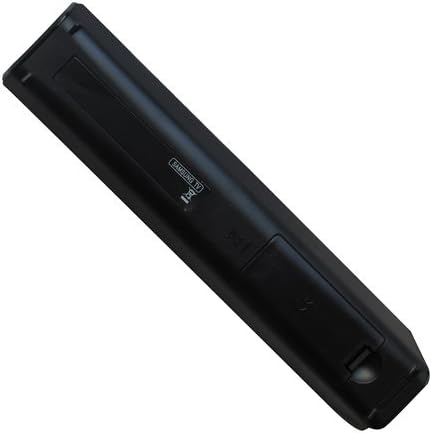
Figure 2: Rear view of the remote control with the battery cover securely closed after installation.
Operating Instructions
Once batteries are installed, the remote control is ready for use. Point the remote directly at your Samsung DVD Home Theater System's infrared receiver.
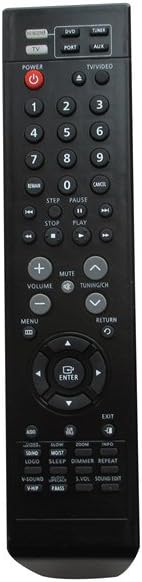
Figure 3: Front view of the Easytry123 replacement remote control, displaying its button layout.
Key Functions Overview
The remote control features a standard layout for common home theater functions:
- Power Button: Located at the top left, typically red, to turn the system on or off.
- Source/Input Selection: Buttons like "DVD", "PORT", "TV/VIDEO" to switch between different audio/video sources.
- Number Pad: Digits 0-9 for direct track selection or input.
- Playback Controls: Buttons such as Play, Pause, Stop, Fast Forward, Rewind, Skip (Next/Previous).
- Volume Control: Dedicated buttons for increasing (+) and decreasing (-) volume, and a Mute button.
- Navigation Pad: Arrow buttons (Up, Down, Left, Right) and an "ENTER" button for menu navigation and selection.
- Menu/Return: Buttons to access system menus and go back to previous screens.
- Function Buttons: Additional buttons for specific features like Sound Mode, V-Sound, Logo, Sleep, Dimmer, Repeat, etc., depending on your system's capabilities.
For detailed functionality of each button, refer to your Samsung Home Theater System's original user manual, as this replacement remote aims to replicate those functions.
Maintenance
Cleaning the Remote Control
To maintain the remote's appearance and functionality:
- Wipe the surface with a soft, dry cloth.
- For stubborn dirt, slightly dampen the cloth with water or a mild, non-abrasive cleaner. Do not spray cleaner directly onto the remote.
- Avoid using harsh chemicals, solvents, or abrasive cleaning pads.
Battery Replacement
Replace the batteries when the remote control's range decreases significantly or if it stops responding. Follow the battery installation steps outlined in the "Setup" section.
Troubleshooting
| Problem | Possible Cause | Solution |
|---|---|---|
| Remote control is not working. |
|
|
| Some functions do not work. |
|
|
| Remote has short operating range. |
|
|
Specifications
- Model Number: Easytry0487
- Brand: Easytry123
- Compatible Devices: Samsung HT-TZ322, HT-TZ325, HT-TZ422, HT-TZ425, HT-Z320, HT-Z420, HT-TZ122, HT-TZ122T DVD Home Theater Systems (and others compatible with AH59-02131D)
- Connectivity Technology: Infrared
- Controller Type: Button Control
- Batteries Required: 2 x AAA (not included)
- Special Feature: Ergonomic design
- Manufacturer: Easytry123
- Country of Origin: China
Support and Returns
For any questions or issues regarding your Easytry123 replacement remote control, please contact the seller directly through the platform where you made your purchase. The seller for this product is Easytry123.
This product typically comes with a 30-day return policy for refund or replacement. Please refer to the specific return policy details provided at the time of purchase or on the product listing page for the most accurate information.
Ensure your home theater system model is listed as compatible before purchasing to avoid functionality issues.
Ask a question about this manual
Ask about setup, troubleshooting, compatibility, parts, safety, or missing instructions. Manuals+ will review the question and use this page’s manual context to help answer it.