
1. Introduction
This manual provides essential information for the safe and effective installation, operation, and maintenance of the OPTEX Z2T-2000CN4 Thru-Beam Sensor. Please read this manual thoroughly before using the product and retain it for future reference.
2. Safety Information
Observe the following safety precautions to prevent injury to personnel and damage to the equipment:
- Ensure power is disconnected before performing any installation, wiring, or maintenance.
- Do not exceed the specified voltage and current ratings.
- Avoid installing the sensor in environments with excessive vibration, dust, moisture, or corrosive gases.
- This product is designed for industrial applications. Do not use it for applications where human life or property may be at risk without additional safety measures.
3. Product Overview
The OPTEX Z2T-2000CN4 is a thru-beam photoelectric sensor system consisting of a separate transmitter and receiver unit. It is designed for reliable object detection over distances up to 20 meters, featuring an NPN output and M8 quick-disconnect connectors for easy integration.
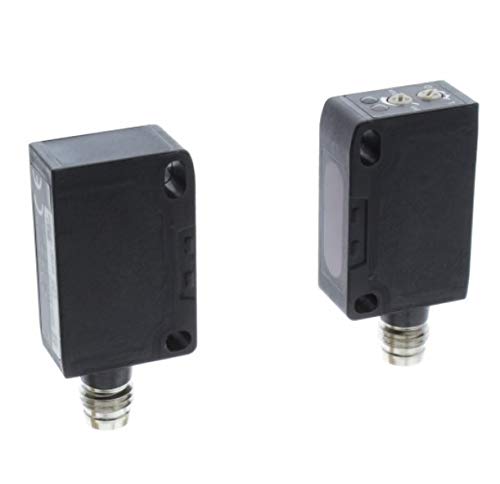
This image displays the two components of the Optex Z2T-2000CN4 thru-beam sensor system. Both units are black, rectangular, and feature an M8 quick-disconnect connector at the bottom. One unit acts as the transmitter, emitting a light beam, while the other acts as the receiver, detecting the beam. This configuration ensures reliable detection over longer distances.
4. Setup and Installation
Proper installation is crucial for optimal performance. Follow these steps:
- Mounting: Securely mount the transmitter and receiver units directly opposite each other. Ensure they are aligned so the light beam from the transmitter can reach the receiver without obstruction. The maximum sensing distance is 20 meters.
- Wiring: Connect the M8 quick-disconnect cables to both the transmitter and receiver. Refer to the wiring diagram provided with your specific cable for correct polarity. The sensor features an NPN output.
- Power Supply: Connect the sensor to a stable DC power supply within the specified voltage range.
- Alignment: After mounting and wiring, power on the sensor. Adjust the position of the transmitter and receiver until the receiver's indicator light (if present) shows a stable detection state, indicating proper alignment.
5. Operating Instructions
Once installed and aligned, the OPTEX Z2T-2000CN4 sensor operates automatically. When an object interrupts the light beam between the transmitter and receiver, the NPN output will switch state, signaling detection to the connected control system.
- Detection Indicator: Observe the indicator light on the receiver unit. A stable light typically indicates a clear beam path, while a change or absence of light indicates detection or misalignment.
- Output: The NPN output provides a sinking current when an object is detected (or not detected, depending on the sensor's configuration).
6. Maintenance
Regular maintenance ensures consistent performance and extends the sensor's lifespan.
- Cleaning: Periodically clean the optical surfaces of both the transmitter and receiver with a soft, lint-free cloth. Avoid abrasive cleaners.
- Inspection: Check cables and connectors for any signs of wear or damage. Ensure mounting hardware remains secure.
- Re-alignment: If the sensor's performance degrades or the indicator light suggests misalignment, re-check and adjust the alignment as described in the Setup section.
7. Troubleshooting
If the sensor is not functioning as expected, consider the following:
- No Detection:
- Check power supply and wiring connections.
- Verify proper alignment between transmitter and receiver.
- Ensure optical surfaces are clean and free from obstructions.
- Intermittent Detection:
- Check for unstable mounting or vibration.
- Inspect for environmental interference (e.g., dust, steam, strong ambient light).
- Re-align the sensor carefully.
- Output Not Switching:
- Confirm correct wiring of the NPN output to the control system.
- Test the output with a multimeter if possible.
8. Specifications
| Model | Z2T-2000CN4 |
| Brand | Optex |
| Sensing Method | Thru-Beam |
| Sensing Distance | 20 meters |
| Output Type | NPN |
| Connector | M8 Quick Disconnect (QD) |
| Manufacturer | OPTEX |
| ASIN | B07DTLRW4M |
9. Warranty and Support
For information regarding warranty coverage, technical support, or replacement parts, please contact your authorized Optex distributor or visit the official Optex website. Keep your purchase receipt and product serial number handy when seeking support.