
1. Introduction
This manual provides essential information for the installation, use, and maintenance of your Vdarts H2 Double Blue Dartboard Segment. This segment is designed as a replacement part for the Vdarts H2 electronic dartboard, ensuring accurate scoring and continued enjoyment of your dart game. Please read these instructions carefully before proceeding.
2. Product Overview
The Vdarts H2 Double Blue Dartboard Segment is a precision-engineered component for the Vdarts H2 electronic dartboard. It is specifically the 'Double' scoring area, colored blue, and is crucial for registering double scores during gameplay. Made from durable plastic, it is designed to withstand repeated dart impacts while maintaining its structural integrity and responsiveness.
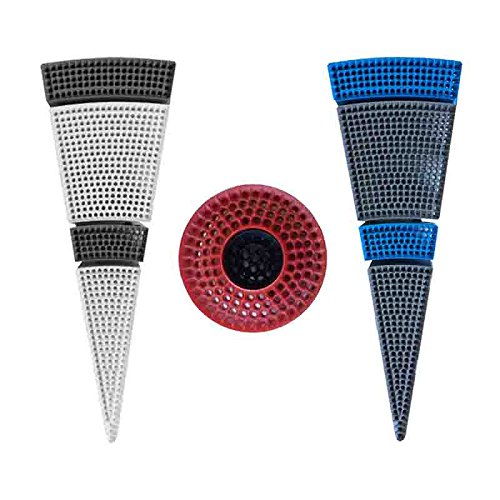
This image displays the Vdarts H2 Double Blue dartboard segment, a replacement part for the Vdarts H2 electronic dartboard. It features the distinct blue color and double segment scoring area.
Key Features:
- Material: High-quality, durable plastic.
- Color: Blue, matching the original Vdarts H2 dartboard design.
- Function: Registers 'Double' scores when hit by a dart.
- Weight: Approximately 15 grams, lightweight for easy replacement.
3. Setup and Installation
This segment is intended for replacement purposes. Ensure your Vdarts H2 dartboard is powered off and unplugged before beginning installation.
- Identify the Damaged Segment: Locate the 'Double Blue' segment on your Vdarts H2 dartboard that requires replacement.
- Access the Dartboard Interior: Carefully open the dartboard casing or access panel as per your Vdarts H2 dartboard's main instruction manual to expose the internal segments.
- Remove the Old Segment: Gently detach the damaged 'Double Blue' segment. This may involve unclipping it or unscrewing small fasteners, depending on the dartboard's design. Note how the segment connects to the electronic sensors.
- Install the New Segment: Align the new Vdarts H2 Double Blue Dartboard Segment with the corresponding slot. Ensure it fits snugly and connects properly to the dartboard's scoring sensors.
- Secure the Segment: Re-secure the new segment using any clips or fasteners that were removed.
- Close the Dartboard: Carefully close the dartboard casing or access panel.
- Test Functionality: Plug in and power on your Vdarts H2 dartboard. Perform a test game or use the dartboard's diagnostic mode (if available) to ensure the new segment registers hits correctly.
Note: If you are unsure about any step, refer to the complete Vdarts H2 dartboard user manual or seek professional assistance.
4. Operating the Dartboard with the New Segment
Once installed, the Vdarts H2 Double Blue Dartboard Segment functions identically to the original part. When a dart lands within the blue 'Double' area of this segment, the Vdarts H2 electronic dartboard will register a score that is double the value of the corresponding number segment. For example, if the segment is part of the 'Double 20' area, a hit will score 40 points.
No special operation is required for the segment itself; its functionality is integrated into the overall dartboard system. Ensure darts are thrown with appropriate force to register hits accurately without damaging the segment.
5. Maintenance
Proper maintenance ensures the longevity and performance of your dartboard segment.
- Cleaning: Use a soft, dry, or slightly damp cloth to wipe the surface of the segment. Avoid abrasive cleaners or solvents, as these can damage the plastic material.
- Dart Care: Ensure your darts have sharp, undamaged tips. Dull or bent dart tips can cause premature wear or damage to the segment.
- Storage: If the dartboard is not in use for an extended period, store it in a clean, dry environment away from direct sunlight and extreme temperatures.
- Inspection: Periodically inspect the segment for any signs of wear, cracks, or loose connections. Replace if significant damage is observed.
6. Troubleshooting
If you encounter issues after installing the new segment, consider the following:
- Segment Not Registering Hits:
- Ensure the segment is correctly seated and fully connected to the dartboard's internal sensors.
- Check for any debris or obstructions between the segment and the sensor pad.
- Verify that the dartboard itself is functioning correctly with other segments.
- Incorrect Scoring:
- Confirm that the correct 'Double Blue' segment was installed in the appropriate location.
- Check for any loose wiring or connections within the dartboard if accessible.
- Physical Damage:
- If the segment becomes cracked or broken, it will need to be replaced again.
- Avoid using excessive force when throwing darts.
For persistent issues, consult the Vdarts H2 dartboard's main user manual or contact Vdarts customer support.
7. Specifications
| Attribute | Detail |
|---|---|
| Brand | Vdarts |
| Model | H2 Double Blue Segment |
| Material | Plastic |
| Color | Blue |
| Item Weight | 15 Grams |
| Compatible Dartboard Size | Designed for Vdarts H2 dartboards (typically 45 cm diameter) |
| Sport Type | Target Shooting (Darts) |
8. Warranty and Support
This Vdarts H2 Double Blue Dartboard Segment is covered by the standard Vdarts warranty policy. Please refer to the warranty information provided with your original Vdarts H2 dartboard or visit the official Vdarts website for details regarding warranty terms, conditions, and registration.
For technical support, replacement parts, or further assistance, please contact Vdarts customer service through their official channels. When contacting support, please have your product model and any relevant purchase information ready.