
1. Introduction
This manual provides essential instructions for the proper assembly, operation, and maintenance of your CaddyTek Explorer V8 Superlite 4-Wheel Golf Push Cart. Please read this manual thoroughly before using the product to ensure safe and efficient operation.
Key Features:
- Patented simple 2-latch mechanism for compact folding.
- Adjustable handle height for various pushing positions.
- 25.5-inch wide body design for effortless pushing.
- Adjustable front wheel width (11.5 to 12.5 inches) for golf bag stability.
- Integrated accessory holders: umbrella, scorecard, beverage, cell phone/GPS.
- Built-in cooler bag and mesh net for additional storage.
2. Setup and Assembly
The CaddyTek Explorer V8 is designed for quick and easy setup. Follow these steps to unfold your cart.
Unfolding the Cart:
- Locate the two latches on the cart frame.
- Release both latches to allow the cart frame to extend.
- Gently pull the handle upwards and the wheels outwards until the cart fully extends and locks into its open position. Ensure all locking mechanisms are securely engaged before use.

This image displays the CaddyTek Explorer V8 golf push cart. On the right, the cart is fully unfolded and ready for use, showcasing its four wheels, handle, and accessory holders. On the left, the cart is shown in its compact, folded state, highlighting its portability and storage efficiency.

The CaddyTek Explorer V8 golf push cart is pictured on a green golf course, holding a golf bag securely. This demonstrates the cart's stability and capacity to transport golf equipment during a round.
Folding the Cart:
To fold the cart for storage or transport, reverse the unfolding process. Release the two latches and collapse the frame until it reaches its compact size. Ensure all components are securely folded before lifting or storing.
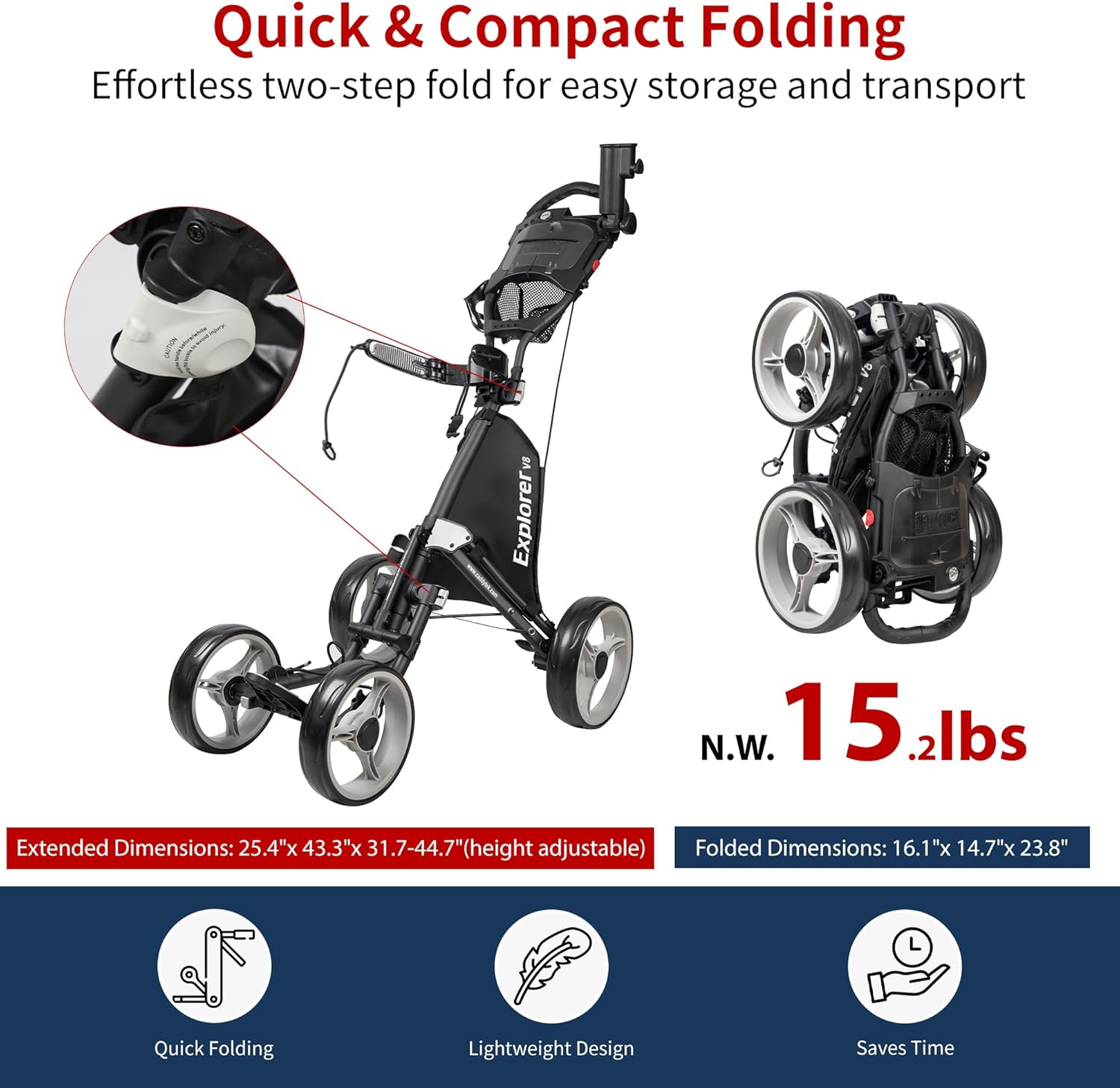
This image highlights the quick and compact folding mechanism of the CaddyTek Explorer V8. It shows the cart in its extended dimensions (25.4" x 43.3" x 31.7-44.7" adjustable height) and its folded dimensions (16.1" x 14.7" x 23.8"), emphasizing its lightweight design at 15.2 lbs and ease of storage.
3. Operating Instructions
Adjusting Handle Height:
The cart features an adjustable handle to accommodate users of different heights. Locate the adjustment mechanism on the handle. Press or release the lever/button and slide the handle to your desired height. Ensure it locks securely in place before pushing.
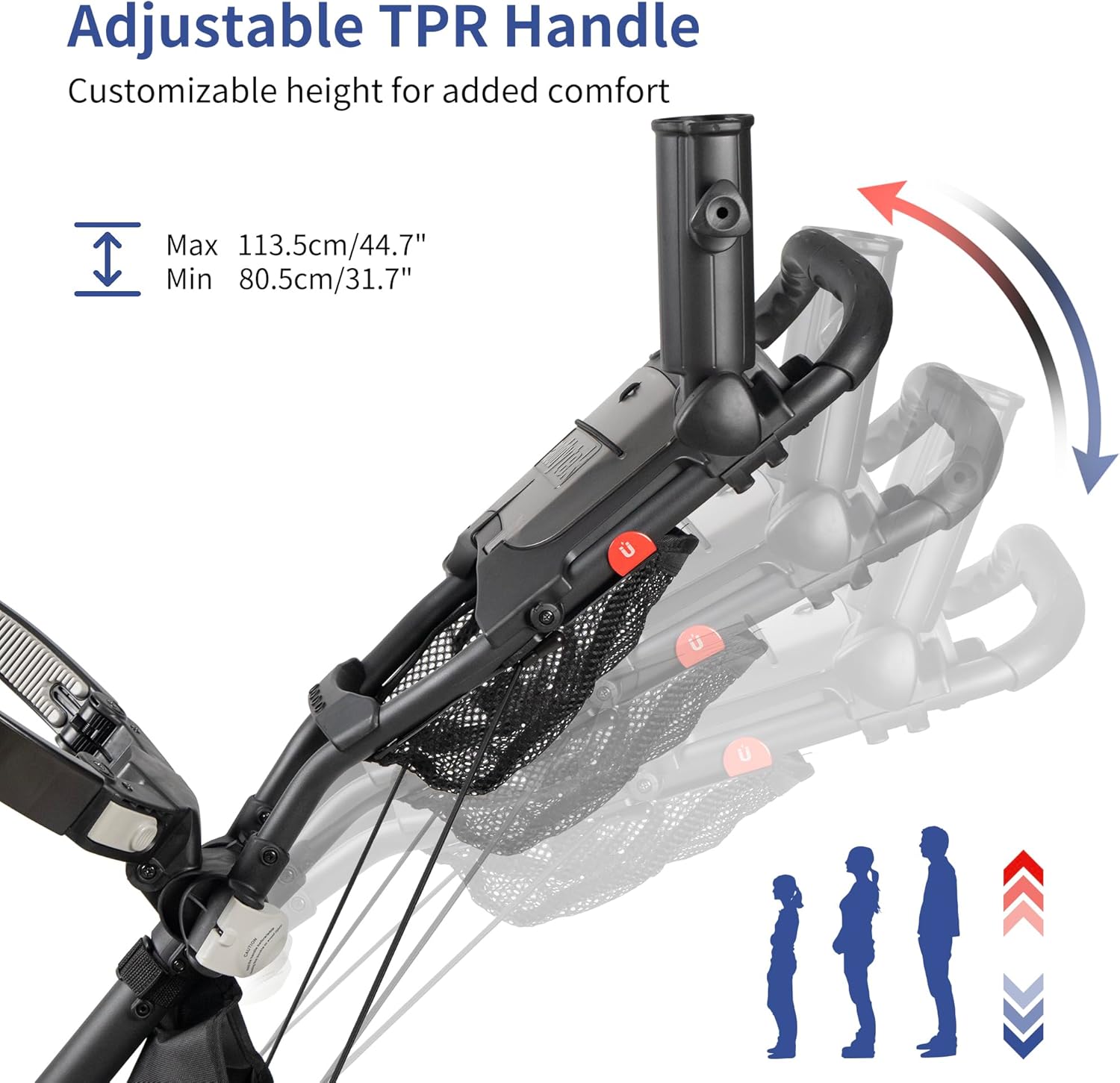
This image illustrates the adjustable TPR handle of the CaddyTek Explorer V8. It shows the handle's range of motion, allowing users to customize the height for comfortable pushing. The minimum height is 80.5 cm (31.7 inches) and the maximum is 113.5 cm (44.7 inches).
Adjusting Front Wheel Width:
The front wheels can be adjusted to optimize stability and fit various golf bag sizes. The width between the two front wheels can be adjusted between 11.5 to 12.5 inches. Consult the mechanism near the front wheels to widen or narrow the stance as needed, ensuring it clicks into position.
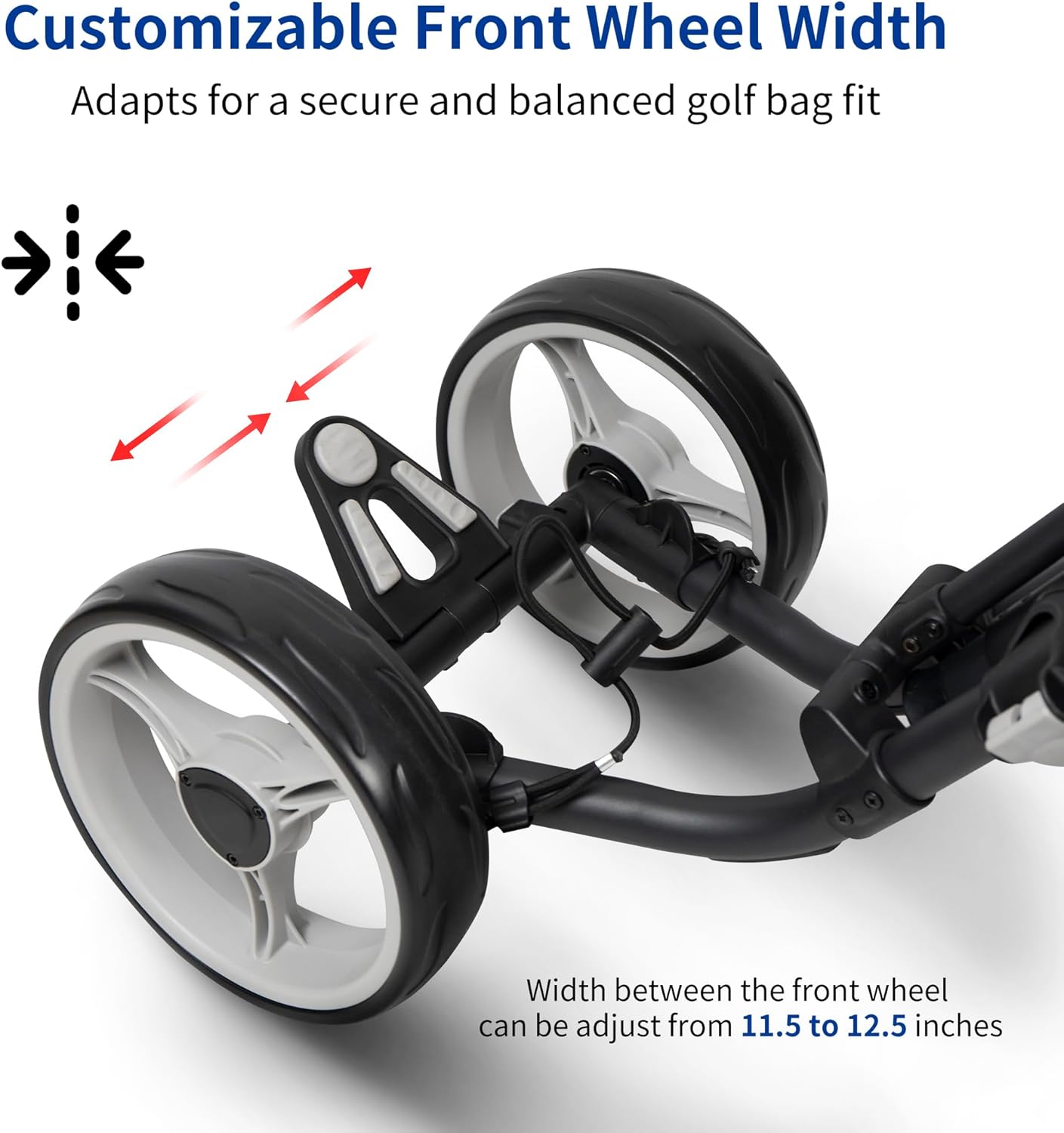
This image focuses on the customizable front wheel width feature of the CaddyTek Explorer V8. It shows how the width between the two front wheels can be adjusted from 11.5 to 12.5 inches, allowing for a secure and balanced fit for various golf bag sizes and enhancing stability.
Using Storage Features:
The CaddyTek Explorer V8 is equipped with multiple storage compartments and holders:
- Scorecard Holder: Located on the handle console, with an internal storage compartment for small items.
- Beverage Holder: Designed to securely hold your drink.
- Cell Phone/GPS Holder: Provides a secure spot for your electronic devices.
- Umbrella Holder: Attaches to the cart to keep your umbrella accessible.
- Mesh Net: A convenient net for quick access to golf balls, tees, or other small accessories.
- Built-in Cooler Bag: A zippered compartment designed to keep beverages and snacks cool.
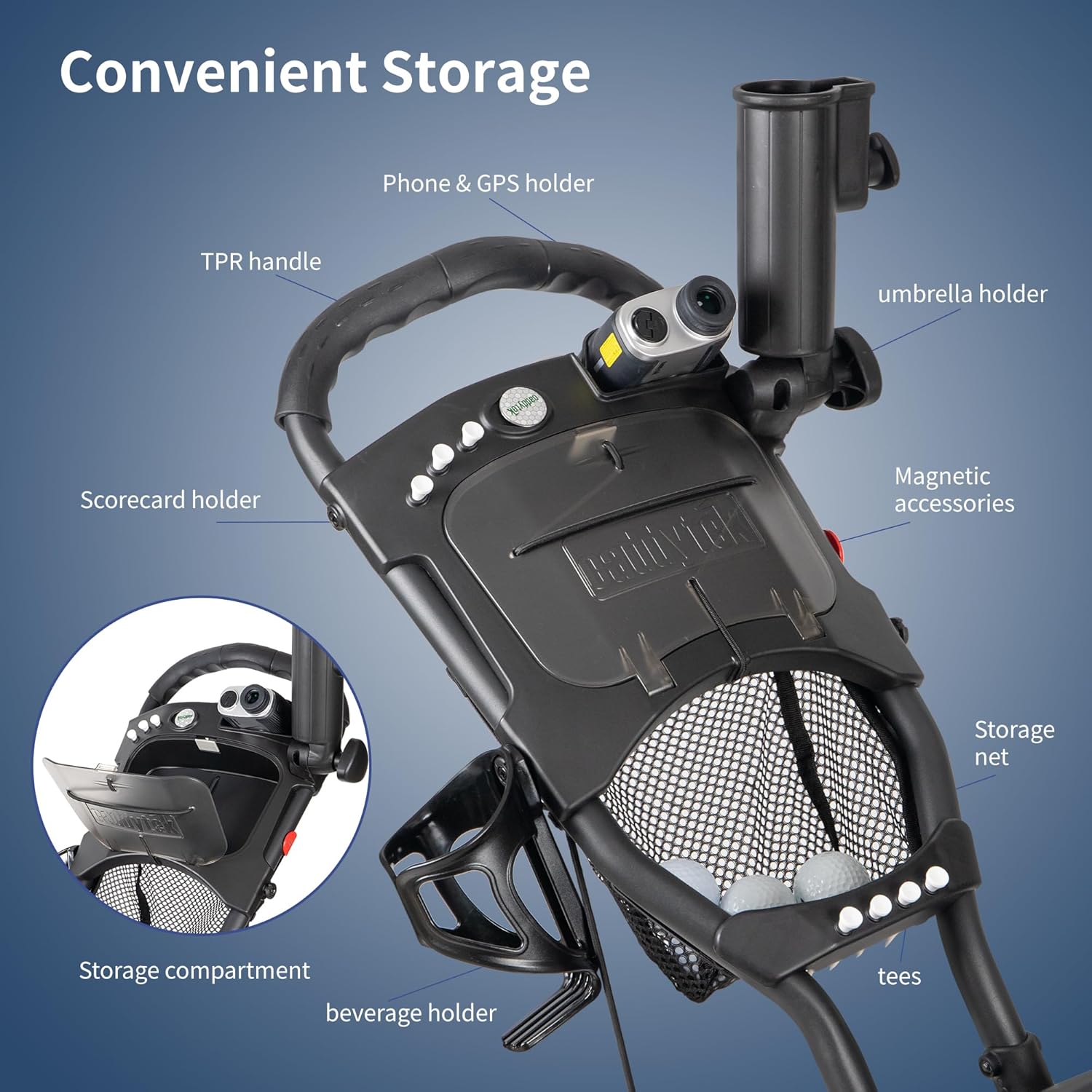
A close-up view of the CaddyTek Explorer V8's handle console, detailing its convenient storage options. These include a phone and GPS holder, umbrella holder, scorecard holder with a storage compartment, beverage holder, and a mesh net for small items like golf balls and tees.
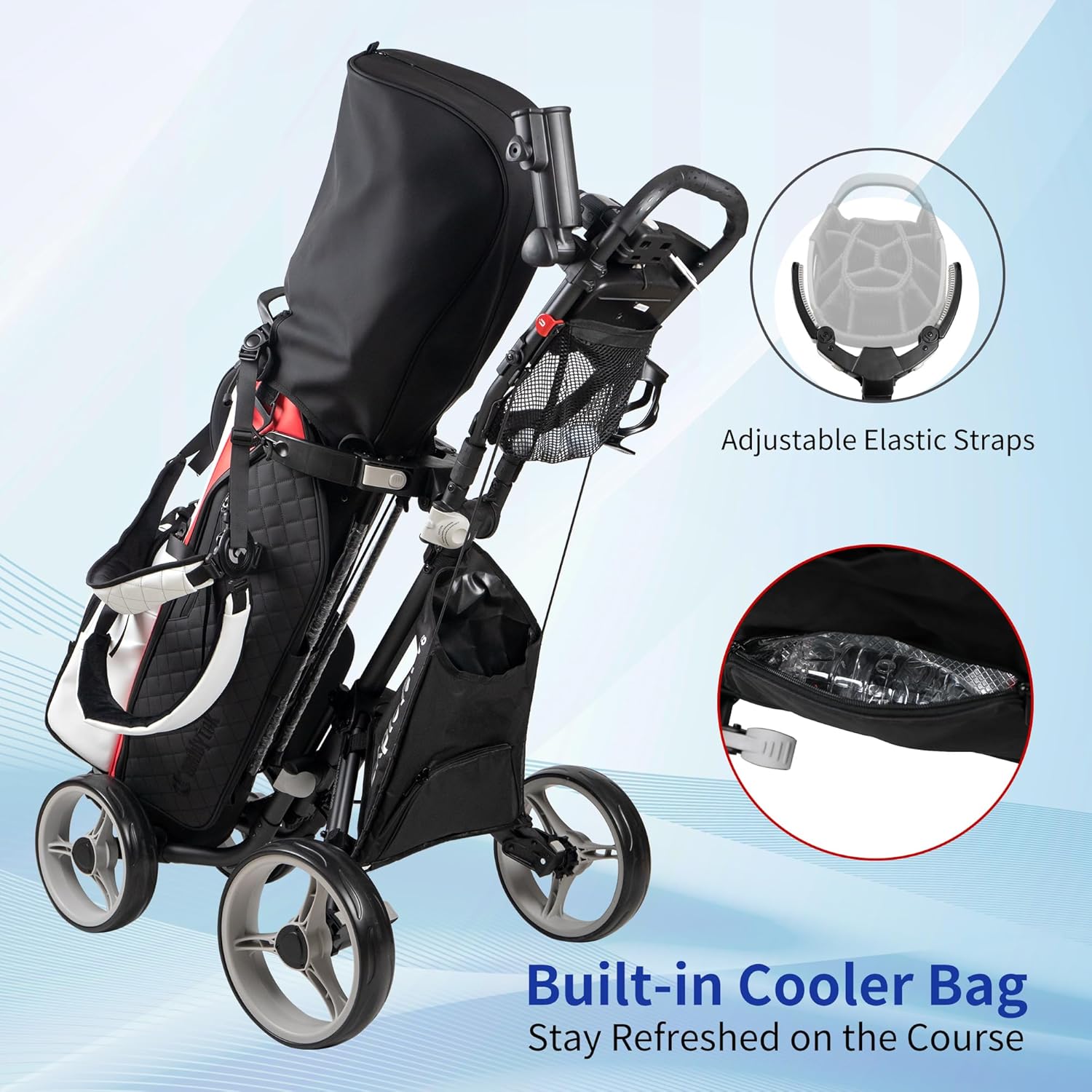
This image illustrates the built-in cooler bag integrated into the CaddyTek Explorer V8 golf push cart. A close-up shows the zippered compartment designed to keep beverages cool, ensuring refreshments are available during a round of golf.
4. Maintenance
Regular maintenance ensures the longevity and optimal performance of your golf push cart.
- Cleaning: Wipe down the cart with a damp cloth after each use, especially if it has been exposed to dirt or moisture. Avoid harsh chemicals that may damage the finish or materials.
- Wheel Inspection: Periodically check the wheels for debris, wear, or damage. Ensure they spin freely and are securely attached.
- Moving Parts: Inspect all hinges, latches, and adjustment mechanisms for smooth operation. Lubricate with a silicone-based spray if necessary.
- Storage: Store the cart in a dry, cool place, away from direct sunlight and extreme temperatures, to prevent material degradation.
5. Troubleshooting
If you encounter any issues with your CaddyTek Explorer V8, refer to the following common troubleshooting tips:
- Cart Does Not Fold/Unfold Smoothly: Ensure both latches are fully disengaged/engaged. Check for any obstructions in the folding mechanism. Lubricate hinges if stiffness persists.
- Steering Difficulty: Verify that the front wheel width is correctly adjusted and that no debris is lodged in the wheel axles. Ensure all wheels are properly inflated if applicable (this model has maintenance-free wheels, so inflation is not a concern).
- Accessories Not Fitting: Double-check that accessories like the umbrella holder are correctly aligned and tightened according to their specific instructions.
6. Specifications
| Feature | Detail |
|---|---|
| Product Dimensions (Extended) | 106.68 x 64.52 x 114.55 cm (42 x 25.4 x 45.1 inches) |
| Folded Dimensions | 16.1" x 14.7" x 23.8" (approx. 40.9 x 37.3 x 60.5 cm) |
| Item Weight | 6.71 kg (14.79 lbs) |
| Material | Nylon (frame components) |
| Color | Dark Grey |
| Adjustable Handle Height | Yes (Min 80.5cm/31.7", Max 113.5cm/44.7") |
| Front Wheel Width Adjustment | 11.5 to 12.5 inches |
| Special Features | Adjustable Handle, Compact, Lightweight, Built-in Cooler Bag, Accessory Holders |
7. Warranty and Support
For specific warranty information and customer support, please refer to the documentation included with your purchase or contact CaddyTek directly through their official website. General return policies may vary based on the retailer.


