
Important Safety Instructions
Please read these instructions carefully before operating the unit. Keep this manual for future reference.
- Do not block any ventilation openings.
- Do not install near any heat sources.
- Protect the power cord from being walked on or pinched.
- Only use attachments/accessories specified by the manufacturer.
- Unplug this apparatus during lightning storms or when unused for long periods of time.
- Refer all servicing to qualified service personnel.
- WARNING: To reduce the risk of fire or electric shock, do not expose this apparatus to rain or moisture.
Product Overview
The Victrola VS-120 is a versatile microsystem offering multiple audio playback options. It includes Bluetooth connectivity, a CD player, USB playback, an Aux-in port, and an FM radio.
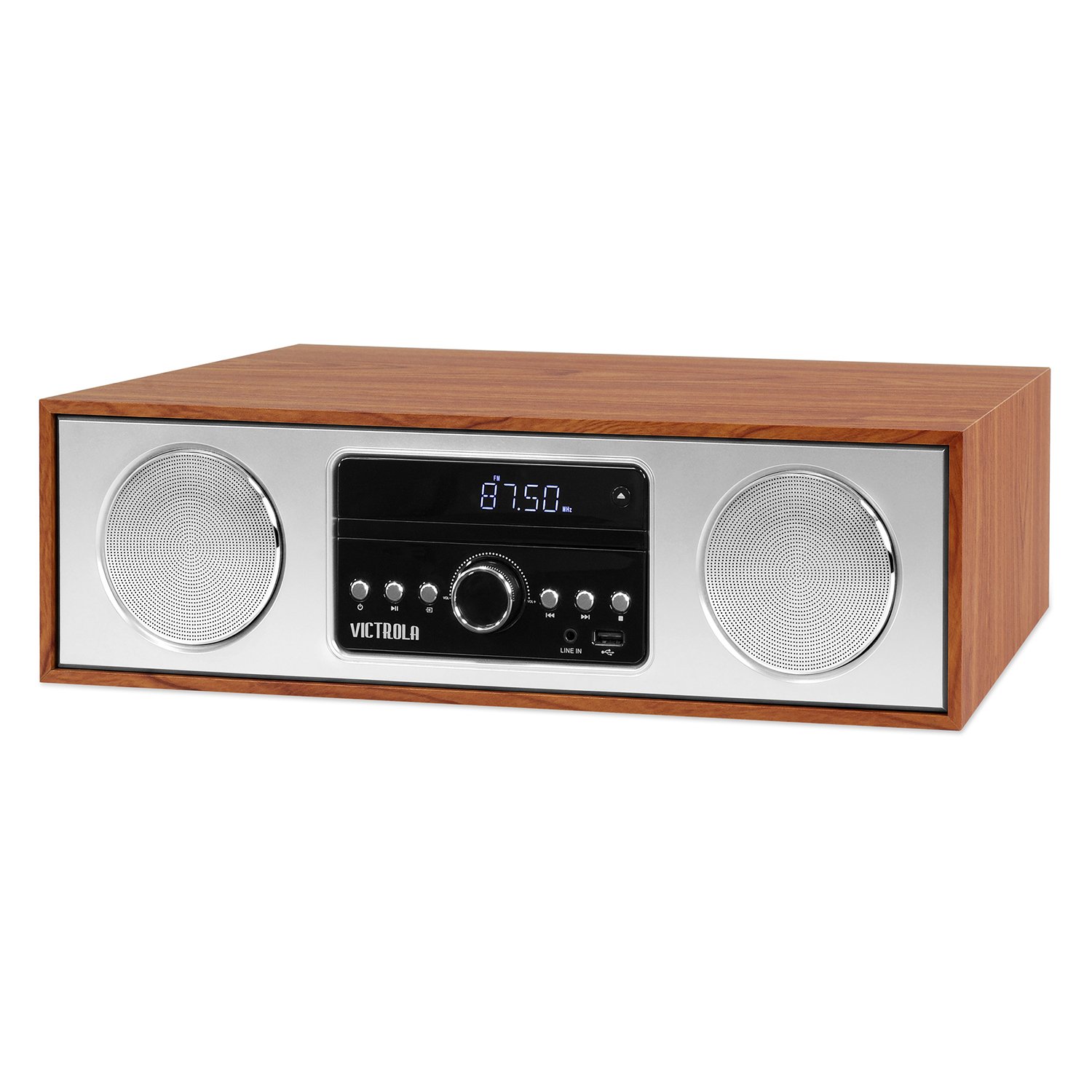
Front view of the Victrola VS-120 Bluetooth Microsystem, showing the speaker, display, and control panel.

The Victrola VS-120 microsystem with its CD tray open, revealing a disc, and the included remote control positioned in the foreground.
Setup Guide
Unpacking
Carefully remove the unit from its packaging. Ensure all accessories are present:
- Victrola VS-120 Microsystem
- Remote Control
- Power Adapter
- User Manual (this document)
Power Connection
- Insert the small end of the power adapter into the DC IN jack on the rear of the unit.
- Plug the other end of the power adapter into a standard wall outlet (AC 100-240V, 50/60Hz).
- The unit will enter standby mode, and the LED clock display will illuminate.
Antenna Connection (FM Radio)
For optimal FM radio reception, extend the FM wire antenna fully. Adjust its position for the best signal.
Operating Instructions
Power On/Off
Press the POWER button on the unit or remote control to turn the system on or off (standby mode).
Mode Selection
Press the MODE button on the unit or remote control repeatedly to cycle through available functions: Bluetooth, CD, USB, AUX, and FM Radio.
Bluetooth Operation
- Select Bluetooth mode. The display will show "BT" and flash, indicating pairing mode.
- On your Bluetooth-enabled device (smartphone, tablet, etc.), enable Bluetooth and search for "Victrola VS-120".
- Select "Victrola VS-120" to pair. Once connected, the "BT" indicator will stop flashing and a confirmation tone will sound.
- You can now stream audio from your device to the microsystem.
- Use your device or the microsystem's controls (PLAY/PAUSE, NEXT, PREVIOUS) to manage playback.
CD Playback
- Select CD mode.
- Press the OPEN/CLOSE button to open the CD tray.
- Place a CD (audio CD or MP3 CD) with the label side facing up into the tray.
- Press OPEN/CLOSE again to close the tray. The unit will read the disc and begin playback automatically.
- Use PLAY/PAUSE, NEXT, and PREVIOUS buttons to control playback.
USB Playback
- Insert a USB flash drive (FAT32 format, containing MP3 files) into the USB port.
- Select USB mode. The unit will automatically detect and begin playing MP3 files from the drive.
- Use PLAY/PAUSE, NEXT, and PREVIOUS buttons to control playback.
FM Radio Operation
- Select FM Radio mode.
- Press and hold the TUNE +/- buttons to automatically scan for the next available station.
- Press the TUNE +/- buttons briefly to manually adjust the frequency in small increments.
- To save a station as a preset, press the MEM button, then use PRESET +/- to select a preset number, and press MEM again to confirm.
- To recall a preset station, use the PRESET +/- buttons.
Aux-in Connection
- Connect an external audio device (e.g., MP3 player, smartphone) to the AUX IN jack using a 3.5mm audio cable (not included).
- Select AUX mode.
- Control playback and volume from your external device.
Remote Control Functions
The included remote control provides full functionality. Ensure batteries are correctly inserted. Key functions include:
- POWER: Turn unit on/off.
- MODE: Select audio source.
- VOL +/-: Adjust volume.
- PLAY/PAUSE, NEXT, PREVIOUS: Control playback for CD, USB, and Bluetooth.
- TUNE +/-: Tune FM radio stations.
- MEM: Store FM presets.
- PRESET +/-: Select FM presets.
- EQ: Cycle through equalizer settings (Flat, Rock, Pop, Jazz, Classic).
- CLOCK: Set the clock.
- DIMMER: Adjust display brightness.
Adjusting EQ Settings
Press the EQ button on the remote control to cycle through preset equalizer modes: Flat, Rock, Pop, Jazz, and Classic. Select the mode that best suits your audio preference.
Setting the Clock
To set the clock, press the CLOCK button on the remote control. Use the TUNE +/- buttons to adjust the hour and minute, and press CLOCK again to confirm each setting.
Maintenance
Cleaning the Unit
To clean the exterior of the unit, use a soft, dry cloth. Do not use abrasive cleaners, waxes, or solvents as these may damage the surface. Ensure the unit is unplugged before cleaning.
CD Player Care
Handle CDs by their edges. Keep them clean and free of scratches. If a CD is dirty, wipe it gently with a soft, lint-free cloth from the center outwards. Do not use solvents or abrasive cleaners on CDs.
Troubleshooting
| Problem | Possible Cause | Solution |
|---|---|---|
| No power | Power cord not connected; Power outlet not active. | Ensure power cord is securely plugged in; Try a different outlet. |
| No sound | Volume too low; Incorrect mode selected; External device not playing. | Increase volume; Select correct mode (BT, CD, USB, AUX, FM); Ensure external device is playing and its volume is up. |
| CD not playing | CD inserted incorrectly; CD is dirty or scratched; Disc format not supported. | Insert CD with label side up; Clean or replace CD; Ensure it's an audio CD or MP3 CD. |
| Bluetooth pairing fails | Unit not in pairing mode; Device too far; Device already paired to another unit. | Ensure unit is in BT mode and "BT" is flashing; Move device closer; Disconnect from other devices. |
| Poor FM reception | Antenna not extended or positioned correctly. | Fully extend and reposition the FM wire antenna. |
| Remote control not working | Batteries dead or inserted incorrectly; Obstruction between remote and unit. | Replace batteries; Ensure correct polarity; Remove obstructions; Point remote directly at the unit's sensor. |
Specifications
- Brand: Victrola
- Model: VS-120
- Connectivity: Bluetooth, USB, Auxiliary (3.5mm)
- Audio Sources: CD Player, USB Player, FM Radio, Bluetooth, Aux-in
- Output Power: 30 Watts
- Supported Audio Formats: CD, MP3
- Dimensions (L x W x H): 15.97 x 4.69 x 10.83 inches (40.56 x 11.91 x 27.51 cm)
- Weight: 10.76 Pounds (4.88 kg)
- Power Input: AC 100-240V, 50/60Hz
- Color: Maple
Warranty and Support
Victrola products are designed with quality and performance in mind. For detailed warranty information, please refer to the warranty card included with your product or visit the official Victrola website. For technical support or customer service inquiries, please contact Victrola customer support through their official channels.
Website: www.victrola.com

