
Introduction
This manual provides detailed instructions for the installation, operation, and maintenance of your JBL PRV-175 Marine Gauge Hole Mount USB Bluetooth AM/FM Digital Stereo Receiver and accompanying 6.5" 2-Way Marine Speakers. Please read this manual thoroughly before attempting installation or operation to ensure proper use and to prevent damage.
Safety Information
- Always disconnect the vehicle's battery negative terminal before installation to prevent electrical shorts.
- Ensure all wiring is properly insulated and secured to prevent damage from vibration or abrasion.
- Do not operate the unit in a manner that distracts you from safe navigation.
- Consult a qualified marine electronics technician if you are unsure about any installation steps.
- This product is designed for marine environments; however, avoid direct high-pressure water spray on the unit.
Package Contents
Verify that all items are present in your package:
- JBL PRV-175 Marine Gauge Hole Mount USB Bluetooth AM/FM Digital Stereo Receiver
- Two (2) pairs of 6.5" 225 Watt Peak Power High-Performance 2-Way Marine Speakers
- Mounting hardware for receiver (typically U-bracket, nuts, washers)
- User Manual (this document)
Note: Speaker mounting hardware and speaker wire are typically not included and must be purchased separately.
Setup and Installation
Receiver Installation (JBL PRV-175)
The PRV-175 receiver is designed for marine gauge-style mounting, fitting into a standard tachometer opening.
- Choose a Mounting Location: Select a flat, secure surface on your boat's dashboard or console that can accommodate the receiver's dimensions and provides adequate clearance for wiring.
- Cut the Mounting Hole: Using a suitable hole saw, cut a circular opening of approximately 3 inches (76mm) in diameter. Refer to the included template for precise measurements.
- Wiring: Connect the power, ground, speaker outputs, and auxiliary inputs/outputs according to the wiring diagram provided with the unit. Ensure all connections are secure and waterproof.
- Mount the Receiver: Insert the receiver into the opening. Secure it from the rear using the supplied U-bracket, nuts, and washers. Tighten until snug, but do not overtighten.
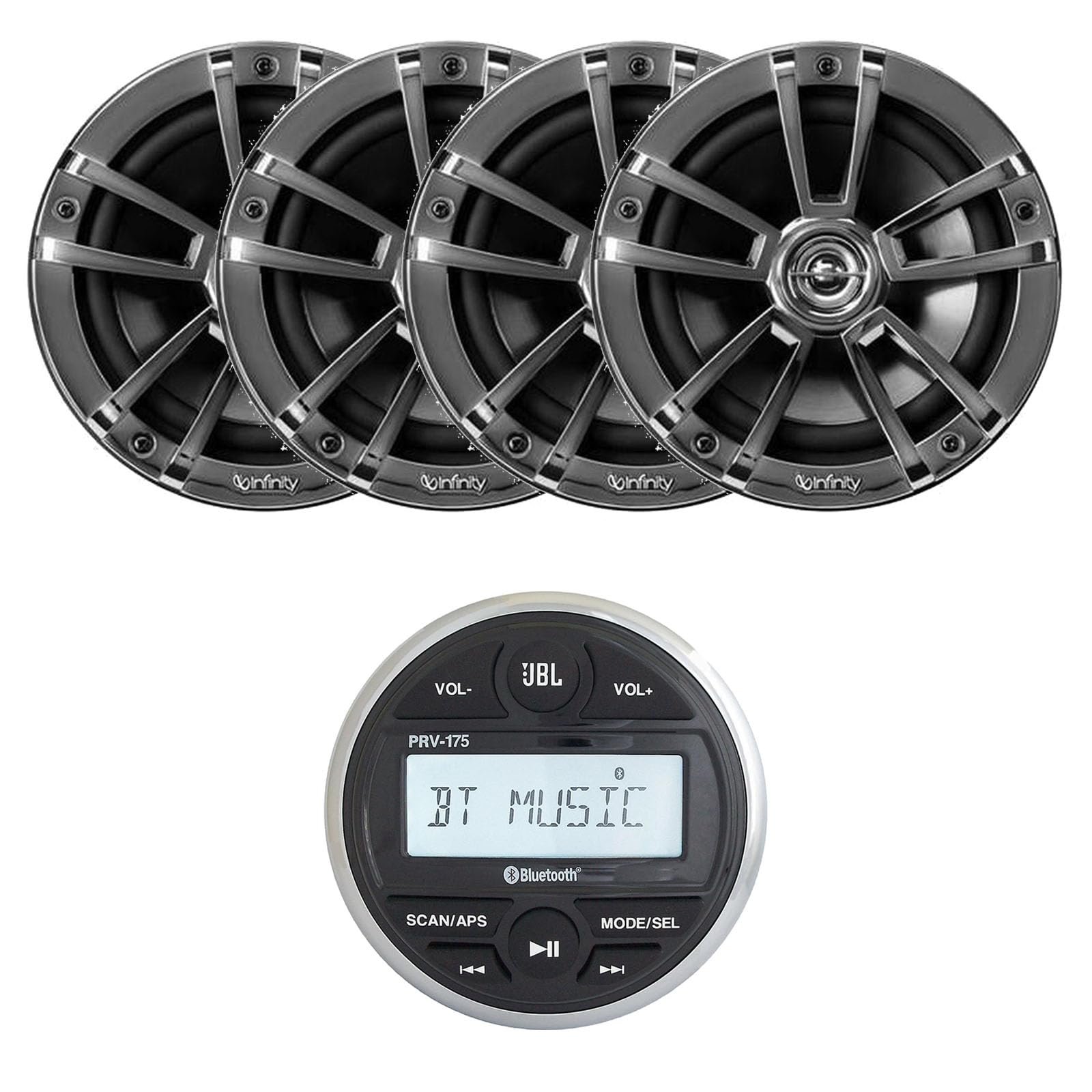
Image: Front view of the JBL PRV-175 Marine Stereo Receiver, showing the display and control buttons. This unit is designed for gauge-style mounting.
Speaker Installation (6.5" Marine Speakers)
The 6.5" marine speakers are designed for flush mounting in suitable locations on your boat.
- Select Mounting Locations: Choose locations that provide optimal sound dispersion and are structurally sound. Ensure there is sufficient depth behind the mounting surface for the speaker magnet.
- Cut Speaker Openings: Carefully cut circular openings for the speakers, typically around 5.6 inches (142mm) in diameter. Refer to the speaker's template for exact dimensions.
- Connect Speaker Wires: Run speaker wires from the receiver to each speaker location. Connect the positive (+) and negative (-) terminals of the speaker to the corresponding wires from the receiver. Ensure correct polarity for optimal sound.
- Mount the Speakers: Place the speakers into the openings and secure them using appropriate marine-grade screws (not included) through the mounting holes on the speaker frame.

Image: Front view of a JBL 6.5-inch Marine Speaker with a chrome grille. These speakers are designed for flush mounting in marine environments.
Operating Instructions
Power On/Off
- Press and hold the MODE/SEL button to power the unit on or off.
Volume Control
- Press VOL+ to increase volume.
- Press VOL- to decrease volume.
Source Selection
- Press the MODE/SEL button repeatedly to cycle through available sources: AM, FM, Bluetooth (BT MUSIC), USB, and Auxiliary (AUX).
AM/FM Radio Operation
- In AM/FM mode, press the SCAN/APS button to automatically scan and store strong stations.
- Use the Previous Track (◀◀) and Next Track (▶▶) buttons to manually tune or seek through stations.
Bluetooth Audio Streaming
- Pairing: Select BT MUSIC mode. On your Bluetooth-enabled device, search for available devices and select "JBL PRV-175". Enter "0000" if a passcode is required.
- Playback: Once paired, you can stream audio from your device. Use the Play/Pause (▶▶) button on the receiver to control playback. Use the Previous Track (◀◀) and Next Track (▶▶) buttons to skip tracks.
USB Playback
- Insert a USB drive (containing compatible audio files) into the USB port. The unit will automatically switch to USB mode and begin playback.
- Use the Play/Pause (▶▶), Previous Track (◀◀), and Next Track (▶▶) buttons to control playback.
Auxiliary Input
- Connect an external audio device to the auxiliary input using a 3.5mm audio cable.
- Select AUX mode on the receiver. Audio playback is controlled from the connected device.
Maintenance
- Cleaning: Use a soft, damp cloth to clean the receiver's faceplate and speaker grilles. Avoid harsh chemicals or abrasive cleaners.
- Connections: Periodically check all wiring connections for corrosion or looseness, especially in marine environments.
- Storage: If the boat is stored for an extended period, ensure the unit is powered off and consider disconnecting the battery.
Troubleshooting
| Problem | Possible Cause | Solution |
|---|---|---|
| No power to unit | Blown fuse; improper wiring; battery disconnected | Check and replace fuse; verify power and ground connections; ensure battery is connected. |
| No sound from speakers | Incorrect source selected; speaker wires disconnected; volume too low; amplifier issue | Select correct source; check speaker wire connections; increase volume; consult technician if amplifier is suspected. |
| Bluetooth not connecting | Unit not in BT MUSIC mode; device not in pairing mode; interference | Ensure receiver is in BT MUSIC mode; put device in pairing mode; move device closer to receiver; try re-pairing. |
| USB not playing | Incompatible file format; USB drive not recognized; unit not in USB mode | Ensure files are compatible (e.g., MP3); try a different USB drive; select USB mode. |
Specifications
JBL PRV-175 Marine Receiver
- Type: Marine Gauge Style Digital Media Receiver
- Tuner: AM/FM
- Connectivity: Bluetooth Audio Streaming, USB input (for USB drives only), Auxiliary input (3.5mm Jack)
- Amplifier: Built-In, 45 Watts Peak x 4 channels (20 Watts RMS x 4 channels)
- Faceplate: Waterproof
- Outputs: 2 pairs of RCA output
- Control: Wired remote option
- Model Number: PRV-175
6.5" Marine Speakers
- Type: 2-way 6-1/2" marine speaker
- Power Handling: 2-75 Watts RMS, 225 Watts Peak Power
- Woofer: Polypropylene cone with rubber surround
- Tweeter: Grille-mounted 1" polypropylene semi-dome
- Basket: Cast-polymer
- Frequency Response: 50-20,000 Hz
- Sensitivity: 92 dB
General
- Item Weight: 8.34 pounds (total package)
- Package Dimensions: 16.14 x 12.76 x 10.71 inches
- Manufacturer: JBL
- Color: Black
Warranty and Support
For warranty information and technical support, please refer to the warranty card included with your product or visit the official JBL website. You may also contact JBL customer service directly for assistance with product operation, troubleshooting, or parts.


