Introduction
This manual provides essential information for the proper installation, operation, and maintenance of your BOSS Audio Systems BRT26A ATV UTV Sound Bar. Please read this manual thoroughly before using the product to ensure optimal performance and safety. Keep this manual for future reference.
Safety Information
Always ensure the product is securely mounted and all wiring connections are correct to prevent damage or injury. Avoid operating the sound bar at excessively high volumes for prolonged periods to prevent hearing damage. This product is designed to be weatherproof (IPX5 rated), but it should not be submerged in water.
Product Overview
The BOSS Audio Systems BRT26A is a 26-inch wide ATV/UTV sound bar designed for outdoor use. It features four 4-inch speakers and two 1-inch soft dome tweeters, powered by a built-in Class A/B amplifier. Key features include Bluetooth connectivity for audio streaming, a 3.5mm auxiliary input, a USB port for charging and audio playback, and an IPX5 weatherproof rating.

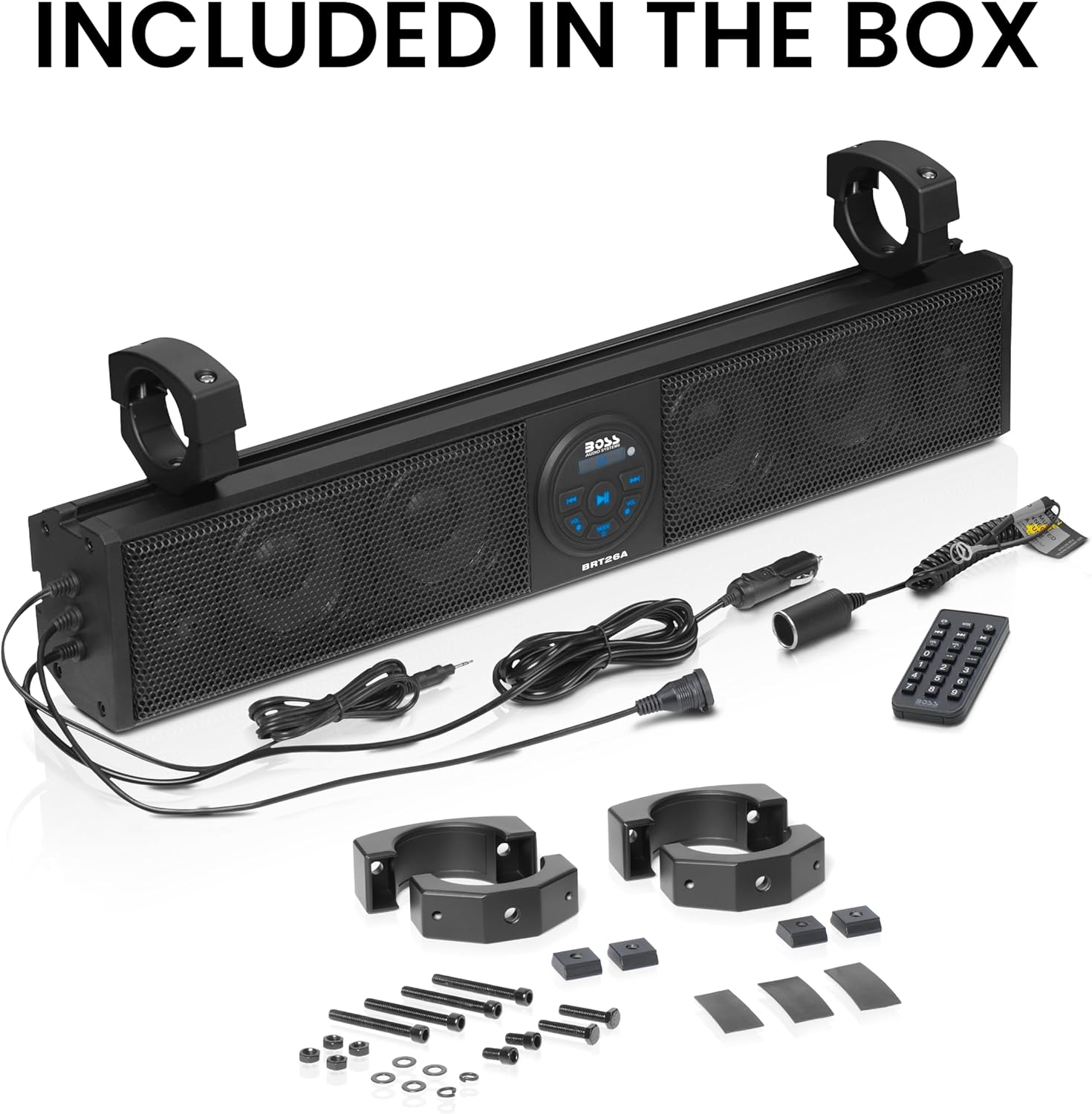
What's in the Box
Upon unpacking, verify that all items listed below are present:
- BOSS Audio Systems BRT26A Sound Bar
- 2 Multi-angle adjustable mounting clamps (fits bars from 1.75” to 2”)
- Mounting hardware
- Power accessory extension adaptor
- User manual
- Warranty card
- Multi-function wireless remote control
Specifications
| Model Name | BRT26A |
| Mounting Type | Bar mount |
| Product Dimensions | 26"D x 3.75"W x 4.88"H (673mm x 95mm x 124mm) |
| Speaker Type | Soundbar |
| Speaker Size | 4 Inches (Woofer), 1 Inches (Tweeter) |
| Speaker Maximum Output Power | 500 Watts |
| Impedance | 4 Ohms |
| Frequency Response | 22000 Hz |
| Connectivity Technology | Auxiliary, Bluetooth |
| Wireless Communication Technology | Bluetooth |
| Special Feature | USB Port, Waterproof (IPX5) |
| Power Source | Corded Electric |
| Item Weight | 11.75 Pounds |

Setup and Installation
Professional installation is strongly encouraged to ensure proper and safe functionality. The BRT26A sound bar comes with two multi-angle adjustable mounting clamps designed to fit bars from 1.75 inches to 2 inches. Securely attach the clamps to your vehicle's roll bar or other suitable mounting location using the provided hardware. Ensure the sound bar is positioned to avoid obstructing visibility or interfering with vehicle operation. Connect the power accessory extension adaptor to a suitable 12V power source on your ATV or UTV.

Installation Overview Video
Operating Instructions
The BRT26A offers multiple audio input options and easy-to-use controls.
Power On/Off
Press the power button on the unit or the remote control to turn the sound bar on or off.
Bluetooth Pairing
- Ensure Bluetooth is enabled on your smartphone or MP3 player.
- Select the BRT26A from the list of available devices.
- The sound bar will automatically reconnect to the last paired device when powered on.
Auxiliary Input
Connect your audio device (iPod, iPhone, smartphone, MP3 player) to the 3.5mm aux-in port using a standard audio cable.
USB Playback and Charging
Insert a USB device containing audio files into the USB port for playback. The USB port also provides charging for compatible USB devices.
Controls
Use the buttons on the sound bar or the multi-function wireless remote control to adjust volume, skip tracks, and change modes (Bluetooth, Auxiliary, USB).
Maintenance
To maintain the performance and longevity of your BRT26A sound bar:
- Cleaning: Use a soft, damp cloth to clean the exterior. Avoid harsh chemicals or abrasive cleaners.
- Weatherproofing: While IPX5 rated, avoid direct high-pressure water spray. Ensure all port covers are securely closed when not in use to maintain water resistance.
- Storage: If storing the vehicle for an extended period, it is recommended to disconnect the sound bar from the power source to prevent battery drain, as the RF receiver for the remote control draws minimal power even when off.

Troubleshooting
- No Power: Check all power connections and ensure the vehicle's battery is charged. Verify the power accessory extension adaptor is correctly connected.
- No Sound: Ensure the volume is turned up on both the sound bar and your connected device. Check that the correct input mode (Bluetooth, Aux, USB) is selected.
- Bluetooth Connection Issues: Ensure the sound bar is in Bluetooth mode and your device's Bluetooth is enabled and discoverable. Try unpairing and re-pairing the device.
- Low Volume: Adjust the volume on both the sound bar and the connected audio source. Some devices may have their own volume limits that need to be adjusted.
- Battery Drain: If the sound bar is left connected to the vehicle's battery for extended periods without the vehicle running, it may cause battery drain due to the remote control's RF receiver. Disconnect the sound bar from the power source when not in use for prolonged periods.
Warranty
BOSS Audio Systems provides a powerful 3-year Platinum Online Dealer Warranty for this product, provided the purchase is made through Amazon.com. Please refer to the included warranty card for full terms and conditions. Registration may be required after purchase to activate the warranty.
Support
For technical assistance, troubleshooting beyond this manual, or warranty claims, please contact BOSS Audio Systems customer support. Refer to the warranty card or the official BOSS Audio Systems website for contact information.


