
1. Introduction
Thank you for choosing the DEMA Digital Cube Level. This device is designed for precise horizontal and vertical alignment measurements. This manual provides essential information for safe and effective use, including setup, operation, calibration, and maintenance.
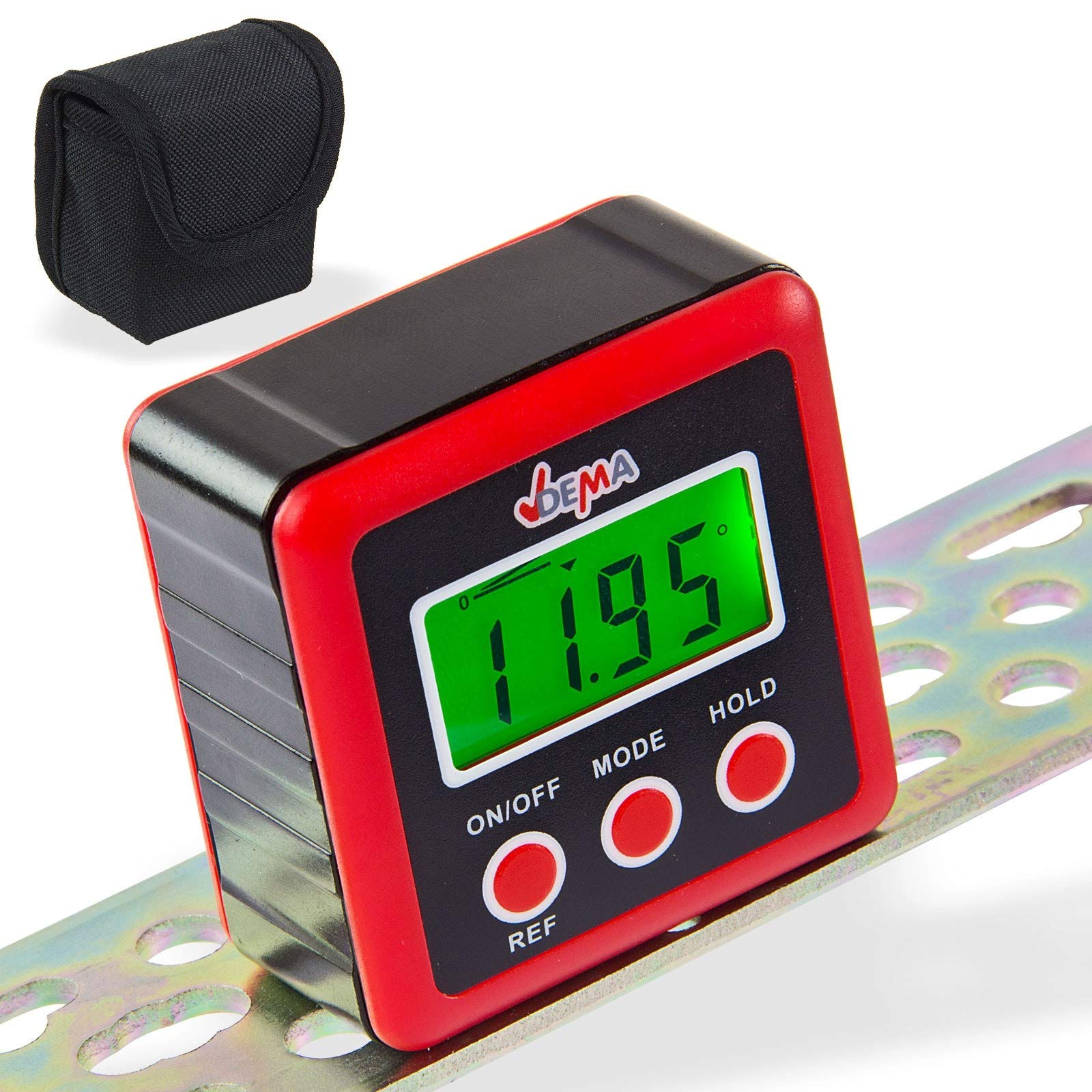
Figure 1: DEMA Digital Cube Level
2. Safety Instructions
- Technical advancements may lead to changes without prior notice from the manufacturer, which may not yet be reflected in this manual.
- Before initial operation, check the device for completeness and proper function.
- Never operate a defective or malfunctioning device. Contact the manufacturer or have the device inspected by a qualified mechanic.
- Always work with care and the necessary caution.
- Never apply excessive force to the device.
- Ensure batteries are removed if the device will not be used for an extended period. Never touch leaking batteries with any part of your body.
- Keep children and unauthorized persons away from the work area.
- Never work when tired or under the influence of drugs, medication, or alcohol.
- Store packaging materials (foils, plastic bags, Styrofoam, etc.) only in places inaccessible to children, especially infants, as packaging parts often pose unrecognized dangers (e.g., choking hazard).
3. Intended Use
- The DEMA Digital Cube Level is suitable as a testing device for horizontal or vertical alignment of an object.
- The level is not designed for commercial purposes.
4. Setup
4.1. Battery Installation
- Locate the battery cover on the back of the device.
- Unscrew the three screws securing the battery cover.
- Insert two 1.5V AAA batteries (not included) into the compartment, ensuring correct polarity.
- Replace the battery cover and secure it by tightening the three screws.

Figure 2: Battery compartment on the back of the device
5. Operating Instructions
5.1. Power On/Off
- Press the ON/OFF button to turn on the device.
- The device will automatically turn off if not used for approximately three minutes to conserve battery life.
5.2. Taking Measurements
- Turn on the device.
- Place the device firmly on the surface to be measured. The display will show the incline in degrees.

Figure 3: Examples of display readings
5.3. Changing Display Units
- Press the MODE button to cycle through different display units: degrees (°), percentage (%), millimeters per meter (mm/m), and slope (ft,in).
- The slope is displayed in 1/8 increments.
- The '0°' symbol indicates the current angle.
5.4. Relative Angle Measurement (REF Function)
- If the device is not perfectly level, it will display a value. To set the current angle as a reference (zero), press the REF button.
- The device is now in relative angle measurement mode and will display 'S'.
- Press the REF button again to exit the relative angle mode.
5.5. Display Backlight
- The display backlight turns on automatically when any button is pressed.
- The backlight will automatically turn off after 20 seconds of no button activity.
5.6. Hold Function
- Press the HOLD button to 'freeze' the current measurement result on the display. The 'H' symbol will be shown.
- Press HOLD again to reactivate the measurement mode.
5.7. Low Battery Indicator
- When the battery symbol appears on the screen, it is recommended to replace the batteries promptly.
6. Calibration
For accurate measurements, periodic calibration is recommended.
- Turn off the device.
- Place the level on a perfectly horizontal, flat, and stable surface.
- Press and hold both the ON/OFF and HOLD buttons simultaneously until 'CAL' is displayed. The device is now in calibration mode.
- Leave the device still for a moment, then press the HOLD button. The display will show 'CAL1'.
- Rotate the level 180° on the same surface and press the HOLD button. 'CAL2' will be displayed.
- Once 'CAL2' is no longer displayed, the calibration process is complete.
ATTENTION: During the calibration process, the surface must not be tilted or moved. After calibration, the original data will be overwritten with the new calibration data.
7. Maintenance
- Keep the device clean and dry. Wipe the exterior with a soft, damp cloth. Do not use abrasive cleaners or solvents.
- Avoid exposing the device to extreme temperatures, humidity, or direct sunlight.
- Remove batteries if the device is not used for an extended period to prevent leakage and damage.
- Store the device in its protective pouch (if included) when not in use to prevent scratches and damage.

Figure 4: Carrying pouch for the Digital Cube Level
8. Troubleshooting
8.1. Device Does Not Turn On
- Check if the batteries are inserted correctly with the correct polarity.
- Replace the batteries with new 1.5V AAA batteries.
- Ensure the battery contacts are clean and free from corrosion.
8.2. Inaccurate Readings
- Perform a calibration as described in Section 6.
- Ensure the measurement surface is stable and free from vibrations.
- Check for any physical damage to the device.
If problems persist, please contact customer support.
9. Technical Specifications
| Feature | Specification |
|---|---|
| Display Resolution | ±0.01° |
| Display Accuracy | ±0.1° at 0° and 90°, ±0.2° at other angles |
| Displayable Units | ° / %, mm/m, in/ft |
| Operating Temperature | 0°C ~ 40°C |
| Required Batteries | 2 x 1.5V AAA |
| Dimensions (L x W x H) | 58 x 58 x 32 mm |
| Weight (without batteries) | approx. 70 g |
| Material | Polyvinyl chloride (PVC) |
10. Disposal
Do not dispose of this device with household waste. Please contact DEMA Vertriebs-GmbH, your local dealer, or a local recycling company for proper disposal. By disposing of the device correctly, you are making a valuable contribution to environmental protection.
11. Warranty and Support
Warranty information for the DEMA Digital Cube Level is not provided within this manual. Please refer to your purchase documentation or contact your seller for details regarding warranty coverage.
For technical support, questions, or service requests, please contact the retailer from whom you purchased the product or the manufacturer directly. Contact information can typically be found on the product packaging or the seller's website.