SHIDU S613 Wireless Voice Amplifier User Manual
Model: S613 | Brand: SHIDU
1. Introduction
The SHIDU S613 18W UHF Wireless Voice Amplifier is designed to provide clear and powerful voice amplification for various settings, including teaching, guiding, coaching, and presentations. It features a wireless microphone, MP3 playback capabilities via TF card or USB disk, and can function as an external speaker for other devices.
Key features include:
- 18W output for clear, natural, and crystal-clear voice amplification, covering up to 10,000 sq. ft.
- UHF digital wireless technology for stable performance and automatic pairing.
- Integrated MP3 player supporting TF cards and USB disks.
- Auxiliary audio input for connecting to computers, laptops, tablets, or phones.
- Portable and lightweight design with an adjustable waistband for easy carrying.
- Rechargeable 2200mAh lithium battery for extended operation.
2. Package Contents
Please check the box for the following items:
- 1 x Voice Amplifier
- 1 x UHF Wireless Microphone
- 1 x Adjustable Waistband
- 1 x Audio Cable
- 1 x USB Cable
- 1 x DC 9V Charger (for Voice Amplifier)
- 1 x 5V Wall Charger (for Microphone)
- 1 x User Manual

Figure 2.1: All items included in the package.
3. Product Overview

Figure 3.1: SHIDU S613 Wireless Voice Amplifier.

Figure 3.2: Amplifier Controls and Ports.
The amplifier features a compact design with clearly labeled controls and ports for easy operation. Refer to Figure 3.2 for a detailed layout of the buttons and connections.
4. Setup
4.1 Charging the Amplifier and Microphone
Before first use, fully charge both the voice amplifier and the wireless microphone.
- Voice Amplifier: Connect the DC 9V charger to the amplifier's power jack. The red indicator light will flash during charging. A solid red light indicates a full charge. Charging time is approximately 3-5 hours.
- Wireless Microphone: Connect the 5V wall charger (or USB cable to a 5V USB power source) to the microphone's charging port. Charging time is approximately 2-4 hours.

Figure 4.1: Indicator Light Meanings.
4.2 Pairing the Wireless Microphone
The UHF wireless microphone and amplifier are designed for automatic pairing. Simply turn on both devices, and they should connect automatically. If pairing issues occur, ensure both devices are charged and within range.
4.3 Wearing the Amplifier
Attach the adjustable waistband to the amplifier. You can wear the amplifier around your waist or over your shoulder for hands-free operation.

Figure 4.2: Wearing options for the voice amplifier.
5. Operating Instructions
5.1 Power On/Off and Volume Control
- To power on, slide the ON/OFF switch to the "ON" position.
- To power off, slide the ON/OFF switch to the "OFF" position.
- Adjust the volume using the Vol. UP/DOWN slider switch.
5.2 Voice Amplification Mode
After powering on the amplifier and the wireless microphone, the system will automatically enter voice amplification mode. The yellow indicator light will illuminate (refer to Figure 4.1). Speak into the microphone, and your voice will be amplified through the speaker.
5.3 Music Playback Mode (TF Card / USB Disk)
The amplifier supports MP3 playback from a TF card or USB disk.
- Insert a TF card into the TF card slot or a USB disk into the USB disk slot (refer to Figure 3.2).
- Press the "mode" button to switch to music playback mode. The blue indicator light will flash (refer to Figure 4.1).
- Use the "previous song", "play/pause", and "next song" buttons to control playback.

Figure 5.1: Music Playback Mode and Compatible Devices.
5.4 Auxiliary Audio Input (AUX)
Connect external audio devices (e.g., smartphone, laptop, tablet) to the amplifier using the provided audio cable via the AUX input port (refer to Figure 3.2). The amplifier will then function as an external speaker for the connected device.
6. Maintenance
- Cleaning: Use a soft, dry cloth to clean the amplifier. Do not use liquid cleaners or solvents.
- Storage: Store the device in a cool, dry place away from direct sunlight and extreme temperatures.
- Battery Care: To prolong battery life, avoid fully discharging the battery frequently. Charge the device regularly, even if not in use for extended periods.
- Handling: Handle the amplifier and microphone with care to prevent damage from drops or impacts.

Figure 6.1: Anti-skid pads for stable placement.
7. Troubleshooting
- No Sound:
- Ensure the amplifier is powered on and charged.
- Check that the volume is turned up.
- For wireless microphone: Ensure the microphone is powered on and paired with the amplifier.
- For AUX input: Verify the audio cable is securely connected to both devices and the external device's volume is up.
- For TF card/USB disk: Ensure the media is inserted correctly and contains compatible audio files.
- Distorted Sound:
- Reduce the volume on both the amplifier and the input source.
- Ensure the microphone is not too close to the amplifier to avoid feedback.
- Check for low battery on either the amplifier or microphone.
- Microphone Not Pairing:
- Ensure both the amplifier and microphone are fully charged and powered on.
- Power cycle both devices and try again.
- Ensure no other UHF wireless devices are causing interference nearby.
- Short Battery Life:
- Ensure the device is fully charged before use.
- Operating at maximum volume will consume battery faster.
- Battery performance may degrade over time with repeated charge cycles.
8. Specifications
| Feature | Specification |
|---|---|
| Power Output | 18 W |
| Battery Capacity (Amplifier) | 2200 mAh |
| Frequency Response | 80 Hz - 18 kHz |
| Charging Voltage (Amplifier) | DC 9V, 650 mA |
| Charging Voltage (Microphone) | DC 5V, 500 mA |
| Working Time (MIC Mode) | 8-10 hours |
| Working Time (Music Mode) | 6-8 hours |
| Working Time (Microphone) | 3-5 hours |
| Charging Time (Amplifier) | 3-5 hours |
| Charging Time (Microphone) | 2-4 hours |
| Sound Coverage | Up to 10,000 sq. ft. |
| Operating Temperature | -10 ℃ to 45 ℃ (14 ℉ to 113 ℉) |
| Product Dimensions (L x W x H) | 98 x 88 x 43 mm (3.86 x 3.46 x 1.69 inches) |
| Unit Weight | 221 g |
| Connectivity | UHF Wireless, AUX, USB |
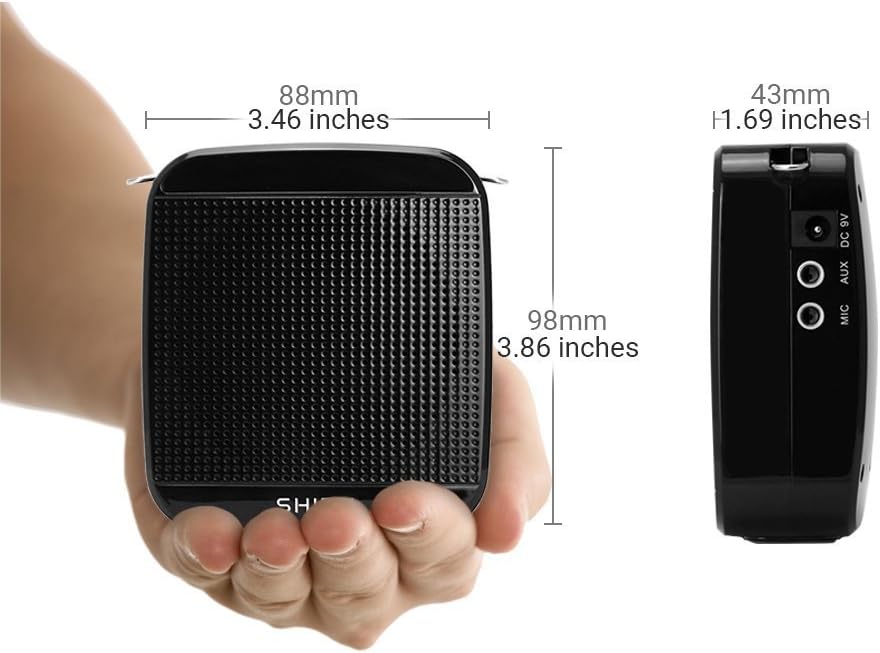
Figure 8.1: Product Dimensions.
9. Warranty and Support
SHIDU offers a 30-day easy return and full refund policy for purchases and a 1-year warranty from the date of purchase. For any issues or support, please contact SHIDU customer service.


