
1. Introduction
This manual provides instructions for the Easytry123 replacement remote control, model Easytry0337. This remote is designed to operate various LG Smart 3D LED TV models as listed above. Please note that while this remote is a functional replacement, some advanced or specific functions of your original remote may not be fully supported.
2. Setup
2.1 Battery Installation
The remote control requires two (2) AAA batteries for operation. Follow these steps to install the batteries:
- Locate the battery compartment cover on the back of the remote control.
- Press down on the tab and slide the cover off in the direction indicated by the arrow.
- Insert two AAA batteries, ensuring the positive (+) and negative (-) terminals align correctly with the markings inside the compartment.
- Slide the battery compartment cover back into place until it clicks securely.

Figure 1: Battery compartment with batteries installed. Ensure correct polarity.
2.2 Initial Use
This replacement remote control typically operates via infrared (IR) technology and does not require complex pairing. Once batteries are installed, point the remote directly at your LG TV and press the Power button to test functionality. Ensure there are no obstructions between the remote and the TV's IR receiver.
3. Operating Instructions
The Easytry123 remote control features a standard layout for common TV functions. Refer to the image below for button identification and their primary functions.
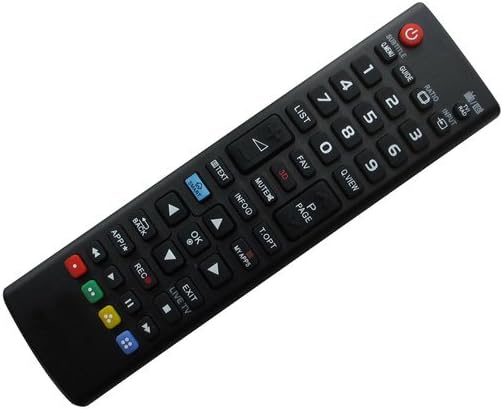
Figure 2: Front view of the remote control with button layout.
- Power (Red Button): Turns the TV on or off.
- Number Pad (0-9): Direct channel selection.
- Volume Up/Down (VOL +/-): Adjusts the TV's volume.
- Channel Up/Down (CH +/-): Changes TV channels sequentially.
- MUTE: Silences the TV audio.
- INPUT: Selects input sources (e.g., HDMI, AV).
- GUIDE: Displays the electronic program guide.
- LIST: Accesses the channel list.
- FAV: Accesses favorite channels.
- INFO: Displays on-screen information about the current program.
- Navigation Buttons (Up, Down, Left, Right, OK): Used to navigate menus and confirm selections.
- BACK: Returns to the previous menu or screen.
- EXIT: Exits the current menu or application.
- APP/* (Smart/Apps): Accesses smart TV applications or features.
- REC: Initiates recording if your TV supports it and has a connected recording device.
- LIVE TV: Switches to live television broadcast.
- Color Buttons (Red, Green, Yellow, Blue): Functionality varies by TV model and application. Refer to your TV's on-screen prompts.
For specific functions related to your LG TV's Smart features or 3D capabilities, please consult your television's original user manual.
4. Maintenance
4.1 Cleaning
To clean the remote control, use a soft, dry cloth. For stubborn dirt, lightly dampen the cloth with water or a mild, non-abrasive cleaner. Avoid using harsh chemicals, solvents, or abrasive materials, as these can damage the remote's surface or internal components.
4.2 Battery Replacement
Replace batteries when the remote's response becomes sluggish or stops working. Always replace both AAA batteries at the same time with new ones. Do not mix old and new batteries, or different types of batteries. Dispose of used batteries according to local regulations.
4.3 Storage
If the remote control will not be used for an extended period, remove the batteries to prevent leakage, which can damage the remote. Store the remote in a cool, dry place away from direct sunlight and extreme temperatures.
5. Troubleshooting
- Remote not responding:
- Check if the batteries are correctly installed with the proper polarity.
- Replace old batteries with new ones.
- Ensure there is a clear line of sight between the remote and the TV's IR receiver. Remove any obstructions.
- Point the remote directly at the TV.
- Some functions do not work:
- As a replacement remote, certain advanced or specific functions of your original TV remote may not be supported. This is a common characteristic of universal or replacement remotes.
- Verify that your TV model is listed as compatible in the product description.
- Buttons are sticky or unresponsive:
- Clean the remote control as described in the Maintenance section.
6. Specifications
| Feature | Description |
|---|---|
| Model Number | Easytry0337 |
| Brand | Easytry123 |
| Power Source | 2 x AAA Batteries (not included) |
| Connectivity Technology | Infrared (IR) |
| Compatible Devices | LG Smart 3D LED Televisions (specific models listed in title) |
| Special Feature | Ergonomic Design |
7. Warranty and Support
No specific warranty information is provided with this product. For any support inquiries, troubleshooting assistance beyond this manual, or questions regarding returns and replacements, please contact the seller directly through your purchase platform.