1. Introduction
This manual provides detailed instructions for the installation, operation, and maintenance of your Caliber RCD122BT Car Radio. Please read this manual thoroughly before using the product to ensure proper and safe operation. Keep this manual for future reference.
2. Safety Information
- Do not operate the unit in a manner that distracts you from driving.
- Ensure all wiring is correctly connected to prevent short circuits or damage.
- Do not expose the unit to moisture or extreme temperatures.
- Refer all servicing to qualified personnel.
3. Package Contents
Verify that all items are present in the package:
- Caliber RCD122BT Car Radio Unit
- Remote Control
- Mounting Sleeve
- Release Keys (2x)
- Wiring Harness
- User Manual
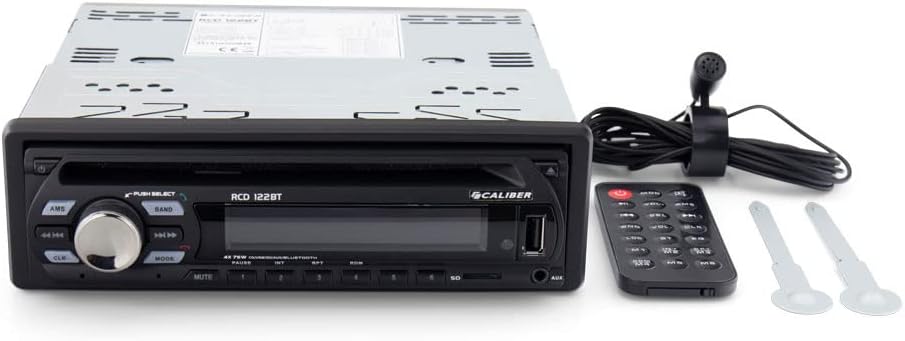
Image: Caliber RCD122BT Car Radio shown with its included remote control and two removal keys.
4. Product Features
- Bluetooth Connectivity: Enjoy your favorite radio broadcasts and playlists. Easily stream music from your mobile phone up to 10 meters away without signal interruption.
- Bassboost Function: Equipped with a dedicated Bassboost feature for enhanced low-frequency audio output.
- High Power Output: Features 4 x 75 watts, delivering a total power output of 300 watts.
- USB Type-A Port: For media playback.
- MP3 Playback: Supports MP3 audio format.
- 3.5mm Headphone Jack: For audio output.

Image: Front view of the Caliber RCD122BT Car Radio, showing the display indicating 'BLUETOOTH' mode and various control buttons.
5. Installation
5.1 Pre-installation Checklist
- Disconnect the vehicle's negative battery terminal before installation.
- Ensure the mounting location is suitable and provides adequate ventilation.
- Check your vehicle's wiring diagram for compatibility.
5.2 Mounting the Unit
Insert the mounting sleeve into the dashboard opening. Bend the tabs on the sleeve outwards to secure it. Slide the car radio unit into the mounting sleeve until it clicks into place.
5.3 Wiring Connections
Connect the wiring harness to the corresponding ports on the rear of the car radio and to your vehicle's electrical system. Ensure correct polarity for power, ground, and speaker connections. Refer to the diagram below for typical connections.
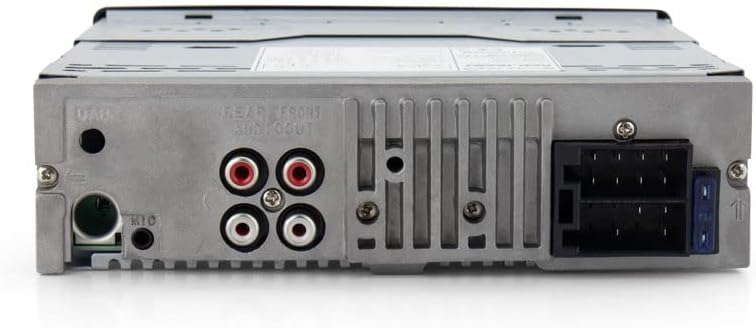
Image: Rear view of the Caliber RCD122BT Car Radio, highlighting the various connection ports including power, speaker outputs, and auxiliary inputs.
- Power (Yellow): Constant 12V+
- Ignition (Red): Switched 12V+
- Ground (Black): Vehicle Chassis Ground
- Antenna (Blue): Power Antenna/Amplifier Remote Turn-On
- Speakers: Connect according to vehicle's speaker wiring (e.g., White/White-Black for Front Left, Grey/Grey-Black for Front Right, Green/Green-Black for Rear Left, Purple/Purple-Black for Rear Right).
- RCA Outputs: For connecting external amplifiers.
- Microphone Input: For hands-free calling.
6. Operation
6.1 Basic Controls

Image: Angled view of the Caliber RCD122BT Car Radio, showing the main rotary knob and various function buttons.
- Power Button: Press to turn the unit ON/OFF.
- Volume Knob: Rotate to adjust volume. Press to select menu options.
- MODE Button: Press to cycle through available sources (Radio, Bluetooth, USB, AUX).
- AMS Button: Auto Memory Store (Radio mode).
- Band Button: Selects radio band (FM1, FM2, FM3, AM1, AM2).
- Mute Button: Mutes audio output.
- Playback Controls (◀◀ / ▶▶): Skip tracks/stations.
- Numeric Buttons (1-6): Preset stations (Radio mode), direct track selection (USB mode).
6.2 Radio Operation
- Press the MODE button to select Radio mode.
- Press the BAND button to select your desired radio band (FM1, FM2, FM3, AM1, AM2).
- Press and hold ◀◀ or ▶▶ to automatically search for the next strong station. Press briefly to manually tune.
- To store a station, tune to the desired frequency, then press and hold one of the numeric preset buttons (1-6) until you hear a beep.
6.3 Bluetooth Operation
- Press the MODE button to select Bluetooth mode. The display will show "BLUETOOTH".
- On your mobile device, enable Bluetooth and search for available devices.
- Select "Caliber RCD122BT" from the list. If prompted for a password, enter "0000".
- Once paired, you can stream audio from your device to the car radio. Use the playback controls on the radio or your device to manage music.
- For hands-free calling, ensure the external microphone is connected.
6.4 USB/AUX Operation
- USB: Insert a USB drive into the USB Type-A port. The unit will automatically switch to USB mode and begin playing compatible audio files (MP3).
- AUX: Connect an external audio device to the 3.5mm AUX input. Press the MODE button to select AUX mode.
6.5 Audio Settings (Bassboost)
To activate the Bassboost function, refer to the audio settings menu accessible via the volume knob. Navigate through the menu options to find and enable the Bassboost feature for enhanced bass response.
7. Maintenance
- Clean the unit's front panel with a soft, dry cloth. Do not use abrasive cleaners or solvents.
- Keep the USB port free from dust and debris.
8. Troubleshooting
| Problem | Possible Cause | Solution |
|---|---|---|
| No power | Incorrect wiring; Blown fuse | Check power and ground connections; Replace fuse if necessary. |
| No sound | Speaker wires disconnected; Volume too low; Mute activated | Check speaker connections; Increase volume; Deactivate mute. |
| Bluetooth not connecting | Device too far; Bluetooth not enabled on device; Incorrect pairing process | Move device closer; Enable Bluetooth; Re-attempt pairing. |
| USB playback issues | Incompatible file format; Damaged USB drive | Ensure files are MP3; Try a different USB drive. |
9. Specifications
| Feature | Specification |
|---|---|
| Model Name | RCD122BT |
| Brand | Caliber |
| Power Output | 4 x 75 Watts (300 Watts total) |
| Number of Channels | 4 |
| Audio Format Supported | MP3 |
| Connector Type | USB Type-A |
| Headphone Jack | 3.5 mm Jack |
| Media Format Type | Digital |
| Item Weight | 1100 Grams |
| Model Number | 8714505044972 |
10. Warranty and Support
For warranty information and technical support, please refer to the warranty card included with your product or visit the official Caliber website. Keep your proof of purchase for any warranty claims.