
1. Introduction
The PopBabies Portable Blender is designed for convenient preparation of shakes and smoothies on the go. This manual provides essential information for the safe and efficient use of your blender.
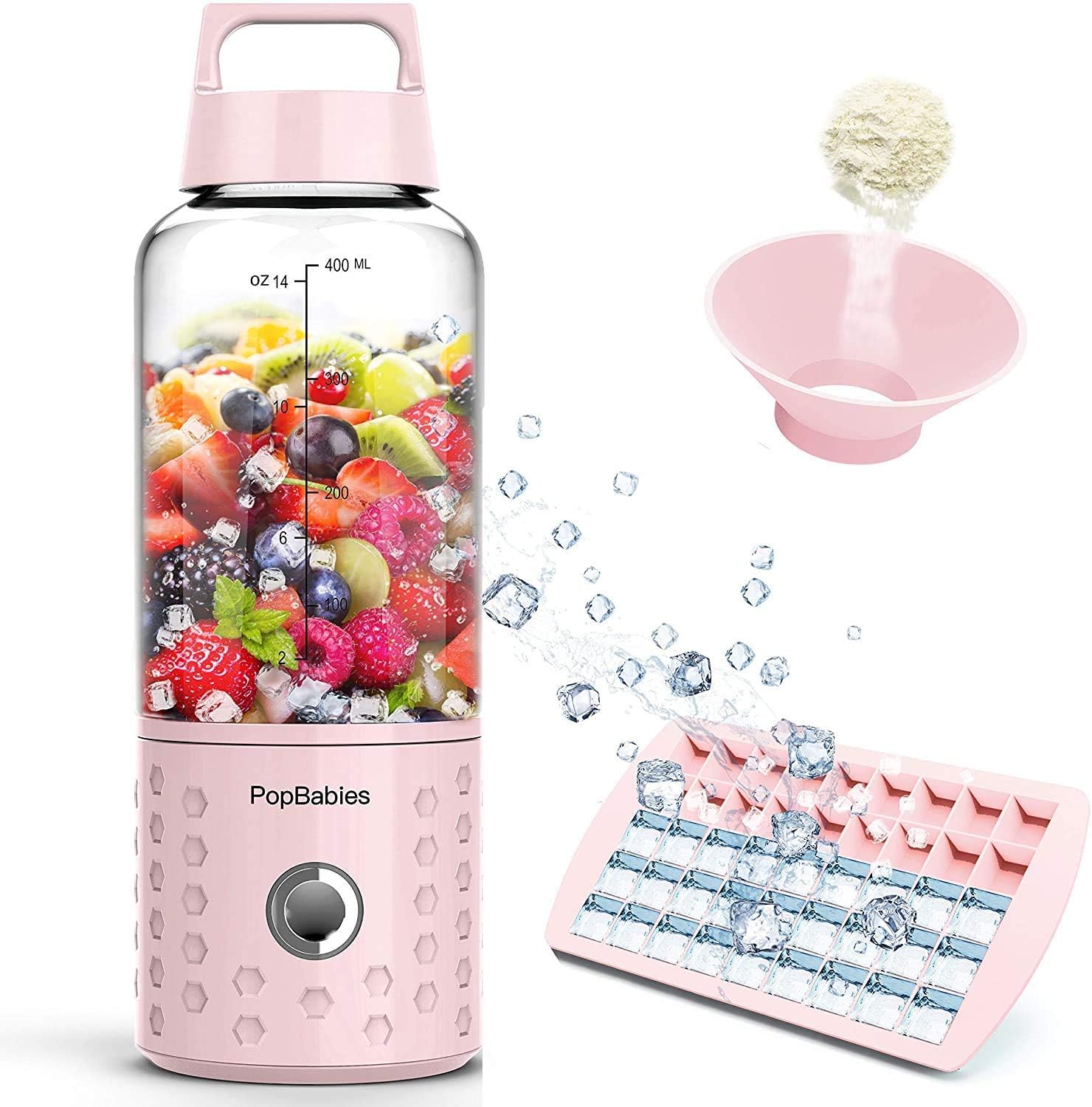
Image 1.1: The PopBabies Portable Blender, showcasing its compact design, a cup filled with fruits and ice, an ice cube tray, and a funnel for easy ingredient addition.
2. Product Components
Your PopBabies Portable Blender package includes the following items:
- Blender Base with Motor and Blades
- Blender Cup (14 oz / 400 ml capacity)
- USB Charging Cable
- Ice Cube Tray
- Funnel
- User Manual (this document)

Image 2.1: Components of the PopBabies Portable Blender, including the motor base, blending cup, and lid, separated for clarity.
3. Safety Instructions
Please read and understand all safety instructions before using the blender to prevent injury or damage.
- Do not immerse the motor base in water or other liquids.
- Keep hands and utensils out of the blending cup while operating.
- Ensure the cup is securely attached to the base before blending.
- Do not operate the blender when empty.
- Do not use the blender while it is charging.
- Keep out of reach of children.
- Do not blend hot liquids (above 100℃/212℉).
- Only use the provided USB cable for charging.
4. Setup and Charging
4.1 Initial Charging
Before first use, fully charge the blender for 3-4 hours. Subsequent charges typically take 0.5-1 hour.

Image 4.1: Connecting the USB charging cable to the blender base. The blender can be charged via a laptop, power bank, or USB wall adapter.
4.2 Assembly
Ensure the blending cup is clean. Place ingredients into the cup, then securely twist the motor base onto the cup until it is firmly sealed.
5. Operation
Follow these steps to prepare your beverages:
- Prepare Ingredients: Cut fruits or vegetables into small pieces, approximately 1 inch (2.5 cm) or smaller.
- Add Liquid: Pour liquid (water, milk, juice) into the blending cup. Ensure the total volume of ingredients does not exceed 2/3 of the cup's capacity (approximately 10 oz / 300 ml).
- Add Solids: Add your prepared fruits, vegetables, or protein powder. Use the provided funnel for easy addition of powders.

Image 5.1: A user adding protein powder to the blender cup containing fruit, utilizing the included funnel for convenience.
- Blend: Invert the blender (turn it upside down), then press the power button to start blending. Return the blender to an upright position and gently shake it up and down during operation to ensure thorough blending. Blending typically takes about 20 seconds.
- Enjoy: Once blended, you can drink directly from the cup or detach it from the base.
Important Blending Tips:
- Always add liquid first, then solid ingredients.
- For optimal results with ice or frozen fruit, invert the blender before starting, then gently shake.
- Do not overfill the cup.

Image 5.2: A visual guide illustrating the complete process from charging and ingredient preparation to blending and cleaning the PopBabies Portable Blender.
6. Cleaning and Maintenance
Proper cleaning ensures the longevity and hygiene of your blender.
- Easy Cleaning: After use, add water and a drop of dish soap to the cup, then briefly run the blender. Rinse thoroughly.
- Dishwasher Safe: The blending cup (without the motor base) is dishwasher safe.
- Motor Base: Wipe the motor base with a damp cloth. Do not submerge it in water.
- Storage: Store the blender in a clean, dry place.
7. Troubleshooting
If you encounter issues with your PopBabies Portable Blender, refer to the following common problems and solutions:
| Problem | Possible Cause | Solution |
|---|---|---|
| Blender does not start | Low battery; Cup not securely attached; Overload protection activated. | Charge the blender; Ensure cup is twisted on tightly; Reduce ingredients and restart. |
| Ingredients not blending smoothly | Too many solid ingredients; Not enough liquid; Ingredients too large. | Reduce solid ingredients; Add more liquid; Cut ingredients into smaller pieces (approx. 1 inch). Invert and shake during blending. |
| Leakage from cup | Cup not properly sealed; Gasket missing or damaged. | Ensure cup is tightly screwed onto the base; Check and replace gasket if necessary. |
| Blender stops during operation | Overload protection; Low battery. | Reduce load and restart; Charge the blender. |
8. Specifications
| Feature | Specification |
|---|---|
| Model Number | PBDE-1001P |
| Brand | PopBabies |
| Color | Princess Pink |
| Max. Power | 175W |
| Motor Speed | 22000 rpm ±15% |
| Power Supply | Lithium battery USB 5V |
| Battery Volume | 4000mAh |
| Blade Material | 304 Stainless Steel, 4-leaf blade |
| Temperature Limit | Below 100°C / 212°F |
| Capacity | 14 fl oz (400 ml) |
| Cup Material | AS (BPA free) |
| Product Dimensions | 8.13 x 8.13 x 25.91 cm (3.2 x 3.2 x 10.2 inches) |
| Item Weight | 397 g (1.3 lb) |
| Special Features | Crushes mini ice cubes, frozen fruits, and nuts; 20+ blends per charge; Rechargeable; Portable. |
9. Warranty and Support
For warranty information and customer support, please refer to the official PopBabies website or contact their customer service directly. Keep your purchase receipt as proof of purchase for any warranty claims.
For further assistance, please visit the PopBabies Store on Amazon.