1. Introduction
Thank you for choosing the Amica PC7511FT ceramic hob. This manual provides essential information for the safe and efficient installation, operation, and maintenance of your new appliance. Please read these instructions carefully before using the hob and keep them for future reference.
Components Included:
- 1 x Amica PC7511FT Ceramic Hob
- Mounting Set
- User Manual (this document)
2. Safety Instructions
Your safety and the safety of others are paramount. Please read and follow all safety instructions carefully to prevent personal injury or property damage.
- Electrical Safety: Ensure the hob is connected to a properly grounded electrical supply by a qualified electrician. Do not use adapter plugs or extension cords.
- Hot Surface Warning: The hob surface will remain hot after use. Avoid touching the hot surface directly.
- Children and Pets: Keep children and pets away from the appliance during operation and while it is cooling down.
- Flammable Materials: Do not store flammable materials near the hob.
- Ventilation: Ensure adequate ventilation around the appliance as specified in the installation guidelines.
- Cleaning: Always disconnect the power supply before cleaning the hob.
- Damage: Do not operate the hob if it is damaged. Contact Amica customer service for repairs.
3. Installation and Setup
Installation must be performed by a qualified technician in accordance with local regulations and standards.
3.1 Unpacking
Carefully remove the hob from its packaging. Inspect the appliance for any signs of damage. Report any damage to your retailer immediately.
3.2 Dimensions and Placement
The Amica PC7511FT ceramic hob has the following dimensions:
- Width: 77 cm
- Depth: 51.8 cm
- Height: 4.6 cm
- Weight: 9 kg
Ensure the countertop cutout dimensions match these specifications. Maintain adequate clearance from adjacent walls and overhead cabinets as per installation diagrams provided in the full installation manual.
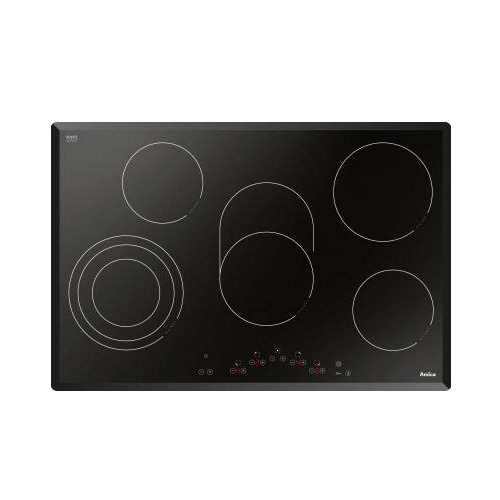
Image 1: Amica PC7511FT Ceramic Hob. This image shows the black ceramic surface with five cooking zones and sensor controls.
3.3 Electrical Connection
The hob requires a power supply of 400 V 3N. If connecting to a 230 V supply, it requires a protection of 40 A. The electrical connection must be carried out by a qualified electrician. Ensure the mains supply is disconnected before commencing any electrical work.
The total power output of the hob is 8.7 kW.
4. Operating Instructions
The Amica PC7511FT ceramic hob features sensor controls for precise heat management across its five heating zones.
4.1 Control Panel Overview
The hob is equipped with a touch-sensitive control panel. The controls typically include:
- On/Off Button: To switch the hob on or off.
- Zone Selection: Buttons or areas to select individual cooking zones.
- Heat Level Adjustment: Plus (+) and Minus (-) buttons or a slider to adjust the heat intensity from 1 (low) to 9 (high).
- Timer Function: (If applicable) To set cooking times for individual zones.
- Child Lock: (If applicable) To prevent accidental operation.
4.2 Basic Operation
- Switching On: Touch the On/Off button. The display will illuminate.
- Selecting a Cooking Zone: Touch the sensor control for the desired cooking zone.
- Adjusting Heat: Use the Plus (+) or Minus (-) buttons to set the desired heat level. The display for the selected zone will show the current heat setting.
- Switching Off a Cooking Zone: Select the zone and reduce the heat level to '0' or press the On/Off button for that specific zone (if available).
- Switching Off the Hob: Touch the main On/Off button to turn off the entire hob.
- Residual Heat Indicator: After switching off, an 'H' may appear on the display for a cooking zone, indicating that the surface is still hot. Do not touch the surface until the 'H' disappears.
5. Cleaning and Maintenance
Regular cleaning and maintenance will ensure the longevity and optimal performance of your ceramic hob.
5.1 Daily Cleaning
- Always ensure the hob is cool and disconnected from the power supply before cleaning.
- Wipe the ceramic surface with a soft cloth or sponge and a mild detergent.
- For stubborn stains, use a specialized ceramic hob cleaner and a scraper designed for ceramic surfaces.
- Rinse thoroughly with clean water and dry with a soft, clean cloth to prevent water marks.
- Do not use abrasive cleaners, scouring pads, or harsh chemicals, as these can scratch or damage the ceramic surface.
5.2 Preventing Damage
- Avoid dropping heavy or sharp objects on the hob surface.
- Do not drag pots and pans across the surface, as this can cause scratches.
- Clean up spills immediately, especially sugary liquids, to prevent them from burning onto the surface and causing permanent damage.
6. Troubleshooting
Before contacting customer service, please refer to the following troubleshooting guide for common issues.
| Problem | Possible Cause | Solution |
|---|---|---|
| Hob does not turn on. | No power supply; child lock activated; faulty connection. | Check circuit breaker; deactivate child lock (refer to full manual); ensure proper electrical connection. |
| Cooking zone not heating. | Incorrect zone selection; low heat setting; pan not suitable. | Ensure correct zone is selected and heat is set appropriately. |
| Display shows 'H'. | Residual heat indicator. | This is normal. The zone is still hot. Wait for it to cool down. |
| Error code displayed. | Specific internal fault. | Note the error code and consult the comprehensive manual or contact Amica service. |
If the problem persists after attempting these solutions, please contact Amica customer support.
7. Specifications
| Feature | Specification |
|---|---|
| Brand | Amica |
| Model Number | PC7511FT (23476) |
| Type | Ceramic Hob |
| Surface Material | Vitroceramic |
| Number of Heating Zones | 5 |
| Control Type | Sensor Control |
| Total Power | 8.7 kW |
| Voltage | 400 V 3N (230 V requires 40 A protection) |
| Product Dimensions (W x D x H) | 77 cm x 51.8 cm x 4.6 cm |
| Net Weight | 9 kg |
8. Warranty and Support
For detailed information regarding the warranty period and terms for your Amica PC7511FT ceramic hob, please refer to the warranty card included with your purchase or the comprehensive user manual. In case of technical issues, repairs, or spare parts, please contact Amica customer support or an authorized service center.
Please have your model number (PC7511FT) and serial number ready when contacting support.


