
1. Introduction
Thank you for choosing the Esperanza EBS016W B.Fit Bluetooth 8-in-1 Bathroom Scale. This device is designed to provide accurate body measurements and help you monitor your health. Please read this manual carefully before use to ensure proper operation and safety.
2. Safety Information
- Do not use this device if you have a pacemaker or other internal medical device.
- Do not use this device if you are pregnant.
- Place the scale on a hard, flat surface for accurate measurements. Avoid carpets or soft surfaces.
- The scale surface can be slippery when wet. Ensure the surface is dry before stepping on it.
- Do not jump on the scale or drop heavy objects on it.
- Keep the scale away from water and extreme temperatures.
- This scale is for household use only and not for medical diagnosis.
3. Package Contents
- Esperanza EBS016W B.Fit Bluetooth Bathroom Scale
- User Manual
Note: Batteries are not included and must be purchased separately.
4. Setup
4.1 Battery Installation
- Turn the scale over to access the battery compartment on the underside.
- Open the battery compartment cover.
- Insert the required batteries (e.g., 2x AAA or 2x CR2032, refer to the compartment label) ensuring correct polarity (+/-).
- Close the battery compartment cover securely.
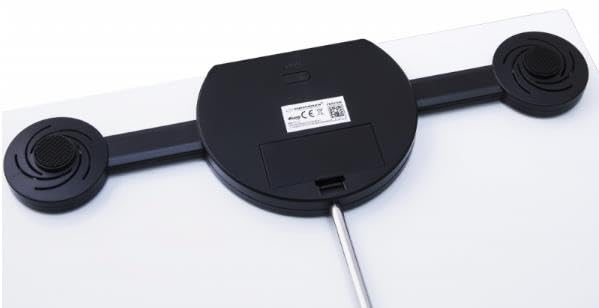
Image: The underside of the Esperanza EBS016W scale, illustrating the battery compartment and its cover. A screwdriver is shown near the compartment, indicating how to open it for battery installation.
4.2 App Download and Pairing
- Download the 'B.Fit' app from your smartphone's app store (iOS App Store or Android Google Play Store).
- Enable Bluetooth on your smartphone.
- Open the B.Fit app and create your user profile.
- Step onto the scale to activate it. The display will light up.
- The app should automatically detect and pair with the scale. Follow any on-screen prompts in the app to complete the pairing process.
5. Operating Instructions
5.1 Taking a Measurement
- Ensure the scale is on a hard, flat surface.
- Open the B.Fit app on your smartphone and ensure Bluetooth is active.
- Step onto the scale barefoot, placing your feet on the metal electrodes. Stand still until your weight is displayed and the measurement is complete.
- Your weight will be shown on the scale's display, and all 8 body composition metrics will be transmitted to the B.Fit app.
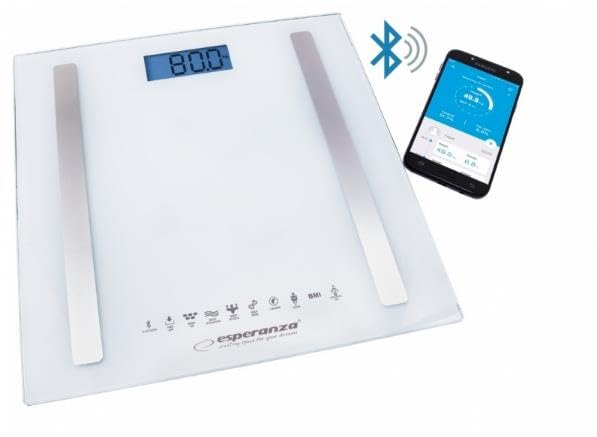
Image: The Esperanza EBS016W scale displaying a weight of '80.0' on its digital screen, with a Bluetooth icon indicating connectivity. A smartphone next to the scale shows the B.Fit app interface, displaying various body metrics.
5.2 Understanding 8-in-1 Measurements
The B.Fit app provides detailed analysis of 8 key body composition metrics, which typically include:
- Body Weight
- Body Fat Percentage
- Body Water Percentage
- Muscle Mass
- Bone Mass
- BMI (Body Mass Index)
- BMR (Basal Metabolic Rate)
- Visceral Fat
Refer to the B.Fit app's help section for detailed explanations of each metric and how to interpret your results.
6. Maintenance
6.1 Cleaning
- Wipe the scale surface with a soft, damp cloth.
- Do not use abrasive cleaners or immerse the scale in water.
- Ensure the scale is completely dry before storage or next use.
6.2 Storage
- Store the scale in a cool, dry place.
- Avoid placing heavy objects on the scale during storage.
6.3 Battery Replacement
When the display shows a 'Lo' indicator, it's time to replace the batteries. Follow the battery installation steps in Section 4.1.
7. Troubleshooting
| Problem | Possible Cause | Solution |
|---|---|---|
| Scale does not turn on | Dead or incorrectly installed batteries | Replace batteries or check polarity. |
| Inaccurate readings | Scale on uneven surface; not standing still; dirty electrodes | Place on hard, flat surface. Stand still. Clean scale surface. |
| 'Lo' displayed | Low battery power | Replace batteries. |
| 'Err' displayed | Overload or measurement error | Ensure weight is within scale's capacity. Re-measure. |
| Bluetooth not connecting | Bluetooth off; app not open; scale not active | Ensure Bluetooth is on. Open B.Fit app. Step on scale to activate. |
8. Specifications
- Model: EBS016W
- Dimensions (L x W x H): 20 x 20 x 5 cm
- Weight: 1.76 kg
- Special Features: Portable
- Connectivity: Bluetooth
- Measurements: 8-in-1 Body Composition Analysis
- Manufacturer: Esperanza
9. Warranty and Support
Esperanza products are manufactured to high-quality standards. This product is covered by a standard manufacturer's warranty against defects in materials and workmanship. Please retain your proof of purchase for warranty claims.
For technical support or warranty inquiries, please refer to the contact information provided with your purchase or visit the official Esperanza website.
