Introduction
This manual provides essential information for the safe and effective use of your Tool Shop 7-1/4 inch 150 Tooth Plywood Circular Saw Blades. These blades are designed for precision cutting of plywood, laminate, and melamine, and can also be used for non-ferrous metals and wood. Please read this manual thoroughly before installation and operation to ensure proper usage and to maximize blade life.

Image: Four Tool Shop 7-1/4 inch 150 Tooth Plywood Circular Saw Blades. Each blade is silver with black markings indicating "TOOL SHOP", "PLYWOOD", "7-1/4 inch", "184 mm", and "150 TEETH". Recommended applications are also visible on the blade surface.
Safety Information
Always prioritize safety when working with power tools and saw blades. Failure to follow these safety guidelines can result in serious injury.
- Wear Personal Protective Equipment (PPE): Always wear safety glasses, hearing protection, and a dust mask. Gloves are recommended for handling blades.
- Disconnect Power: Ensure the power tool is unplugged or its battery removed before installing, removing, or adjusting saw blades.
- Inspect Blades: Before each use, inspect the blade for cracks, missing teeth, or any other damage. Do not use damaged blades.
- Use Correct Blade: Ensure the blade is appropriate for the material being cut and the saw's specifications (e.g., RPM, arbor size).
- Secure Workpiece: Always secure the material being cut to prevent kickback.
- Maintain Saw: Ensure your circular saw is in good working condition, with all guards and safety features operational.
- Keep Hands Clear: Never place hands near the blade while the saw is connected to power.
- Proper Ventilation: Work in a well-ventilated area, especially when cutting materials that produce fine dust.
Setup and Installation
Proper installation is crucial for safe and effective operation. Refer to your circular saw's instruction manual for specific blade change procedures.
- Ensure Power is Disconnected: Unplug the saw from the power outlet or remove the battery pack.
- Access Blade Arbor: Depending on your saw model, you may need to lift the blade guard or open a cover to access the arbor nut.
- Remove Old Blade (if applicable): Use the appropriate wrench (often provided with the saw) to loosen and remove the arbor nut. Carefully remove the old blade.
- Clean Arbor and Flanges: Ensure the arbor shaft and blade flanges are clean and free of debris.
- Install New Blade: Place the new Tool Shop circular saw blade onto the arbor, ensuring the teeth are oriented correctly for cutting (usually indicated by an arrow on the blade matching the saw's rotation direction). The blade's arbor hole is 5/8 inch.
- Secure Blade: Reinstall the outer flange and arbor nut. Tighten the nut firmly with the wrench, but do not overtighten.
- Check for Free Rotation: Manually rotate the blade to ensure it spins freely and is properly seated.
- Replace Guards: Ensure all blade guards are properly reinstalled and functioning before reconnecting power.
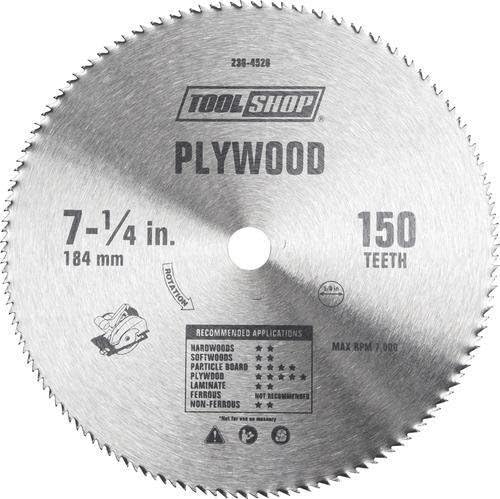
Image: A single Tool Shop 7-1/4 inch 150 Tooth Plywood Circular Saw Blade. An arrow indicating the direction of rotation is clearly visible on the blade's surface, which is crucial for correct installation.
Operating Guidelines
These blades are designed for optimal performance when used correctly. Always refer to your saw's manual for specific operating instructions.
- Material Compatibility: These blades are specifically designed for plywood, laminate, and melamine. They are also suitable for non-ferrous metals and general wood cutting. Avoid cutting ferrous metals (iron, steel) or masonry.
- Cutting Speed: Allow the saw to reach full speed before beginning a cut. Maintain a consistent, moderate feed rate. Do not force the blade through the material.
- Blade Depth: Adjust the blade depth so that the teeth extend just below the workpiece. This minimizes kickback and provides a cleaner cut.
- Support Workpiece: Ensure the workpiece is fully supported throughout the cut to prevent pinching or binding of the blade.
- Clean Cuts: The 150-tooth count is ideal for fine, splinter-free cuts in plywood and laminates.
Maintenance
Proper maintenance extends the life and performance of your saw blades.
- Cleaning: After use, clean the blade to remove resin, pitch, and sawdust buildup. A specialized blade cleaner or mild solvent can be used. Ensure the blade is dry before storage.
- Storage: Store blades in a dry place to prevent rust. Use original packaging or a blade storage case to protect the teeth from damage.
- Sharpening: When the blade becomes dull, it can be professionally sharpened. Do not attempt to sharpen carbide-tipped blades yourself unless you have specialized equipment and training.
- Inspection: Regularly inspect blades for signs of wear, damage, or dullness. Replace blades that are severely damaged or excessively dull.
Troubleshooting
If you encounter issues during operation, consider the following common problems and solutions:
| Problem | Possible Cause | Solution |
|---|---|---|
| Rough or splintered cuts | Dull blade, incorrect feed rate, improper blade depth, wrong blade for material. | Sharpen or replace blade. Adjust feed rate. Set blade depth correctly. Ensure blade is suitable for material. |
| Blade binding or smoking | Dull blade, forcing the cut, workpiece not properly supported, blade misalignment. | Sharpen or replace blade. Reduce feed pressure. Secure workpiece. Check saw's alignment. |
| Excessive vibration or noise | Loose blade, damaged blade, dirty arbor/flanges, worn saw bearings. | Tighten arbor nut. Inspect blade for damage and replace if necessary. Clean arbor and flanges. Consult saw's manual for maintenance. |
Specifications
Detailed technical specifications for the Tool Shop 7-1/4 inch 150 Tooth Plywood Circular Saw Blades:
- Model: 236-4526
- Diameter: 7-1/4 inch (184 mm)
- Arbor Size: 5/8 inch
- Number of Teeth: 150
- Blade Type: Plywood, Non-Ferrous Metal, Laminate/Melamine
- Maximum Speed (Max RPM): 7000 Revolutions per Minute
- Thickness: 0.08 inch
- Material: High Carbon Steel
- Quantity: 4 blades per pack
- UPC: 859082007014

Image: A close-up view of a single Tool Shop 7-1/4 inch 150 Tooth Plywood Circular Saw Blade, highlighting the printed specifications and recommended applications directly on the blade surface.
Warranty and Support
Specific warranty information for Tool Shop 7-1/4 inch 150 Tooth Plywood Circular Saw Blades is not provided within this manual. For details regarding warranty coverage, returns, or customer support, please refer to the original purchase documentation or contact the seller directly. The product was sold by Olori Africana Beauty Store.
For general inquiries about Tool Shop products, you may visit the Tool Shop brand page on Amazon.


