
Introduction
The Samsonite PRO-DLX 5 Wheeled Laptop Backpack is engineered for the modern business traveler, offering a blend of durability, functionality, and sophisticated design. This versatile backpack provides multiple carrying options, organized storage solutions, and enhanced security features for your belongings. This manual will guide you through the proper setup, operation, and maintenance of your backpack to ensure a long and satisfactory user experience.

Front view of the Samsonite PRO-DLX 5 Wheeled Laptop Backpack with its telescopic handle extended.
Key Features
- Durable Construction: Crafted from ballistic nylon with genuine leather accents at key touchpoints for enhanced durability and comfort.
- Optimal Dimensions: Measures 33 x 48 x 20 cm (W x H x D), weighing approximately 2.6 kg, with a generous capacity of 28 liters.
- Laptop and Tablet Protection: Features a dedicated, premium padded compartment designed to securely hold laptops up to 17.3 inches and tablets.
- Advanced Organization: Includes multiple zippered and open pockets, mesh pockets, a power bank pocket, and a key hanger for efficient organization of business essentials.
- Easy Pass Cable System: An integrated system allowing cables to pass through different compartments, enabling electronic devices to be charged without removal.
- Water-Resistant Treatment: The product is treated with a protective film to make it water-resistant, safeguarding your belongings from light moisture.
- Comfortable Carrying: Equipped with shock-absorbing shoulder straps and a breathable 3D-mesh back panel for ergonomic comfort when worn as a backpack.
- Smooth Mobility: Features a two-wheel trolley system with a telescopic extendable handle for effortless rolling.
- Integrated Security: Includes a TSA combination lock for secure travel.
Setup
1. Unpacking
Carefully remove the backpack from its packaging. Inspect for any signs of damage during transit. Retain all packaging materials for potential returns or warranty claims.
2. Adjusting Shoulder Straps
When using the backpack in its carrying mode, adjust the shoulder straps to fit comfortably. Loosen or tighten the straps using the buckles located at the bottom of each strap. The backpack should sit snugly against your back, with the weight evenly distributed across your shoulders.

Side view of the backpack, highlighting the padded shoulder straps.
3. Extending the Telescopic Handle
To use the backpack as a wheeled trolley, locate the button on the top of the handle. Press this button and pull the handle upwards until it locks into place. Ensure the handle is fully extended before rolling. To retract, press the button again and push the handle down until it is fully stowed.

Back view of the backpack, showing the wheels and the telescopic handle in its extended position.
4. Setting the TSA Combination Lock
Your backpack is equipped with a TSA-approved combination lock. The initial combination is typically 0-0-0. To set your personal combination:
- Ensure the lock is set to 0-0-0 and the zippers are disengaged.
- Locate the small reset button (often recessed and requires a pen tip to press).
- Press and hold the reset button until you hear a click.
- Set your desired 3-digit combination by turning the dials.
- Release the reset button. Your new combination is now set.
Important: Remember your combination. There is no master key for personal combinations.
Operating the Backpack
1. Using Main Compartments
The backpack features multiple compartments for various items. The main compartment is spacious for clothing and larger items, often including packing straps to secure contents. The dedicated laptop and tablet compartment is designed with extra padding for electronic devices.

Interior view showing the laptop compartment and internal packing straps for securing items.
2. Utilizing the Easy Pass Cable System
The Easy Pass system allows you to route charging cables between different compartments. This enables you to charge your devices, such as a phone or tablet, from a power bank stored in another pocket without having to remove them from the backpack. Look for small openings or dedicated channels between compartments.

Close-up of the laptop and tablet compartment, illustrating the secure storage and potential cable routing.
3. RFID Protected Pocket
Some models include an RFID-protected pocket designed to safeguard your credit cards and passport from unauthorized scanning. Store sensitive items in this designated pocket for added security.
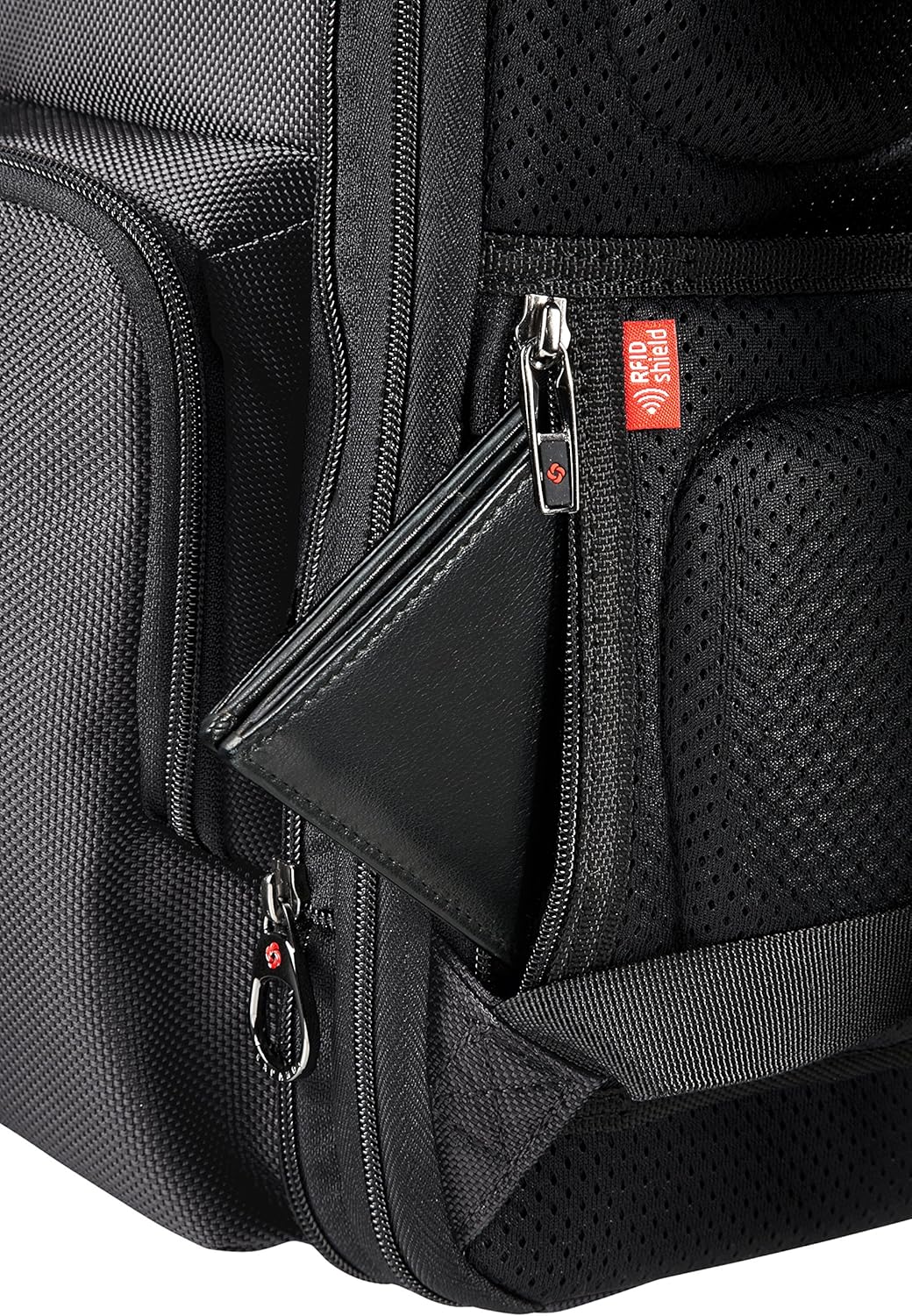
Detail of the RFID protected pocket, shown with a wallet placed inside for security.
4. Using the Address Tag
Fill out the integrated address tag with your contact information. This helps in identifying your backpack if it is misplaced during travel.

Close-up of the integrated address tag, ready for personal contact information.
Maintenance
1. Cleaning Instructions
To clean your Samsonite PRO-DLX 5 backpack, use a soft cloth dampened with mild soap and water. Gently wipe down the exterior surfaces. For stubborn dirt, a soft brush can be used. Avoid harsh chemicals or abrasive cleaners, as these can damage the ballistic nylon and leather components. Allow the backpack to air dry completely before storing.
2. Care for Zippers and Wheels
Periodically check zippers for smooth operation. If a zipper becomes stiff, apply a small amount of zipper lubricant or wax. Keep the wheels free of debris to ensure smooth rolling. Clean the wheel housings regularly, especially after use in dusty or dirty environments.
3. Removing Stickers and Adhesive Residue
If you need to remove stickers or adhesive residue, use isopropyl alcohol, white spirit (naphtha), or paraffin oil. Apply a small amount to a clean cloth and gently rub the affected area. Test on an inconspicuous area first to ensure no discoloration occurs.
4. Storage
Store your backpack in a cool, dry place away from direct sunlight when not in use. Avoid storing heavy objects on top of the backpack to prevent deformation.
Troubleshooting
1. Stiff or Jammed Zippers
If a zipper is stiff, apply a small amount of zipper lubricant or a graphite pencil lead along the teeth. If jammed, gently try to move the slider back and forth. Do not force it, as this can cause damage.
2. Wheels Not Rolling Smoothly
Check the wheels for any trapped debris such as hair, string, or dirt. Remove any obstructions. If the wheels are still not smooth, they may require cleaning or lubrication at the axle points.
3. Difficulty with TSA Lock
Ensure the combination is correctly aligned in the center of the dials. If you have forgotten your combination, unfortunately, there is no way to reset it without knowing the original code. You may need to contact Samsonite customer service for assistance or consider a replacement lock.
Specifications
| Model Name | PRO-DLX 5 Wheeled Laptop Backpack |
| Model Number | 106363-0555 |
| Dimensions (W x H x D) | 33 x 48 x 20 cm (12.99 x 18.9 x 7.87 inches) |
| Weight | 2.6 kg (5.73 lbs) |
| Capacity | 28 Liters |
| Laptop Compatibility | Up to 17.3 inches |
| Material | Ballistic Nylon with Leather Details |
| Water Resistance | Water-resistant |
| Wheels | 2, Inline Skate Type |
| Lock Type | TSA Combination Lock |
| Handle Type | Telescopic Extendable Handle |
| Shoulder Straps | Shock-absorbing, Adjustable |
| Back Panel | Breathable 3D-Mesh |
| Number of Sections | 2 |
| Number of Pockets | 6 |
| Color | Black |
| Manufacturer | SAMSONITE |
| Country of Origin | Thailand |

Visual representation of the backpack's dimensions: 33cm width, 48cm height, 20cm depth.
Warranty and Support
Samsonite is committed to producing high-quality, durable luggage. This product is backed by Samsonite's reputation for innovation and quality. For specific warranty details, including coverage and duration, please refer to the warranty card included with your purchase or visit the official Samsonite website. Samsonite also offers an extensive repair network to ensure your product can be maintained and repaired globally.
For further assistance, product registration, or to locate a service center, please visit the official Samsonite website or contact their customer support directly.


