
1. Product Overview
The DigiTech FreqOut is a Natural Feedback Creator pedal designed to provide controlled, natural-sounding feedback at any volume level, with or without distortion. This pedal is ideal for studio recording, live performances with in-ear monitors, or low-volume practice where traditional amplifier feedback is not feasible or desired. It can also be used at higher volumes to precisely control feedback harmonics.
The FreqOut pedal features adjustable feedback onset, gain, dry signal control, and selectable momentary or latching operation. It offers true bypass functionality to preserve your guitar's tone when the effect is disengaged. The robust steel chassis ensures durability for road use.

Figure 1.1: Top view of the DigiTech FreqOut Natural Feedback Creator Pedal, showing controls and indicators.
Key Features:
- Generates natural feedback at any volume.
- Seven distinct harmonic feedback types (1st, 2nd, 3rd, 5th, Sub, Nat Low, Nat Hi).
- Adjustable Feedback Onset and Gain controls.
- Dry On/Off switch for wet-only signal.
- Momentary or Latching footswitch operation.
- True Bypass circuitry.
- Rugged metal construction.
2. Setup and Connections
Before connecting the FreqOut pedal, ensure your amplifier and other audio equipment are turned off to prevent damage from sudden signal spikes.
2.1 Included Components:
This bundle includes the DigiTech FreqOut pedal, a 9V DC power supply, two patch cables, and six assorted Dunlop guitar picks.


Figure 2.1: Included 9V DC Power Supply and Patch Cable.

Figure 2.2: Assortment of Dunlop guitar picks included in the bundle.
2.2 Power Connection:
- Connect the included 9V DC power supply to the POWER input jack on the FreqOut pedal.
- Plug the power supply into a standard AC outlet. The FreqOut requires 9V DC at 100mA.
2.3 Audio Connections:
- Connect your guitar to the INPUT jack of the FreqOut pedal using a standard 1/4" instrument cable.
- Connect the OUTPUT jack of the FreqOut pedal to your amplifier or the next pedal in your signal chain using another 1/4" instrument cable.

Figure 2.3: Side view of the FreqOut pedal, illustrating the input and output jacks.
3. Operating the FreqOut Pedal
The FreqOut pedal features several controls to shape your feedback effect. Familiarize yourself with each control for optimal performance.
3.1 Controls and Indicators:
- ONSET Knob: Controls the delay time before the feedback begins. Turn clockwise for a longer delay, counter-clockwise for a quicker response.
- GAIN Knob: Adjusts the level of the feedback signal. Use this to balance the feedback volume with your dry guitar signal.
- TYPE Knob: Selects one of seven harmonic feedback types:
- SUB: An octave below the played note.
- 1ST: The fundamental note.
- 2ND: An octave above the played note.
- 3RD: A major third above the octave.
- 5TH: A perfect fifth above the octave.
- NAT LOW: Natural low-frequency feedback.
- NAT HI: Natural high-frequency feedback.
- MOMENTARY/LATCHING Switch:
- MOMENTARY: Feedback is active only while the footswitch is held down.
- LATCHING: Press the footswitch once to activate feedback, press again to deactivate.
- DRY ON/OFF Switch:
- ON: Your dry guitar signal is mixed with the feedback.
- OFF: Only the feedback signal is heard (wet-only).
- FEEDBACK LEDs: A series of red LEDs indicate the intensity and presence of the feedback effect.
- FOOTSWITCH: Activates or deactivates the feedback effect based on the MOMENTARY/LATCHING switch setting.
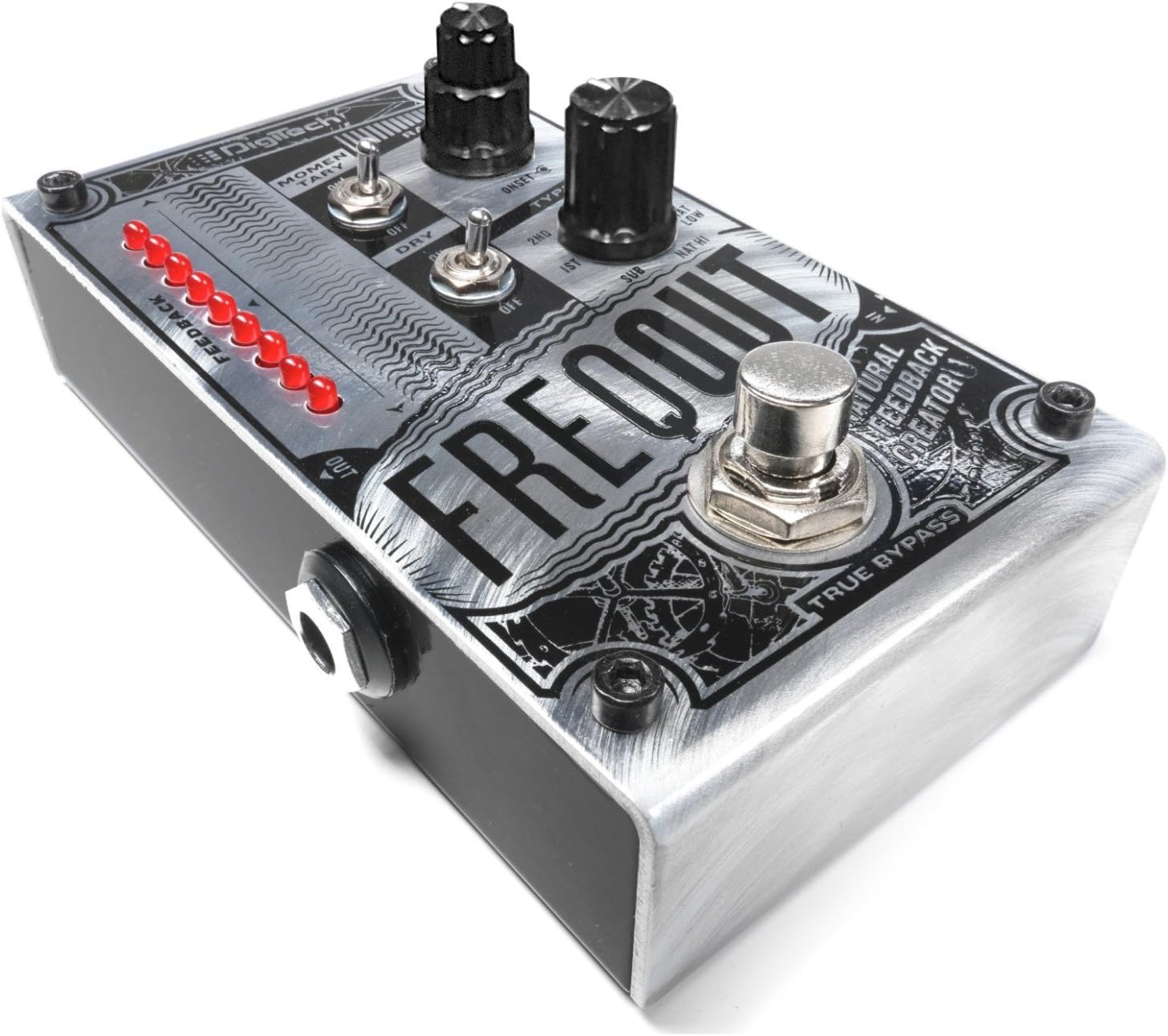
Figure 3.1: Angled view of the FreqOut pedal, highlighting the control knobs and switches.
3.2 Basic Operation:
- Ensure the pedal is correctly connected and powered on.
- Set the MOMENTARY/LATCHING switch to your preferred mode.
- Set the DRY ON/OFF switch to ON for a mixed signal, or OFF for feedback only.
- Select a TYPE of feedback using the knob. Start with 1ST or 2ND for common feedback sounds.
- Adjust the ONSET knob to control how quickly the feedback swells in.
- Adjust the GAIN knob to set the feedback volume relative to your dry signal.
- Press (or hold, depending on mode) the footswitch to engage the feedback effect.
- Experiment with different settings to find the desired feedback characteristics for your playing style.
4. Maintenance
The DigiTech FreqOut pedal is designed for durability and requires minimal maintenance.
- Cleaning: Use a soft, dry cloth to clean the pedal's exterior. Avoid abrasive cleaners or solvents, which can damage the finish.
- Storage: When not in use for extended periods, store the pedal in a dry, temperate environment. Disconnect the power supply.
- Power Supply: Always use the specified 9V DC power supply (center negative) to prevent damage to the unit.
- Cables: Regularly check instrument and power cables for wear and tear. Replace damaged cables to ensure optimal performance and safety.
5. Troubleshooting
If you encounter issues with your FreqOut pedal, refer to the following troubleshooting tips:
- No Sound:
- Check all cable connections (guitar to input, output to amp).
- Ensure the power supply is correctly connected and functioning.
- Verify that your guitar and amplifier are working correctly by bypassing the pedal.
- If the DRY switch is OFF, you will only hear feedback when the effect is engaged. Ensure it's ON if you expect a dry signal.
- No Feedback Effect:
- Ensure the pedal is engaged (footswitch pressed, FEEDBACK LEDs active).
- Check the GAIN knob setting; increase it to hear more feedback.
- Adjust the ONSET knob; if set too high, the feedback may take too long to appear.
- Experiment with different TYPE settings.
- Unwanted Noise/Hum:
- Ensure you are using the correct 9V DC power supply.
- Try a different power outlet or a dedicated pedal power supply.
- Check for faulty instrument cables.
- Ensure proper grounding of your amplifier and other equipment.
6. Specifications
| Brand | DigiTech |
| Model Name | FREQOUT |
| Model Number | 811054031090 |
| Audio Output Effects | Feedback |
| Signal Format | Analog |
| Connector Type | 1/4" Mono Phone Plug |
| Power Source | Corded Electric (9V DC) |
| Voltage | 9 Volts |
| Amperage | 100 Milliamps |
| Item Weight | 989 g |
| Controls Type | Knob, Switch |
7. Warranty and Support
For warranty information and technical support, please refer to the official DigiTech website or contact their customer service directly. Warranty terms typically cover manufacturing defects for a specified period from the date of purchase.
DigiTech Official Website: https://digitech.com/
Please retain your proof of purchase for any warranty claims.