
1. Introduction
Thank you for choosing the Brightech LightView Pro Magnifying LED Desk Lamp. This versatile 3-in-1 lamp is designed to provide bright, clear illumination and magnification for various tasks, hobbies, and reading. Its flexible design allows for use as a floor lamp, desk lamp, or with a clamp for workbench applications, enhancing visibility for detailed work.
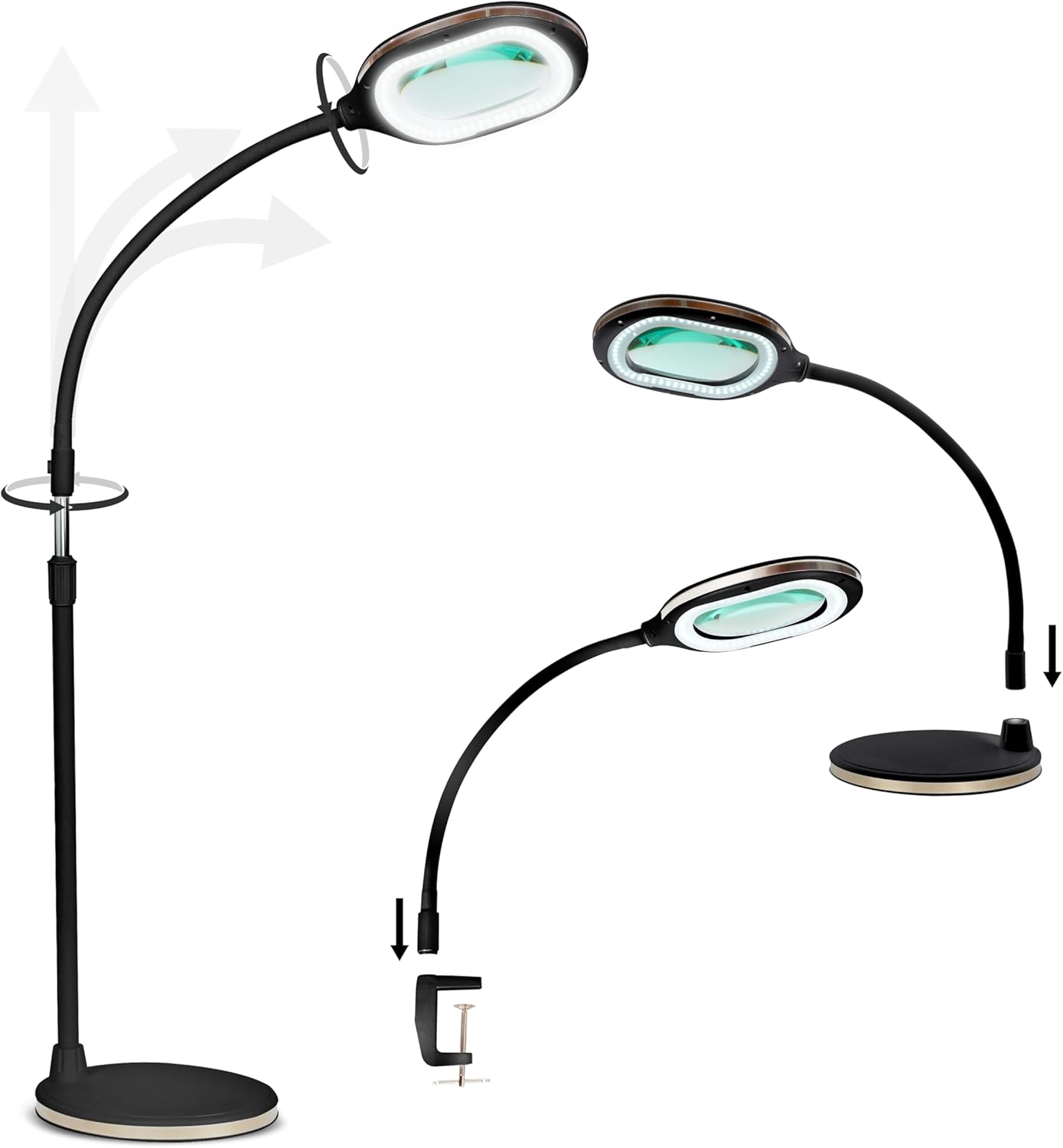
Image 1: Brightech LightView Pro Magnifying LED Desk Lamp in black.
2. Safety Information
Please read all safety instructions before using the product. Failure to follow these instructions may result in electric shock, fire, or serious injury.
- Electrical Safety: Ensure the power adapter is connected to a properly grounded outlet. Do not operate the lamp with a damaged cord or plug. Keep the power cord away from heat, sharp edges, or moving parts.
- Magnifying Lens: Do not expose the magnifying lens to direct sunlight. Concentrated sunlight can cause fire.
- Placement: Place the lamp on a stable, flat surface to prevent tipping. Ensure the gooseneck is securely positioned to avoid sudden movement.
- Cleaning: Disconnect the power before cleaning. Use a soft, dry cloth for cleaning. Avoid abrasive cleaners or solvents.
- Children: Keep out of reach of children. This product is not a toy.
3. Package Contents
Verify that all components are present in the package:
- Magnifying LED Lamp Head with Flexible Gooseneck
- Floor Stand Pole Sections
- Heavy-Duty Floor Base
- Desk Base
- Clamp Attachment
- Power Adapter

Image 2: Exploded view of the lamp components for its 3-in-1 versatile setup.
4. Setup Instructions
The Brightech LightView Pro offers three configuration options:
4.1 Floor Lamp Configuration
- Connect the flexible gooseneck lamp head to the top pole section.
- Assemble the pole sections by screwing them together firmly.
- Attach the assembled pole to the heavy-duty floor base, ensuring it is stable.
- Plug the power adapter into the lamp and then into a wall outlet.

Image 3: Brightech LightView Pro configured as a floor lamp, used for reading.
4.2 Desk Lamp Configuration
- Connect the flexible gooseneck lamp head directly to the desk base.
- Ensure the desk base is placed on a flat, stable surface.
- Plug the power adapter into the lamp and then into a wall outlet.

Image 4: Brightech LightView Pro configured as a desk lamp, ideal for detailed work.
4.3 Clamp Configuration
- Attach the flexible gooseneck lamp head directly to the clamp attachment.
- Securely fasten the clamp to a workbench, table, or other suitable surface.
- Plug the power adapter into the lamp and then into a wall outlet.
5. Operating Instructions
5.1 Power On/Off and Brightness Adjustment
The lamp features a touch-sensitive power button located on the lamp head. This button also controls the brightness settings:
- First Touch: Turns the lamp ON to full brightness.
- Second Touch: Dims the light to 50% brightness.
- Third Touch: Turns the lamp OFF.

Image 5: The lamp provides bright, focused light for tasks like sewing.
5.2 Positioning the Magnifying Head
The flexible gooseneck allows you to easily adjust the position and angle of the magnifying lamp head. Bend and twist the gooseneck to direct the light and magnification precisely where needed for hands-free operation.

Image 6: Detailed view through the magnifying lens, showing enhanced clarity for fine work.
6. Maintenance
Proper maintenance ensures the longevity and optimal performance of your lamp.
- Cleaning the Lens: Use a soft, lint-free cloth specifically designed for optics to clean the glass lens. Avoid paper towels or abrasive materials that could scratch the surface.
- Cleaning the Body: Wipe the lamp body with a soft, dry cloth. Do not use liquid cleaners or sprays directly on the lamp.
- LED Lifespan: The integrated LED bulbs are designed to last approximately 20,000 hours, which translates to about 20 years with typical use (3 hours/day). LEDs are not user-replaceable.
7. Troubleshooting
If you encounter issues with your Brightech LightView Pro, refer to the following common problems and solutions:
| Problem | Possible Cause | Solution |
|---|---|---|
| Lamp does not turn on. | No power supply; loose connection. | Ensure the power adapter is securely plugged into both the lamp and a working wall outlet. Check if the outlet has power. |
| Light flickers or is dim. | Loose connection; power fluctuation. | Check all power connections. Try a different outlet. If the issue persists, contact customer support. |
| Lamp feels unstable or tips easily. | Base not securely attached; uneven surface. | Ensure the pole sections and base are tightly screwed together. Place the lamp on a flat, stable surface. |
| Magnification is blurry. | Lens is dirty; object is out of focal range. | Clean the lens with a soft, lint-free cloth. Adjust the distance between the lens and the object until it is in clear focus. |
8. Specifications
| Feature | Detail |
|---|---|
| Model Number | BT-FL-LGHTVW-3IN1-BLCK |
| Brand | Brightech |
| Power Source | Corded Electric |
| Voltage | 120 Volts (AC) |
| Wattage | 9 watts |
| Light Source Type | LED |
| Lumen Output | 800 lumens |
| Magnification | 1.75x (3 Diopter Glass) |
| Lens Diameter | 4.5 inches |
| Switch Type | Touch Control |
| Material | Glass (Lens), Metal (Base) |
| Finish Type | Matte |
| Overall Height (Floor Lamp) | Up to 51 inches (adjustable) |
| UPC | 853913008522 |

Image 7: Illustration of 1.75x magnification provided by the lamp.
9. Warranty and Support
Brightech stands behind the quality of its products. The LightView Pro Magnifying LED Desk Lamp comes with an industry-leading 3-year limited warranty. This warranty covers any defects, malfunctions, or sudden failures of your lamp.
If you experience any issues or require assistance, please do not hesitate to contact Brightech customer support. For more information or to register your product, visit the official Brightech website or refer to the contact information provided with your purchase.
You can also visit the Brightech Store on Amazon for additional products and support.


