
JDYYICZ O1A1.064
Contents
JDYYICZ Desktop Document and Book Holder
Model: O1A1.064
Instruction Manual
Product Overview
This manual provides instructions for the JDYYICZ Black Metal Desktop Document and Book Holder, Model O1A1.064. This versatile holder is designed to improve reading posture and efficiency by securely holding documents, books, or tablets at an optimal viewing angle.
- Made of durable stainless steel for sturdiness and compactness.
- Features 7 adjustable grooves to offer a variety of viewing angles.
- Includes a removable line guide for highlighting text and improving focus.
- Equipped with an adjustable document clip that can be positioned on the side edges.
- Foldable design for convenient storage and portability, with dimensions of 13.9" x 8.2" when folded.

Image: The JDYYICZ Black Metal Desktop Document and Book Holder, showcasing its sleek design and functionality.
Setup Instructions
- Unfolding the Stand: Gently pull the two support legs located at the bottom rear of the holder outwards until they lock into place. These legs provide stability for the stand.
- Adjusting the Angle: Locate the metal support bar at the back of the holder. Lift the main panel and position the support bar into one of the 7 available grooves on the base. Each groove corresponds to a different viewing angle. Select the angle that best suits your comfort and task.

Image: Rear view of the document holder, illustrating the adjustable support legs and the mechanism for setting the viewing angle.
Operating Instructions
- Placing Documents/Books: Open the top clip and place your document, book, or tablet onto the main panel. Ensure the item rests securely on the bottom ledge. Close the top clip to hold the item firmly in place.
- Using the Removable Line Guide: The holder comes with a clear, removable line guide. To use it, slide it onto either side edge of the main panel. Position it to highlight the line of text you are currently reading, aiding focus and reducing eye strain.
- Adjusting the Document Clip: An additional adjustable clip is provided. This clip can be moved along the side edges of the holder to secure specific sections of a document or to hold multiple pages together.

Image: The document holder in use, displaying a document secured by the top clip and the clear line guide positioned to assist reading.
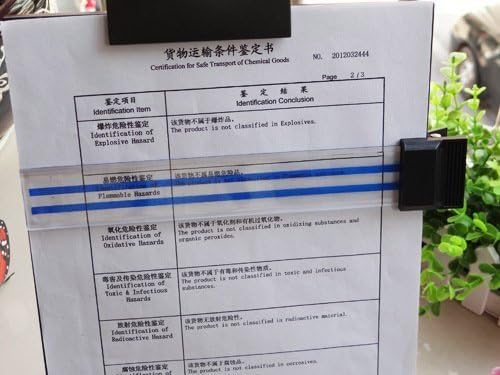
Image: A detailed view of the removable line guide, showing how it slides along the side of the holder to highlight text.
Maintenance
- Cleaning: Wipe the holder with a soft, damp cloth. For stubborn marks, a mild soap solution can be used, followed by drying thoroughly. Avoid abrasive cleaners or harsh chemicals, as they may damage the finish.
- Storage: When not in use, fold the support legs and the main panel flat for compact storage. Store in a dry place away from extreme temperatures.
Troubleshooting
- Holder is unstable: Ensure both support legs are fully extended and locked into place. Verify that the metal support bar is securely seated in one of the grooves.
- Document slips: Make sure the top clip is firmly holding the document. For thicker items, ensure they are properly seated on the bottom ledge.
- Difficulty adjusting angle: Check that the metal support bar is not obstructed and can move freely between the grooves. Apply gentle pressure when adjusting.
Specifications
| Feature | Detail |
|---|---|
| Brand | JDYYICZ |
| Model Number | O1A1.064 |
| Material Type | Metal, Stainless Steel |
| Color | Black |
| Item Weight | 1.48 pounds (0.67 Kilograms) |
| Package Dimensions | 14.41 x 9.53 x 1.06 inches |
| Foldable Dimensions (LxW) | 13.9" x 8.2" |
| Adjustable Positions | 7 grooves for viewing angles |
Warranty and Support
For warranty information or technical support regarding your JDYYICZ Desktop Document and Book Holder, please refer to the documentation included with your purchase or contact the manufacturer directly. Contact details are typically provided on the product packaging or the manufacturer's official website.
Ask a question about this manual
Ask about setup, troubleshooting, compatibility, parts, safety, or missing instructions. Manuals+ will review the question and use this page’s manual context to help answer it.