1. Safety Instructions
Please read these safety instructions carefully before operating the device and retain them for future reference. Incorrect operation due to disregard of these instructions may cause damage to the product or personal injury.
- Power Source: Ensure the power supply voltage (AC 220V) matches the requirements specified on the device. Do not use with incompatible power sources.
- Ventilation: Do not block any ventilation openings. Allow adequate space around the unit for proper airflow to prevent overheating.
- Water and Moisture: Do not expose the unit to rain, moisture, or dripping/splashing liquids. Keep away from objects filled with liquids, such as vases.
- Heat Sources: Keep the unit away from heat sources such as radiators, heat registers, stoves, or other apparatus (including amplifiers) that produce heat.
- Cleaning: Unplug the unit from the power outlet before cleaning. Use a dry, soft cloth only. Do not use liquid cleaners or aerosol cleaners.
- Servicing: Do not attempt to service this product yourself. Refer all servicing to qualified service personnel.
- Remote Control Batteries: If the remote control is not used for a long period, remove the batteries to prevent leakage.
2. Product Overview
The Mikado MD-92FM is a versatile speaker system featuring USB, SD card, and FM radio playback capabilities, controlled conveniently via a remote. It is designed for easy setup and provides clear audio for various applications.
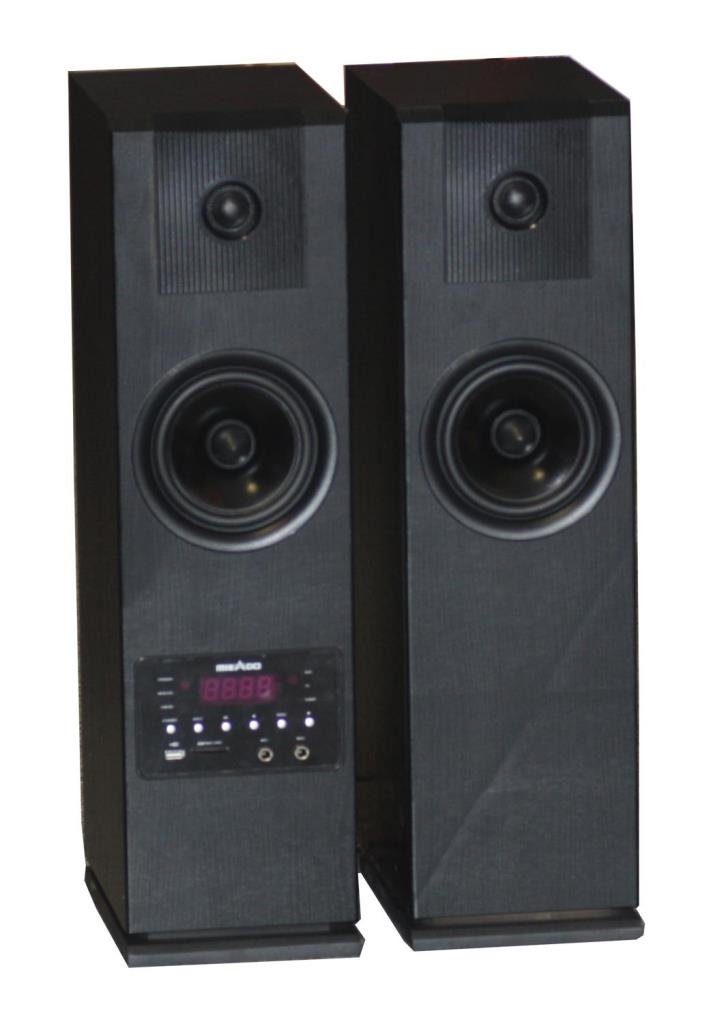
Figure 2.1: Front view of the Mikado MD-92FM speaker system, showing the main unit with control panel, display, and input ports. The included remote control is also visible.
3. Package Contents
Please check the package contents upon unboxing to ensure all items are present:
- Mikado MD-92FM Speaker Unit
- Remote Control
- AC Power Cable (220V)
- User Manual (this document)
If any items are missing or damaged, please contact your retailer or Mikado customer support.
4. Setup
4.1. Power Connection
- Ensure the speaker unit is placed on a stable, flat surface.
- Locate the AC power input port on the rear of the MD-92FM unit.
- Connect the provided AC power cable to the unit's power input.
- Plug the other end of the power cable into a standard AC 220V wall outlet.
- The unit will enter standby mode or power on automatically.
4.2. Initial Placement
For optimal sound performance, place the speaker in a central location within the room, avoiding corners or enclosed spaces that might muffle the sound. Ensure it is within reach of a power outlet and away from direct sunlight or excessive heat.
5. Operating Instructions
5.1. Basic Controls
The MD-92FM can be operated using the buttons on the front panel or the included remote control.
- Power Button: Press to turn the unit ON or OFF.
- Mode Button: Press to cycle through available modes: FM Radio, USB, SD.
- Volume +/-: Adjust the master volume level.
- Play/Pause: Start or pause playback in USB/SD mode.
- Previous/Next: Skip to the previous or next track in USB/SD mode, or change FM radio stations.
5.2. FM Radio Mode
- Press the Mode button until 'FM' appears on the display.
- To auto-scan and save available stations, press and hold the Play/Pause button. The unit will scan and store stations automatically.
- Use the Previous/Next buttons to navigate through saved stations or manually tune.
5.3. USB/SD Card Playback
- Insert a USB flash drive or SD card into the respective slot on the front panel. Ensure the media is formatted to FAT32 and contains compatible audio files (e.g., MP3).
- Press the Mode button to select 'USB' or 'SD' mode. The unit will automatically begin playing the first track.
- Use the Play/Pause, Previous, and Next buttons to control playback.
5.4. Remote Control Usage
The remote control provides full functionality from a distance. Ensure there are no obstructions between the remote and the unit's IR receiver. Insert 2x AAA batteries (not included) into the remote control, observing polarity.
- Power: Turns the unit on/off.
- Mode: Selects input source (FM, USB, SD).
- Volume +/-: Adjusts volume.
- EQ: Cycles through equalizer presets (if available).
- Numeric Keypad: Direct track selection in USB/SD mode or direct frequency input in FM mode.
6. Maintenance
6.1. Cleaning
To maintain the appearance and longevity of your MD-92FM speaker:
- Always unplug the unit from the power outlet before cleaning.
- Use a soft, dry, lint-free cloth to wipe the exterior surfaces.
- Do not use abrasive cleaners, waxes, or solvents as they may damage the finish.
- Avoid spraying liquids directly onto the unit.
6.2. Storage
If you plan to store the unit for an extended period:
- Unplug the power cable and remove any USB drives or SD cards.
- Remove batteries from the remote control.
- Store the unit in a cool, dry place, away from direct sunlight and extreme temperatures.
- It is recommended to store the unit in its original packaging to protect it from dust and physical damage.
7. Troubleshooting
Refer to the table below for common issues and their solutions. If the problem persists, contact customer support.
| Problem | Possible Cause | Solution |
|---|---|---|
| No power | Power cable not connected; Power outlet faulty | Ensure power cable is securely plugged in; Try a different power outlet. |
| No sound | Volume too low; Mute activated; Incorrect mode selected | Increase volume; Check if mute is active; Select the correct input mode (USB, SD, FM). |
| Remote control not working | Batteries depleted or incorrectly inserted; Obstruction between remote and unit | Replace batteries, ensuring correct polarity; Remove any obstructions; Point remote directly at the unit's IR sensor. |
| USB/SD card not recognized | Incorrect format; Corrupted files; Card not fully inserted | Ensure media is FAT32 format; Check for corrupted files; Reinsert the USB/SD card firmly. |
| Poor FM radio reception | Weak signal; Antenna not extended | Adjust the position of the unit; Fully extend the FM antenna (if applicable); Try auto-scanning again. |
8. Specifications
- Model: MD-92FM
- Power Input: AC 220V, 50/60Hz
- Audio Output: 20W RMS (estimated)
- Connectivity: USB, SD Card, FM Radio
- FM Frequency Range: 87.5 - 108 MHz
- Supported Audio Formats: MP3 (USB/SD)
- Remote Control: Infrared (IR)
- Dimensions (Approx.): 250mm x 150mm x 120mm (W x H x D)
- Weight (Approx.): 1.5 kg
9. Warranty and Support
This Mikado MD-92FM speaker system comes with a standard manufacturer's warranty. Please refer to the warranty card included in your package for specific terms and conditions, including the warranty period and coverage details.
For technical support, service inquiries, or to report any issues not covered in this manual, please contact Mikado customer service:
- Website: www.mikado.com.tr (Note: This is a placeholder URL. Please refer to your product's official documentation for the correct support website.)
- Email: support@mikado.com (Note: This is a placeholder email.)
- Phone: +90 XXX XXX XX XX (Note: This is a placeholder number.)
When contacting support, please have your product model (MD-92FM) and purchase date readily available.


