
Introduction
This manual provides detailed instructions for the setup, operation, and maintenance of your TTEC PLUS TK-3800 White Desktop Headset Phone. Please read this manual carefully before using the device to ensure proper functionality and longevity.
Product Overview
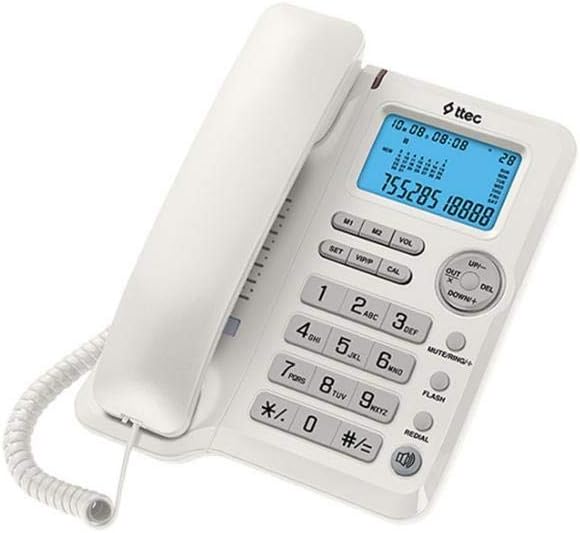
Figure 1: Front view of the TTEC PLUS TK-3800 Desktop Phone, showing the white casing, handset, blue backlit LCD display, and the full keypad with function buttons.

Figure 2: Angled view of the TTEC PLUS TK-3800 Desktop Phone, highlighting the ergonomic design of the handset and the compact base unit.
The TTEC PLUS TK-3800 is a versatile desktop phone designed for clear communication. It features a large, easy-to-read display, a comfortable handset, and dedicated buttons for various functions including volume control, memory dialing, and redial. It is also compatible with headsets for hands-free operation.
Setup
- Unpack the Phone: Carefully remove all components from the packaging. Ensure you have the phone base, handset, coiled handset cord, and telephone line cord.
- Connect the Handset: Plug one end of the coiled handset cord into the jack on the side of the phone base and the other end into the jack on the handset.
- Connect to Telephone Line: Plug one end of the telephone line cord into the LINE jack on the back of the phone base and the other end into your wall telephone jack.
- Power Connection (if applicable): This model typically draws power from the telephone line. No external power adapter is usually required.
- Initial Display Setup: The display should light up. You may need to set the current date and time using the 'SET' button and navigation keys (UP/DOWN). Refer to the 'Operating' section for detailed instructions on setting time and date.
Operating Instructions
Making and Receiving Calls
- To Make a Call: Lift the handset or press the 'FLASH' button (if using hands-free/headset). Dial the desired phone number.
- To Receive a Call: When the phone rings, lift the handset.
- To End a Call: Place the handset back on the cradle.
Keypad and Function Buttons
- Numeric Keypad (0-9, *, #): Used for dialing phone numbers.
- SET: Enters setup mode for date, time, and other settings.
- VOL: Adjusts the volume of the ringer or speakerphone/headset.
- M1/M2: One-touch memory dial buttons. To program, press SET, then M1/M2, dial number, press SET again.
- UP/DOWN: Navigates through menus or adjusts settings in setup mode.
- DEL: Deletes characters or entries in certain modes.
- MUTE/RING+: Mutes the microphone during a call. Also functions as a ringer volume control in standby.
- FLASH: Used for call waiting, transferring calls, or initiating a new call without hanging up.
- REDIAL: Dials the last number called.
Setting Date and Time
- Press the 'SET' button. The display will show the current time/date setting.
- Use the 'UP'/'DOWN' buttons to adjust the year, month, day, hour, and minute.
- Press 'SET' again to confirm each setting and move to the next.
- Once all settings are complete, the phone will return to standby mode.
Maintenance
- Cleaning: Use a soft, slightly damp cloth to clean the phone's surface. Do not use abrasive cleaners or solvents.
- Storage: Store the phone in a cool, dry place away from direct sunlight and extreme temperatures.
- Cord Care: Avoid tangling or stretching the coiled handset cord and telephone line cord excessively to prevent damage.
Troubleshooting
| Problem | Possible Cause | Solution |
|---|---|---|
| No dial tone. | Telephone line cord is disconnected or faulty. | Ensure the telephone line cord is securely plugged into both the phone and the wall jack. Test with another phone if possible. |
| Display is blank. | No power from the telephone line. | Check the telephone line connection. Ensure the line is active. |
| Cannot hear caller / Caller cannot hear me. | Volume too low; Mute function active; Faulty handset cord. | Adjust volume using 'VOL' button. Deactivate 'MUTE'. Check handset cord connection. |
| Phone does not ring. | Ringer volume is off or too low. | Press 'MUTE/RING+' to adjust ringer volume. |
Specifications
- Brand: TTEC
- Model: TK-3800
- Type: Desktop Phone with Headset Compatibility
- ASIN: B07DJ13TX4
- First Available Date: May 30, 2018
Warranty and Support
For warranty information and technical support, please refer to the documentation provided with your purchase or visit the official TTEC website. Keep your purchase receipt as proof of purchase for warranty claims.
Note: Specific warranty terms may vary by region and retailer.
