
Introduction
This manual provides detailed instructions for the Microsoft N9Z-00017 All-In-One Media Keyboard. This wireless keyboard features an integrated multi-touch trackpad, media hotkeys, and 128-bit AES encryption for secure data transmission. It is designed for use with Smart TVs, laptops, and desktop computers, offering a convenient and versatile input solution.
Please read this manual thoroughly before using your keyboard to ensure proper setup and operation.
Setup
1. Package Contents
- Microsoft N9Z-00017 All-In-One Media Keyboard
- USB Wireless Receiver
- AA Batteries (pre-installed or included)
- Quick Start Guide (if applicable)
2. Battery Installation
The keyboard typically comes with AA batteries pre-installed or included. If not, follow these steps:
- Locate the battery compartment cover on the underside of the keyboard.
- Slide or lift the cover to open the compartment.
- Insert the AA batteries, ensuring correct polarity (+ and -).
- Close the battery compartment cover securely.
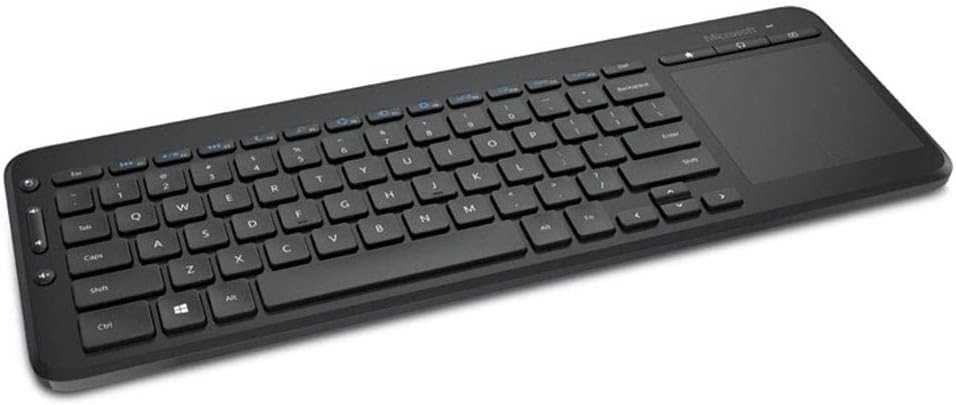
Image: The Microsoft All-In-One Media Keyboard, showing its compact design with an integrated touchpad on the right side. This image provides a general overview of the product's appearance.
3. Connecting the Wireless Receiver
- Locate the USB wireless receiver, usually stored in a compartment on the keyboard or included separately.
- Plug the USB wireless receiver into an available USB port on your computer or Smart TV.
- The operating system should automatically detect and install the necessary drivers. This process may take a few moments.
- Once installed, the keyboard should be ready for use.
Operating Instructions
1. Basic Keyboard Functions
The keyboard functions like a standard QWERTY keyboard. This specific model features a Turkish Q layout. All standard alphanumeric keys, function keys (F1-F12), and modifier keys (Shift, Ctrl, Alt) are present.
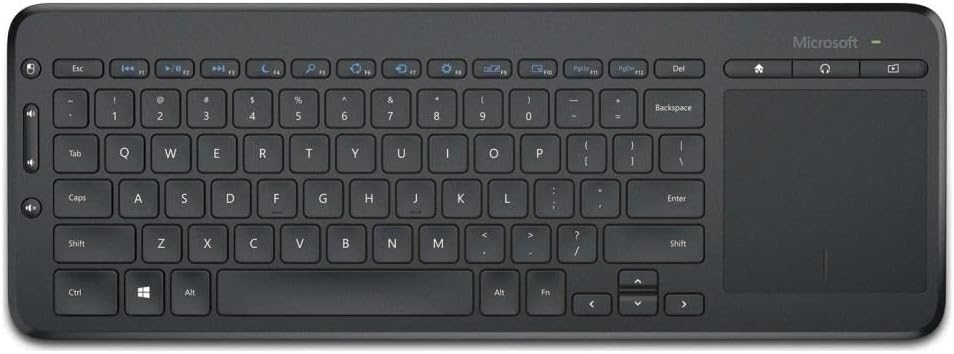
Image: A top-down view of the Microsoft All-In-One Media Keyboard, clearly displaying the Turkish Q keyboard layout and the integrated multi-touch trackpad.
2. Integrated Multi-Touch Trackpad
The large integrated trackpad supports multi-touch gestures, allowing for intuitive navigation.
- Single Finger Tap: Left-click.
- Two Finger Tap: Right-click.
- Two Finger Scroll: Scroll vertically or horizontally.
- Pinch to Zoom: Zoom in or out (application dependent).
3. Media Hotkeys
Dedicated media hotkeys are located above the function keys for quick access to media controls and other common functions. These include volume control, mute, play/pause, and home screen access.
4. 128-bit AES Encryption
The keyboard utilizes 128-bit Advanced Encryption Standard (AES) technology to encrypt your keystrokes. This feature helps protect your personal and business information by securing the wireless communication between the keyboard and the receiver.
5. Device Compatibility
This keyboard is compatible with a range of devices, including:
- Smart Televisions
- Laptops
- Desktop Computers
Ensure your device has an available USB port for the wireless receiver.
Maintenance
1. Cleaning the Keyboard
- Disconnect the keyboard from its power source (remove batteries) before cleaning.
- Use a soft, lint-free cloth slightly dampened with water or a mild cleaning solution.
- Avoid using abrasive cleaners, solvents, or aerosol sprays directly on the keyboard.
- For cleaning between keys, use compressed air to remove dust and debris.
- Wipe the trackpad gently with a clean, dry cloth.
2. Battery Replacement
When the keyboard's performance degrades or the battery indicator (if present) signals low power, replace the batteries:
- Open the battery compartment on the underside of the keyboard.
- Remove the old AA batteries.
- Insert new AA batteries, observing the correct polarity.
- Close the battery compartment securely.
- Dispose of old batteries according to local regulations.
Troubleshooting
| Problem | Possible Cause | Solution |
|---|---|---|
| Keyboard not responding |
|
|
| Keys not working correctly |
|
|
| Trackpad not responding |
|
|
Specifications
- Brand: Microsoft
- Model: N9Z-00017
- Connectivity Technology: Wireless
- Keyboard Layout: Turkish Q
- Compatible Devices: Smart Television, Laptop, Desktop Computer
- Recommended Use: Office, Home Entertainment
- Security: 128-bit AES Encryption
- Power Source: AA Batteries
Warranty and Support
For warranty information, technical support, or to register your product, please visit the official Microsoft support website. You can typically find detailed warranty terms and contact information for customer service there.
Official Microsoft Support: support.microsoft.com
Please retain your proof of purchase for warranty claims.


