
CEM DT-131
CEM DT-131 Digital Pocket Thermometer User Manual
Model: DT-131
Introduction
Thank you for choosing the CEM DT-131 Digital Pocket Thermometer. This manual provides essential information for the safe and effective operation of your device. Please read it thoroughly before use and retain it for future reference.

Image 1: The CEM DT-131 Digital Pocket Thermometer, showing its blue casing, LCD display, and stainless steel probe.
Safety Information
- Do not expose the thermometer to extreme temperatures outside its operating range.
- Keep the probe tip clean to ensure accurate readings.
- Avoid direct contact of the probe with heating elements or open flames.
- This device is not a toy. Keep out of reach of children.
- The probe tip is sharp; handle with care to prevent injury.
Product Components
The CEM DT-131 thermometer consists of the following main parts:
- LCD Display: Shows temperature readings and operational indicators.
- ON/OFF Button: Powers the device on or off.
- °C/°F Button: Toggles between Celsius and Fahrenheit temperature units.
- HOLD/MAX/MIN Button: Used to hold the current reading and recall maximum/minimum temperatures.
- Stainless Steel Probe: For temperature measurement.
- Probe Protection Cover: Protects the probe when not in use.
- Battery Compartment: Houses the LR44 (1.5V) button battery.
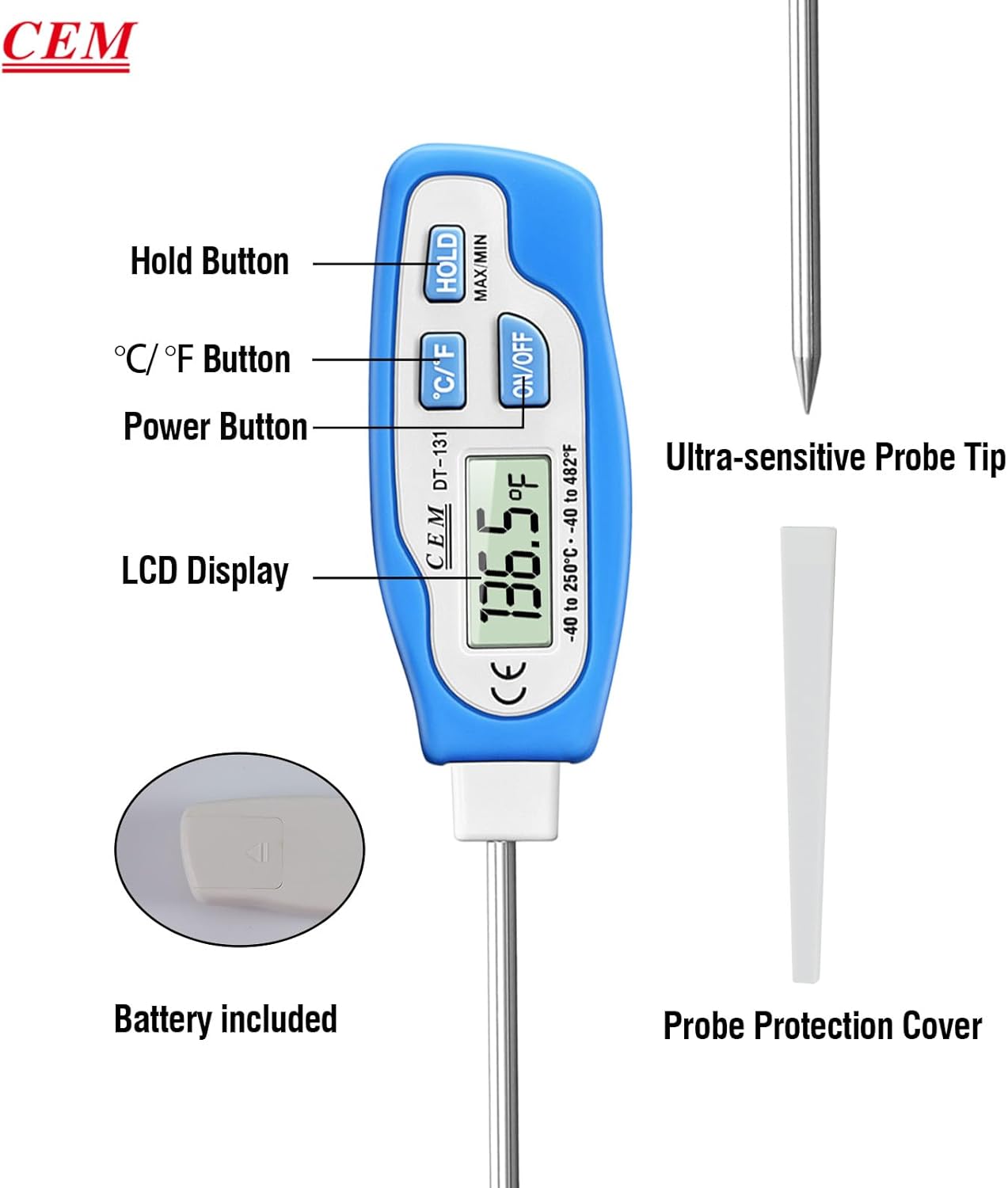
Image 2: Diagram illustrating the various labeled components of the CEM DT-131 Digital Pocket Thermometer, including buttons, LCD, and probe.
Setup
- Battery Installation: The thermometer comes with one LR44 (1.5V) button battery. Ensure it is correctly installed in the battery compartment.
- Remove Probe Cover: Carefully remove the probe protection cover before use.
- Initial Cleaning: Before first use, clean the stainless steel probe with a damp cloth or mild soap and water. Ensure the probe is dry before use.
- Placement (Optional): The thermometer features a magnetic back, allowing it to be conveniently attached to steel surfaces for storage or easy access.
Operating Instructions
Power On/Off
- Press the ON/OFF button once to turn the thermometer on.
- Press the ON/OFF button again to turn the thermometer off.
- The device features an auto-power-off function to conserve battery life.
Temperature Measurement
- Turn on the thermometer.
- Insert the stainless steel probe into the substance you wish to measure. Ensure the probe tip is fully immersed for accurate readings.
- Wait for 2-4 seconds for the reading to stabilize on the LCD display.

Image 3: The CEM DT-131 thermometer probe inserted into a sandwich, demonstrating its use for food temperature measurement.
Switching Temperature Units (°C/°F)
- While the thermometer is on, press the °C/°F button to toggle between Celsius and Fahrenheit units.

Image 4: An illustration showing the thermometer's display switching between Celsius and Fahrenheit, indicating user-selectable units.
Data Hold Function
- From "Normal" mode (live reading), press the HOLD button once. "HOLD" will appear on the display, and the current temperature reading will be locked.
- To return to "Normal" mode, press the HOLD button three times.

Image 5: The CEM DT-131 thermometer displaying a held temperature reading, illustrating the data hold function for convenient viewing away from heat.
Maximum/Minimum Temperature Recall
- From "Normal" mode, press the HOLD button twice. "MAX" will appear on the display, showing the highest temperature recorded since the device was last turned on or reset.
- Press the HOLD button once more. "MIN" will appear on the display, showing the lowest temperature recorded.
- Press the HOLD button once more to return to "Normal" mode.

Image 6: The CEM DT-131 thermometer's display showing both minimum and maximum recorded temperatures, demonstrating the MAX/MIN recall feature.
Maintenance and Care
- Cleaning: The thermometer is IPX6 rated waterproof, allowing it to be cleaned under running water. Use mild soap if necessary. Ensure the probe is thoroughly cleaned after each use, especially when used with food.
- Storage: Always replace the probe protection cover when the thermometer is not in use to prevent damage to the probe and potential injury. Store in a dry, cool place.
- Battery Replacement: When the display becomes dim or the thermometer fails to power on, replace the LR44 (1.5V) button battery. Open the battery compartment, remove the old battery, and insert a new one with the correct polarity.
- Product Care: Hand wash only. Do not immerse the entire unit in water for extended periods.
Troubleshooting
| Problem | Possible Cause | Solution |
|---|---|---|
| Thermometer does not turn on. | Dead or incorrectly installed battery. | Replace the LR44 (1.5V) battery, ensuring correct polarity. |
| Inaccurate readings. | Probe not fully immersed; dirty probe; outside operating temperature range. | Ensure probe tip is fully immersed. Clean the probe. Verify the temperature is within -40°C to 250°C (-40°F to 482°F). |
| Display is dim or flickering. | Low battery. | Replace the LR44 (1.5V) battery. |
Specifications
- Model: DT-131
- Model Number: 8541985772
- Temperature Range: -40°C to 250°C (-40°F to 482°F)
- Accuracy: ±1°C (±1°F)
- Resolution: 0.1°C / 0.1°F
- Sampling Time: 2.0 seconds
- Probe Length: 5.1 inches (approx. 13 cm)
- Display: LCD
- Power Source: 1 x LR44 (1.5V) button battery (included)
- Special Features: User selectable °C/°F, Data Hold, Max/Min Record, Auto Power Off, Fast Reading System, Magnetic Back, IPX6 Waterproof
- Material: Plastic casing, Alloy Steel probe
- Dimensions (Parcel): 25.7 x 10 x 2.5 cm
- Item Weight: 1.12 kg
- Manufacturer: Shenzhen Everbest Machinery Industry Co.,Ltd.
- Certifications: CE
Warranty and Support
CEM offers a 18-month guarantee for this product. For warranty claims or technical support, please contact your retailer or the manufacturer directly. Please retain your proof of purchase for warranty validation.
For further assistance, you may visit the CEM brand page on Amazon.
Related documentsDT-131


Ask a question about this manual
Ask about setup, troubleshooting, compatibility, parts, safety, or missing instructions. Manuals+ will review the question and use this page’s manual context to help answer it.