
Introduction
This manual provides essential information for the safe and effective installation, operation, and maintenance of your LEONLITE 8-Pack Low Voltage LED Landscape Spotlights. These spotlights are designed for outdoor use, featuring a durable aluminum construction and an IP65 waterproof rating, ensuring reliability in various weather conditions. The 3000K warm white light with a CRI90+ rating enhances the natural appearance of your landscape. The low voltage design (AC/DC 12V-24V) ensures safety for children and pets.
1. Setup
1.1 Package Contents
- 8 x LED Landscape Spotlights
- 8 x Ground Stakes
- 16 x Waterproof Wire Connectors
1.2 Assembly
- Carefully unpack all components and inspect for any damage.
- Attach each spotlight head to its corresponding ground stake by screwing it clockwise until secure.
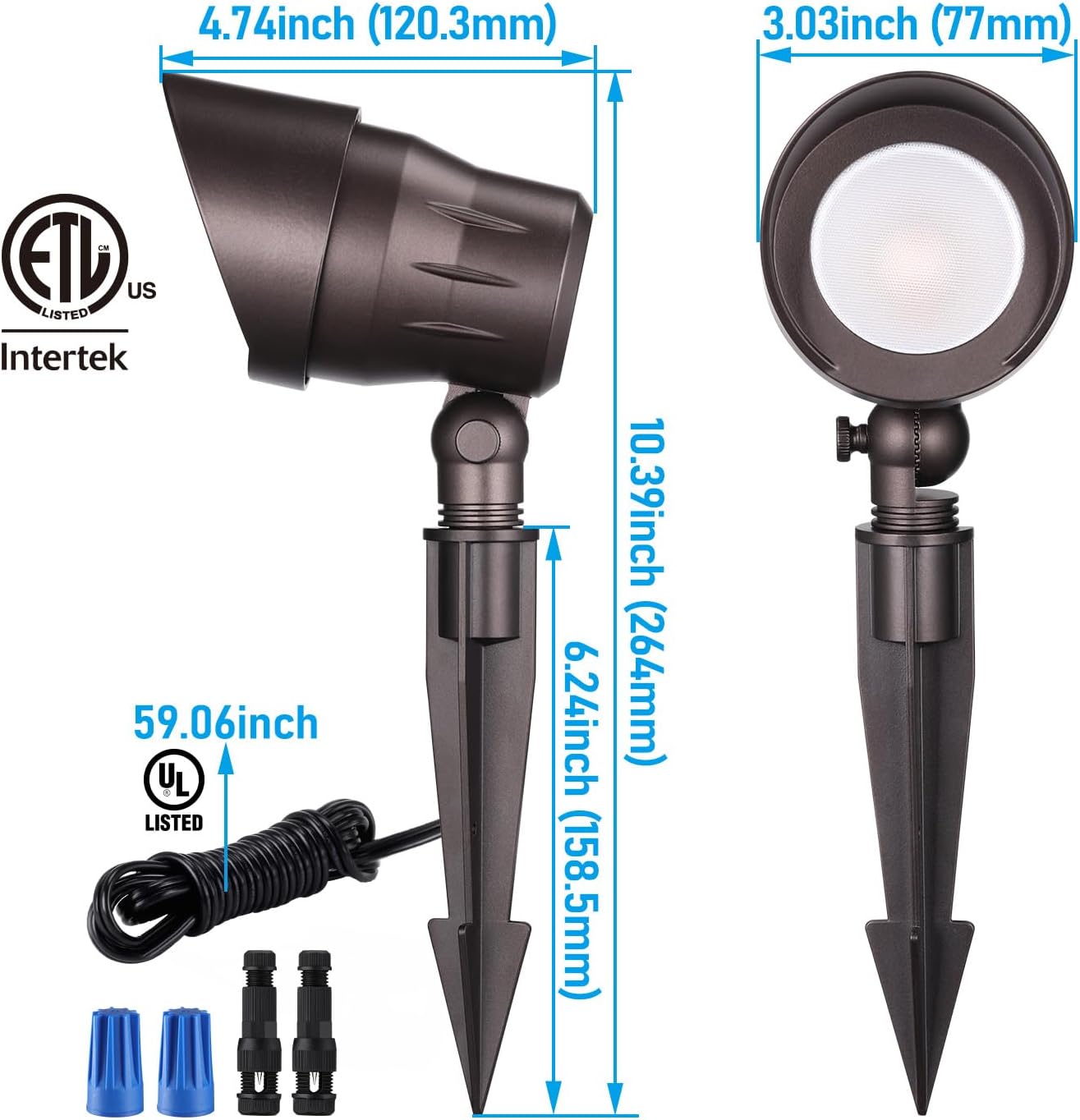
Figure 1: Spotlight dimensions and included components.
1.3 Wiring and Installation
These low voltage spotlights require a 12V-24V AC/DC landscape lighting transformer (not included). Ensure the transformer's wattage capacity is sufficient for the total wattage of all connected lights.
- Plan Layout: Determine the desired placement for each spotlight to highlight specific features like trees, shrubs, or architectural elements. The 45° narrow beam angle is ideal for focused illumination.
- Prepare Wiring: Lay out your low voltage main cable (not included) from the transformer to the desired light locations.
- Connect Lights: For each spotlight, use the provided waterproof wire connectors to securely connect the spotlight's power cable to the main low voltage cable. Ensure a tight and waterproof connection to prevent moisture ingress.
- Stake into Ground: Once wired, firmly push the ground stake of each spotlight into the soil at your chosen location. Ensure the light is stable.
- Adjust Angle: The spotlight features 180° adjustability. Loosen the adjustment knob, position the light to your desired angle, and then tighten the knob to secure it.
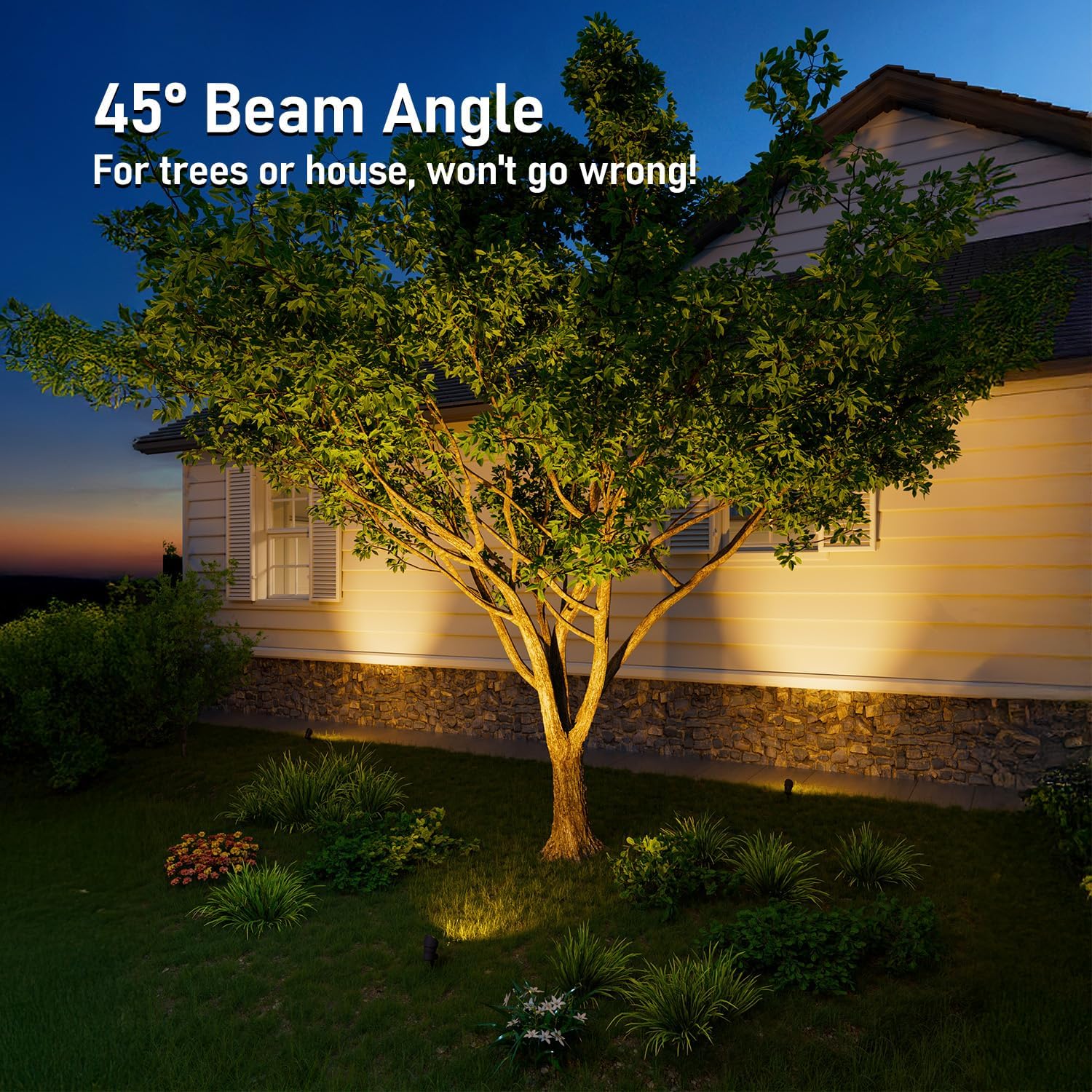
Figure 2: Example of spotlights illuminating a tree and house exterior.

Figure 3: Multiple spotlights highlighting garden features.
2. Operating Instructions
2.1 Powering On/Off
Once properly installed and connected to a low voltage transformer, the spotlights will operate according to the transformer's settings. Most landscape lighting transformers include a timer or photocell sensor for automatic dusk-to-dawn operation or scheduled illumination.
2.2 Light Output
These spotlights provide a consistent 3000K warm white light, offering a cozy and inviting glow. The high Color Rendering Index (CRI) of 90+ ensures that colors in your landscape appear natural and vibrant under illumination.

Figure 4: Close-up of the warm white light output.
3. Maintenance
The LEONLITE landscape spotlights are designed for minimal maintenance due to their durable construction and IP65 waterproof rating.
- Cleaning: Periodically clean the lens and aluminum housing with a soft, damp cloth to remove dirt, dust, or debris. Avoid abrasive cleaners that could damage the finish or lens.
- Inspection: Annually inspect all wiring and connections for any signs of wear, damage, or corrosion. Ensure all wire connectors remain tightly sealed.
- Durability: The die-cast aluminum housing is corrosion-resistant and designed to withstand outdoor elements, contributing to a long product lifespan.

Figure 5: Spotlight demonstrating waterproof capability.
4. Troubleshooting
| Problem | Possible Cause | Solution |
|---|---|---|
| Light does not turn on | No power to the transformer; Loose wire connection; Faulty light. | Check transformer power supply and circuit breaker. Ensure all wire connections are secure. Test with a known working light. |
| Light is dim | Insufficient power from transformer; Long wire run causing voltage drop; Dirty lens. | Verify transformer output voltage. Consider shorter wire runs or thicker gauge wire. Clean the light lens. |
| Water inside light housing | Improperly sealed wire connection; Damaged housing. | Ensure all wire connectors are properly sealed and tightened. Inspect the light housing for cracks or damage. |
5. Specifications
| Feature | Detail |
|---|---|
| Brand | LEONLITE |
| Model Number | 60816 |
| Color Temperature | 3000K Warm White |
| Wattage | 5 Watts |
| Voltage | 12V-24V AC/DC |
| Brightness | 280 Lumens |
| Material | Die-cast Aluminum |
| Beam Angle | 45° Narrow Beam |
| CRI | 90+ |
| Water Resistance Level | IP65 Waterproof |
| Certifications | ETL Listed |
| Lifespan | 30,000 hours |
| Product Dimensions | 14.76"L x 10.83"W x 8.27"H (Overall package dimensions) |
| Item Weight | 1.1 Pounds (per light) |
6. Warranty
This LEONLITE product is covered by a 3-year warranty from the date of purchase. This warranty covers defects in materials and workmanship under normal use. For warranty claims or further details, please refer to the official LEONLITE website or contact customer support.
7. Customer Support
For technical assistance, troubleshooting, or any questions regarding your LEONLITE 8-Pack Low Voltage LED Landscape Spotlights, please contact LEONLITE customer service. You can typically find contact information on the product packaging, the official LEONLITE website, or through your retailer.
Website: www.leonlite.com (Note: This is a placeholder URL, please refer to actual product documentation for official website.)


