
1. Introduction
This manual provides essential information for the safe and efficient installation, operation, and maintenance of your Osculati INDEL MARINE Thermostat, model FNI424. This thermostat is specifically designed for use with Slim/Basic Isotemp boilers. Please read this manual thoroughly before installation and use, and retain it for future reference.
2. Safety Information
Important Safety Instructions:
- Always disconnect power to the boiler and thermostat before installation, maintenance, or troubleshooting.
- Installation should be performed by a qualified technician to ensure compliance with local electrical codes and safety standards.
- Do not expose the thermostat to water or excessive moisture.
- Do not attempt to repair or modify the thermostat yourself. Contact qualified service personnel.
- Ensure all wiring connections are secure and correctly polarized.
3. Package Contents
The Osculati INDEL MARINE Thermostat FNI424 package typically includes:
- 1 x Osculati INDEL MARINE Thermostat (Model FNI424)
- (Mounting screws and basic wiring connectors may be included, but are not explicitly listed.)
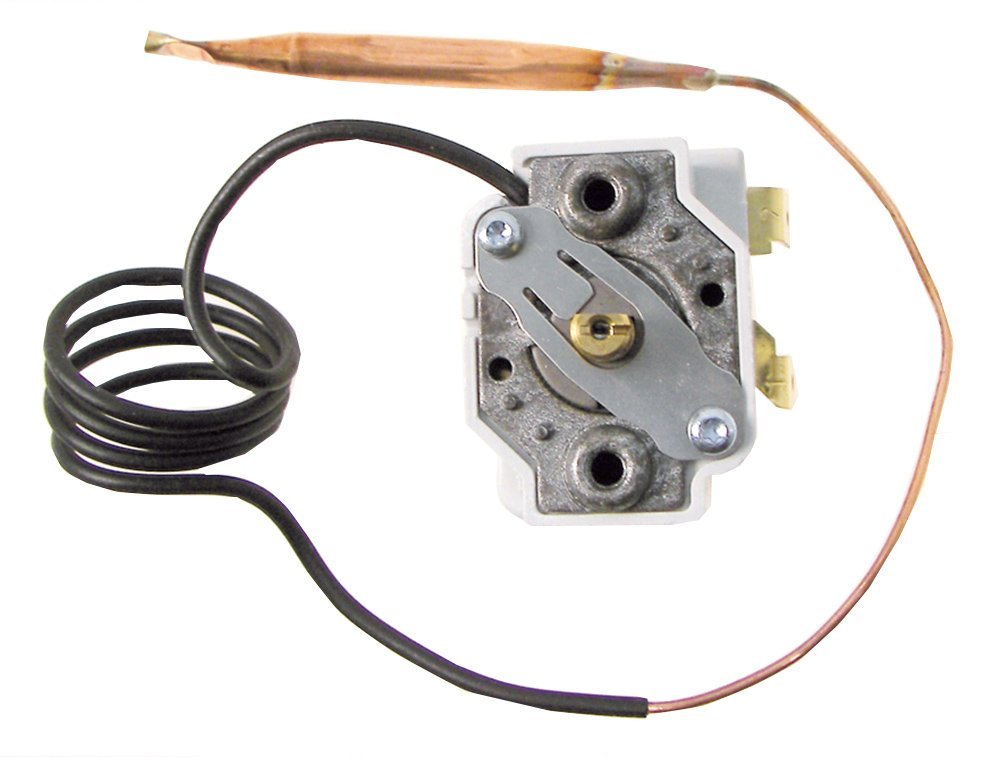
Figure 1: Osculati INDEL MARINE Thermostat FNI424. This image shows the compact design of the thermostat, likely featuring a control dial or buttons for temperature adjustment and possibly an indicator light.
4. Setup and Installation
Before you begin: Ensure the power supply to your Slim/Basic Isotemp boiler is completely disconnected.
- Choose Location: Select a suitable location for the thermostat, away from direct heat sources, drafts, or direct sunlight, which could affect temperature readings.
- Mounting: Securely mount the thermostat to a wall or panel using appropriate screws. Ensure it is level and stable.
- Wiring: Connect the thermostat to your Slim/Basic Isotemp boiler according to the boiler's wiring diagram and the thermostat's connection terminals. Typically, this involves connecting power input, boiler control wires, and potentially a sensor wire. Refer to the specific wiring instructions provided with your boiler for precise connections.
- Verify Connections: Double-check all wiring connections for tightness and correct polarity.
- Restore Power: Once all connections are secure and verified, restore power to the boiler and thermostat.
5. Operating Instructions
The Osculati INDEL MARINE Thermostat is designed for straightforward operation.
- Power On: After installation and power restoration, the thermostat should power on automatically.
- Set Temperature: Use the control dial or buttons (if present) to set your desired water temperature. Rotate the dial clockwise to increase the temperature and counter-clockwise to decrease it.
- Indicator Light (if applicable): A common indicator light (e.g., LED) may illuminate when the boiler is actively heating to reach the set temperature.
- Automatic Operation: The thermostat will automatically switch the boiler on and off to maintain the set temperature.
6. Maintenance
Regular maintenance ensures optimal performance and longevity of your thermostat.
- Cleaning: Periodically wipe the thermostat's exterior with a soft, dry cloth. Do not use abrasive cleaners or solvents.
- Check Connections: Annually, or if issues arise, check all wiring connections to ensure they are secure and free from corrosion.
- Environmental Conditions: Ensure the thermostat remains in a dry environment, protected from extreme temperatures.
7. Troubleshooting
| Problem | Possible Cause | Solution |
|---|---|---|
| Boiler not heating. | No power to thermostat/boiler; Incorrect temperature setting; Loose wiring. | Check power supply; Verify thermostat setting is above current water temperature; Inspect and secure wiring connections. |
| Boiler heats continuously. | Thermostat malfunction; Sensor issue. | Contact qualified service personnel for inspection and repair/replacement. |
| Inaccurate temperature reading. | Thermostat located near heat source/draft; Faulty sensor. | Relocate thermostat if possible; Contact service for sensor check. |
8. Specifications
- Brand: Osculati
- Manufacturer: INDEL MARINE
- Model Number: FNI424
- ASIN: B07DGXLQF9
- Product Dimensions: 80 x 60 x 4 cm
- Power Source: Battery Powered
- Style: Modern
- Backlight: No
- First Available Date: 18 October 2018
9. Warranty and Support
This Osculati product is covered by a manufacturer's warranty. For specific warranty terms and conditions, please refer to the documentation provided with your purchase or contact Osculati customer support. For technical assistance or service inquiries, please contact your retailer or the manufacturer directly.
Manufacturer: INDEL MARINE
Brand: Osculati
For further assistance, you may visit the Osculati brand page on Amazon.