
SmartFly info EAI YDLIDAR G4
YDLIDAR G4 Lidar Laser Rangefinder User Manual
Model: EAI YDLIDAR G4
1. Introduction
The YDLIDAR G4 is a high-performance 2D laser rangefinder designed for various applications including auto mapping, obstacle avoidance, large screen interaction, 3D reconstruction, and routing inspection assistant location. It features 360-degree omnidirectional scanning and a robust industrial design for stable and long-lasting operation.

Image: Front view of the YDLIDAR G4 Lidar Laser Rangefinder, a compact black cylindrical device.
2. Key Features
- 360-Degree Omnidirectional Scanning: Provides comprehensive environmental data.
- Configurable Scanning Frequency: Adjustable from 5-12Hz to suit different application needs.
- High Ranging Frequency: Up to 9000Hz for detailed and rapid data acquisition.
- Wide Ranging Range: Capable of detecting objects up to 16 meters away.
- Strong Ambient Light Interference Resistance: Ensures reliable performance in various lighting conditions.
- Industrial Brushless Motor Drive: Guarantees stable performance and an ultra-long working life of up to 50,000 hours.
- FDA Safety Standard: Class 1 laser product, safe for human eye exposure under normal operation.
- Broad OS Compatibility: Supports Windows, Android, ROS (Robot Operating System), and Linux.
- User-Friendly Software Kit: Allows adjustment of ranging frequency, scanning mode, and low power saving mode.
- Quick Start: Complete drivers, SDK, API, and technical documentation available for easy integration via USB Type-C.

Image: The YDLIDAR G4 Lidar positioned on a couch next to a laptop, illustrating its 360-degree scanning capability in a home environment.
3. What's in the Box
The YDLIDAR G4 package includes the following components:
- 1x YDLIDAR G4 Unit
- 1x USB Type-C Cable
- 1x USB Adapter

Image: Contents of the YDLIDAR G4 package, showing the G4 Laser Radar unit, a USB Type-C cable, and a USB adapter.
4. Setup
To set up your YDLIDAR G4, follow these steps:
- Connect the USB Adapter: Attach the USB Type-C cable to the YDLIDAR G4 unit and then connect the other end to the provided USB adapter.
- Connect to Computer: Plug the USB adapter into an available USB port on your computer (Windows, Android, ROS, or Linux system).
- Driver Installation: The YDLIDAR G4 comes with complete drivers. Ensure they are correctly installed on your operating system. Refer to the official YDLIDAR website for the latest drivers and installation guides if needed.
- Software Setup: Install the necessary SDK and API for your development environment. The device is designed for quick start without extensive coding for basic functionality.

Image: The YDLIDAR G4 unit with its USB Type-C cable connected, illustrating the physical connection for setup.
5. Operating Instructions
Once the YDLIDAR G4 is connected and drivers are installed, you can begin operation using the provided software kit.
- Software Interface: Launch the YDLIDAR G4 software application on your computer.
- Adjusting Parameters:
- Ranging Frequency: Adjust the frequency at which the lidar collects range data.
- Scanning Mode: Select different scanning modes based on your application requirements.
- Low Power Saving Mode: Enable this mode to conserve power when full performance is not required.
- Data Acquisition: Initiate scanning through the software. The G4 will perform 360-degree omnidirectional scans, providing real-time point cloud data.
- Data Processing: Utilize the SDK and API to integrate the collected data into your specific applications, such as SLAM (Simultaneous Localization and Mapping), obstacle avoidance algorithms, or 3D reconstruction.
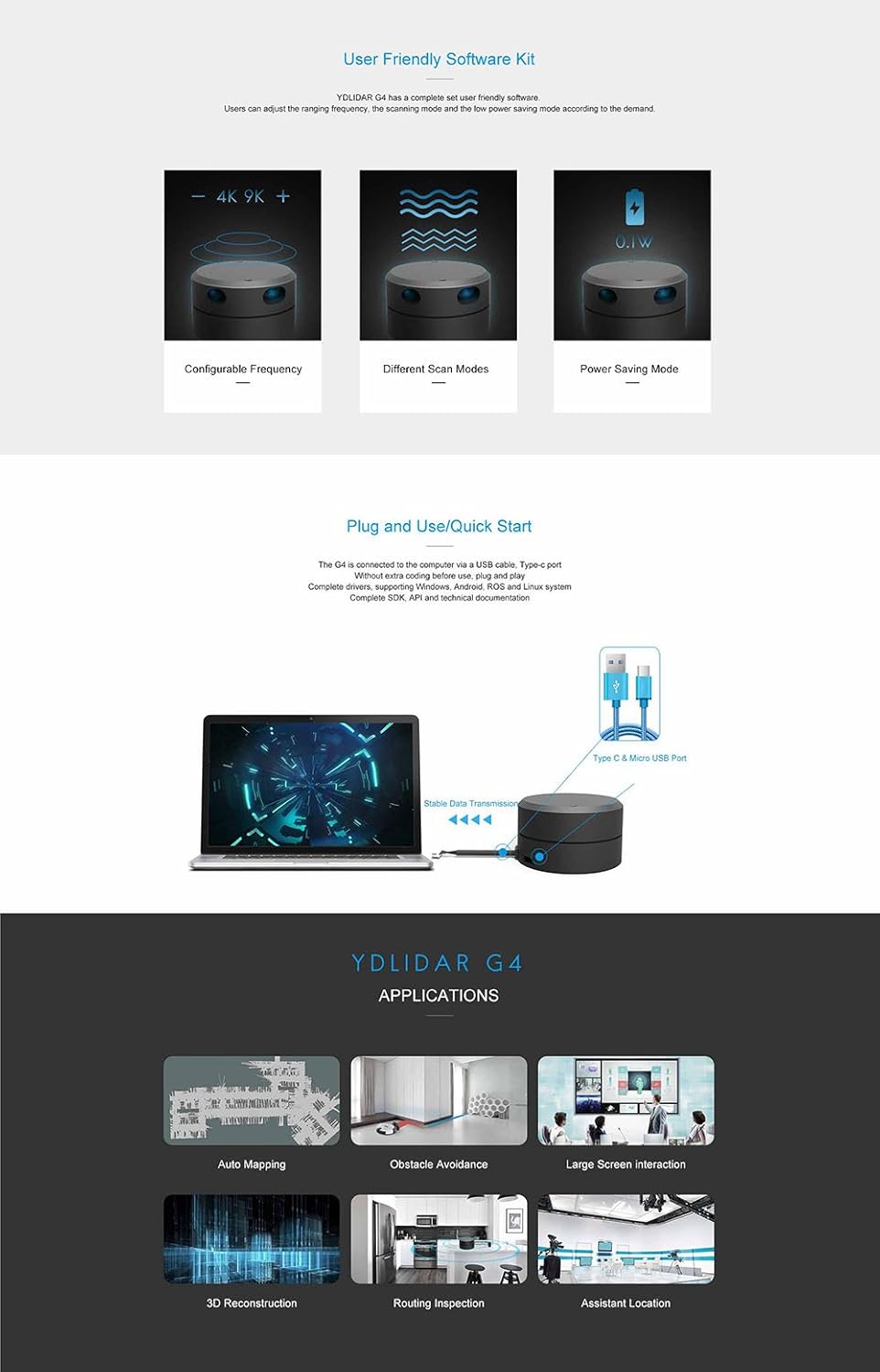
Image: A composite image showing the YDLIDAR G4's user-friendly software interface for configurable frequency, different scan modes, and power saving mode, along with illustrations of its applications like auto mapping and obstacle avoidance.
6. Maintenance
The YDLIDAR G4 is designed for durability and a long operational life. Regular maintenance is minimal but important to ensure optimal performance:
- Cleaning: Keep the optical window and the main body of the lidar clean. Use a soft, dry, lint-free cloth to gently wipe away dust or smudges. Avoid abrasive materials or harsh chemicals.
- Environmental Conditions: Operate the lidar within its specified environmental conditions (temperature, humidity) to prevent damage. While it has an IP54 rating for water resistance, avoid submerging it or exposing it to heavy rain.
- Storage: When not in use, store the YDLIDAR G4 in a cool, dry place, away from direct sunlight and extreme temperatures.
- Cable Care: Ensure the USB Type-C cable is not bent sharply or subjected to excessive strain, which could damage the cable or the port.

Image: An exploded view diagram of the YDLIDAR G4's internal components, highlighting the brushless motor and encoding disk, which contribute to its long working life and precise measurements.
7. Troubleshooting
If you encounter issues with your YDLIDAR G4, consider the following common troubleshooting steps:
- No Power/Connection:
- Ensure the USB Type-C cable is securely connected to both the lidar and the computer.
- Try a different USB port on your computer.
- Verify that the USB adapter is functioning correctly.
- Software Not Detecting Lidar:
- Check if the correct drivers are installed for your operating system. Reinstall them if necessary.
- Ensure no other applications are using the same serial port as the lidar.
- Restart your computer and the lidar unit.
- Inaccurate Readings/Interference:
- Clean the optical window of the lidar.
- Minimize strong ambient light sources if possible, although the G4 has good interference resistance.
- Ensure there are no physical obstructions blocking the lidar's scanning path.
- Motor Not Spinning:
- Verify power connection.
- Check software settings to ensure the motor is commanded to spin.
For persistent issues, refer to the technical documentation or contact customer support.
8. Specifications
| Feature | Specification |
|---|---|
| Brand | SmartFly info |
| Model Number | EAI YDLIDAR G4 |
| Measuring Range | 16 meters |
| Scanning Frequency | 5-12Hz (configurable) |
| Ranging Frequency | 9000Hz |
| Lidar Grade | Class 1 (FDA Safety Standard) |
| Operating Systems Supported | Windows, Android, ROS, Linux |
| Material | Aluminum |
| Item Weight | 210 Grams (7.4 ounces) |
| Product Dimensions | 1.38 x 0.79 x 1.65 inches |
| International Protection Rating | IP54 (Waterproof) |
| Motor Type | Industrial Brushless Motor |
| Estimated Working Life | Up to 50,000 hours |

Image: A close-up view of the YDLIDAR G4, highlighting its compact and ultra-thin design (41mm), suitable for various robotic and interactive applications.
9. Applications
The YDLIDAR G4 is versatile and can be applied in a wide range of fields:
- Auto Mapping: Creating detailed maps of environments for autonomous navigation.
- Obstacle Avoidance: Enabling robots and autonomous vehicles to detect and avoid obstacles.
- Large Screen Interaction: Facilitating interactive experiences with large displays.
- 3D Reconstruction: Generating three-dimensional models of spaces or objects.
- Routing Inspection Assistant Location: Assisting in precise location and navigation for inspection tasks.
10. Support and Resources
For further assistance and detailed information, please refer to the following resources:
- Technical Documentation: http://www.ydlidar.com/download
- Product Information: http://www.ydlidar.com/product/G4
- Expert Support: Email: firefly@smartfire.cn, Skype: smartfire_cn
- Product Customization: Email: firefly@smartfire.cn
Ask a question about this manual
Ask about setup, troubleshooting, compatibility, parts, safety, or missing instructions. Manuals+ will review the question and use this page’s manual context to help answer it.