Canon EF 70-200mm f/2.8L IS III USM Lens User Manual
Model: 3044C002
Introduction
This manual provides essential information for the safe and effective use of your Canon EF 70-200mm f/2.8L IS III USM Lens. Please read it thoroughly before using the product to ensure optimal performance and longevity.
The Canon EF 70-200mm f/2.8L IS III USM Lens is a high-performance telephoto zoom lens designed for Canon Digital SLR Cameras. It features Canon's Air Sphere Coating (ASC) to minimize ghosting and flare, ensuring outstanding clarity. With a constant f/2.8 maximum aperture throughout its entire zoom range, it excels in various lighting conditions and provides excellent background blur. The lens also incorporates optical image stabilization for sharp images, even in challenging situations, and is highly resistant to dust and water for improved durability.
What's in the Box
- EF 70-200mm f/2.8L IS III USM Lens
- Lens Cap E-77II
- Lens Dust Cap E
- Lens Hood ET-87
- Lens Case LZ1326
Key Features
- Constant f/2.8 Maximum Aperture throughout Entire Zoom Range.
- Canon’s Air Sphere Coating (ASC) Minimizes Ghosting and Flare.
- Optical Image Stabilization at up to 3.5 Stops of Shake Correction.
- Fluorine Coating on Front and Rear Elements to Help Reduce Smears and Fingerprints.
- Highly Resistant to Dust and Water, and Improved Durability Even in Harsh Conditions.
- Inner Focusing System with Ring Ultrasonic Motor.
- Full-time Manual Focus.
- One Fluorite Element and Five UD Elements for High Image Quality.
- Minimum Focusing Distance of 3.9 feet (1.2 meters).
- Diagonal Angle of View: 34° - 12°.
Product Overview
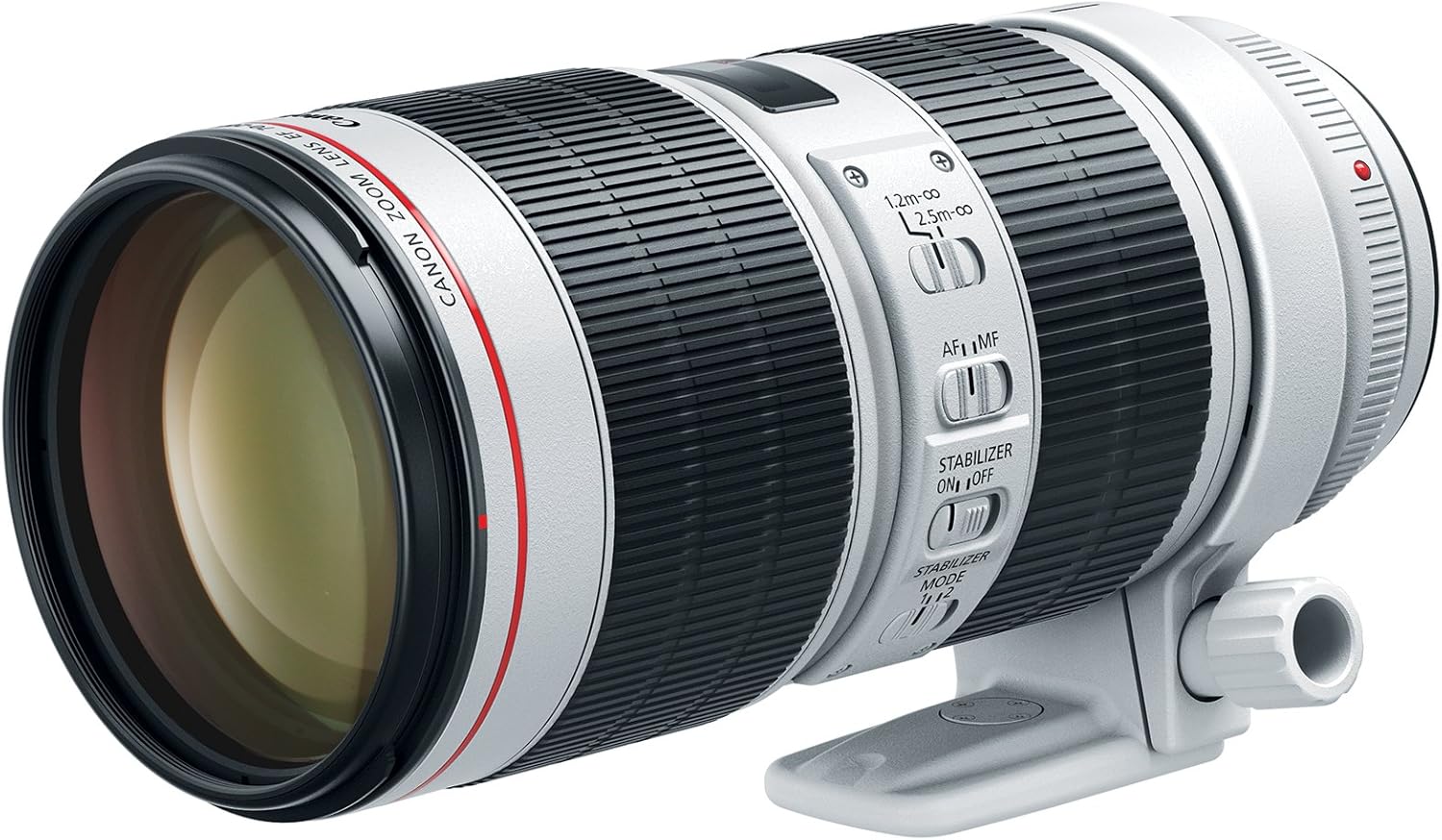
Front-side view of the Canon EF 70-200mm f/2.8L IS III USM Lens, showcasing its white barrel and black rings.

Top view of the lens, displaying the zoom ring, focus ring, and various control switches for autofocus/manual focus and image stabilization.

The Canon EF 70-200mm f/2.8L IS III USM Lens neatly stored within its dedicated protective soft case, emphasizing portability and protection.
Setup
Attaching the Lens
- Ensure both the camera and lens are powered off.
- Align the red index mark on the lens with the red index mark on your camera's lens mount.
- Rotate the lens clockwise until it clicks into place. Do not force the lens.
- Attach the lens hood by aligning the red dot on the hood with the red dot on the front of the lens, then twist until it locks.
Detaching the Lens
- Ensure the camera is powered off.
- While pressing the lens release button on the camera, rotate the lens counter-clockwise until it stops.
- Remove the lens. Immediately attach the lens caps to both the front and rear of the lens to protect the glass elements.
Operating the Lens
Focus Modes (AF/MF)
- AF (Autofocus): For automatic focusing. This is the standard mode for most shooting situations.
- MF (Manual Focus): For manual focusing. Rotate the focusing ring on the lens to adjust focus.
Image Stabilization (IS)
The lens features Optical Image Stabilization to reduce blur caused by camera shake. This is particularly useful when shooting handheld or in low light conditions.
- IS ON/OFF Switch: Turn the image stabilizer on or off. It is recommended to turn it off when using a tripod to conserve battery.
- Stabilizer Mode Switch (Mode 1/Mode 2):
- Mode 1: Corrects camera shake in all directions. Ideal for stationary subjects.
- Mode 2: Corrects camera shake only in the vertical direction. Best for panning shots where you follow a moving subject horizontally.
Zooming
Rotate the zoom ring on the lens to change the focal length between 70mm and 200mm. This allows you to adjust your field of view without changing your physical position.
Maintenance
- Cleaning: Use a soft, lint-free cloth to gently wipe dust from the lens surface. For stubborn smudges, use a lens cleaning solution and a microfiber cloth. Avoid touching the glass elements directly with your fingers.
- Storage: When not in use, store the lens with both front and rear caps attached in a cool, dry place away from direct sunlight and extreme temperatures. Using the provided lens case is recommended for added protection.
- Handling: Always handle the lens by its barrel, not by the focusing or zoom rings, to prevent accidental damage.
Troubleshooting
- Lens not attaching/detaching: Ensure the red index marks are aligned correctly and the lens release button is fully pressed when detaching. Do not force the lens.
- Autofocus not working: Check if the AF/MF switch on the lens is set to AF. Ensure your camera's focus mode is also set to autofocus. Verify that the lens is securely mounted to the camera body.
- Images are blurry: Check your camera's shutter speed and ISO settings. Ensure the Image Stabilization (IS) switch on the lens is set to ON if shooting handheld. If using a tripod, IS should be OFF. Clean the lens elements if smudges are present.
- Lens not zooming smoothly: Check for any obstructions on the zoom ring. If the issue persists, professional servicing may be required.
Specifications
| Feature | Detail |
|---|---|
| Product Dimensions | 7.8 x 3.5 x 3.5 inches |
| Item Weight | 3.18 pounds |
| ASIN | B07DFVF7M4 |
| Item model number | 3044C002 |
| Date First Available | June 7, 2018 |
| Manufacturer | Canon Cameras US |
| Brand | Canon |
| Focal Length Description | 70-200 lens |
| Lens Type | Telephoto |
| Compatible Mountings | Canon EF |
| Camera Lens Description | EF 70-200mm f/2.8L IS III USM for Digital SLR Cameras, White - 3044C002 |
Warranty and Support
For detailed warranty information and further support, please refer to the official user manual provided by Canon. A digital version of the user manual can be accessed via the following link: