
1. Introduction
The Caliber LT3P4 is a 4-channel high-low AutoSense line output converter designed to integrate aftermarket amplifiers with factory car audio systems that lack dedicated RCA pre-amplifier outputs. This device converts high-level (speaker-level) audio signals into low-level (RCA) signals, providing a clean and reliable input for your amplifier. It also generates a +12V remote turn-on signal for the amplifier, eliminating the need for a separate remote wire from the head unit.
2. Specifications
- Channels: 4-channel line output converter
- Conversion Ratio: 6:1 step-down converter
- Output Adjustment: Adjustable output sensitivity
- Maximum Input Power: 80W (high-level) per channel
- Remote Output: AutoSense +12V remote output
- Voltage: 12 Volt
- Design: Extremely compact for easy installation
- Compatibility: Suitable for all car radios
- Weight: Approximately 99.79 g
3. Setup and Installation
Proper installation is crucial for optimal performance. Ensure the vehicle's battery is disconnected before beginning any wiring. The LT3P4 connects between your car's factory radio speaker outputs and your aftermarket amplifier's RCA inputs.
3.1 Wiring Diagram
Refer to the diagram below for detailed wiring connections. This diagram illustrates the connections from the factory radio's speaker outputs to the LT3P4, and from the LT3P4's RCA outputs to your amplifier.
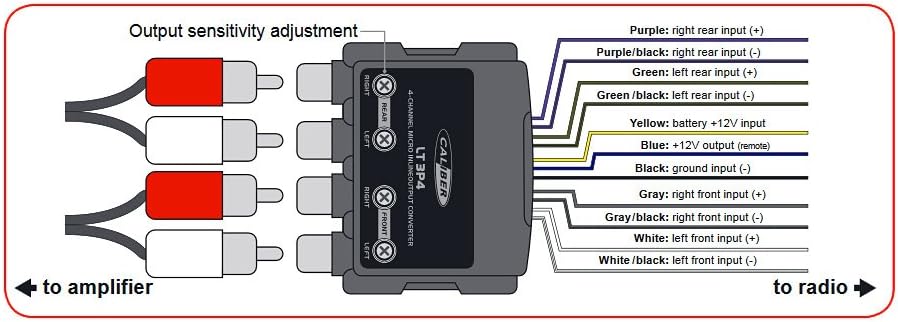
Image 1: Wiring diagram for the Caliber LT3P4 Line Output Converter. It shows the device with RCA outputs on the left connecting to an amplifier, and a multi-wire harness on the right connecting to the radio. The harness includes inputs for right rear (+/-), left rear (+/-), battery +12V, +12V remote output, ground (-), right front (+/-), and left front (+/-). Output sensitivity adjustment dials are visible on the top of the unit.
3.2 Connection Instructions
Follow these steps to connect the LT3P4:
- Speaker Inputs (from Radio):
- Purple: Right Rear Input (+)
- Purple/Black: Right Rear Input (-)
- Green: Left Rear Input (+)
- Green/Black: Left Rear Input (-)
- Gray: Right Front Input (+)
- Gray/Black: Right Front Input (-)
- White: Left Front Input (+)
- White/Black: Left Front Input (-)
- Power Connections:
- Yellow: Battery +12V Input. Connect this wire to a constant +12V power source (e.g., directly to the car battery or a fused +12V line).
- Black: Ground Input (-). Connect this wire to a solid chassis ground point in the vehicle.
- Remote Output:
- Blue: +12V Output (Remote). Connect this wire to the remote turn-on input of your aftermarket amplifier. The LT3P4's AutoSense feature will automatically generate this signal when it detects an audio signal from the radio.
- RCA Outputs (to Amplifier): Connect the RCA cables from the LT3P4's RCA output jacks to the corresponding RCA input jacks on your amplifier. The LT3P4 provides four RCA outputs: Front Right, Front Left, Rear Right, and Rear Left.
3.3 Output Sensitivity Adjustment
The LT3P4 features output sensitivity adjustment dials (labeled 'Output sensitivity adjustment' in the diagram) for each channel pair (Front and Rear). These allow you to match the output level of the converter to the input sensitivity of your amplifier. Start with the dials set to their minimum position and gradually increase them while listening for distortion. Adjust until a clean, strong signal is achieved without clipping at the amplifier.
4. Operating Instructions
Once correctly installed and configured, the Caliber LT3P4 operates automatically. When your car's radio is turned on and produces an audio signal, the AutoSense feature of the LT3P4 will detect this signal, convert it to a low-level RCA output, and simultaneously activate the +12V remote output to turn on your connected amplifier. The unit will power off when the audio signal from the radio ceases.
5. Maintenance
The Caliber LT3P4 is designed for reliable, maintenance-free operation. To ensure longevity:
- Keep the unit free from moisture and extreme temperatures.
- Periodically check all wiring connections to ensure they are secure and free from corrosion.
- Clean the exterior of the unit with a soft, dry cloth if necessary. Do not use harsh chemicals or solvents.
6. Troubleshooting
If you experience issues with your Caliber LT3P4, consider the following:
- No Sound:
- Verify all power (Yellow, Black) and speaker input wires are correctly connected and have good contact.
- Check the RCA connections to the amplifier.
- Ensure the amplifier is receiving the +12V remote signal (Blue wire).
- Confirm the radio is producing sound and its speaker outputs are active.
- Distorted Sound:
- Adjust the output sensitivity dials on the LT3P4. If set too high, it can cause distortion.
- Check the input gain settings on your amplifier.
- Ensure speaker input wires are not reversed in polarity.
- Amplifier Not Turning On:
- Verify the Yellow (+12V) and Black (Ground) wires are properly connected.
- Ensure the radio is on and playing audio for the AutoSense feature to activate the remote output.
- Check the Blue remote wire connection to the amplifier.
7. Warranty and Support
For warranty information and technical support, please refer to the documentation provided with your purchase or visit the official Caliber website. Keep your proof of purchase for any warranty claims.