
Introduction
The Adoric 0-6" Digital Caliper is a versatile electronic measuring tool designed for precise measurements in various applications. This caliper features a large LCD screen for easy reading, an auto-off function to conserve battery life, and the ability to convert between inch and millimeter units with a single button. It is ideal for household tasks, DIY projects, and other applications requiring accurate dimensional measurements.
Product Overview
Familiarize yourself with the components of your digital caliper:
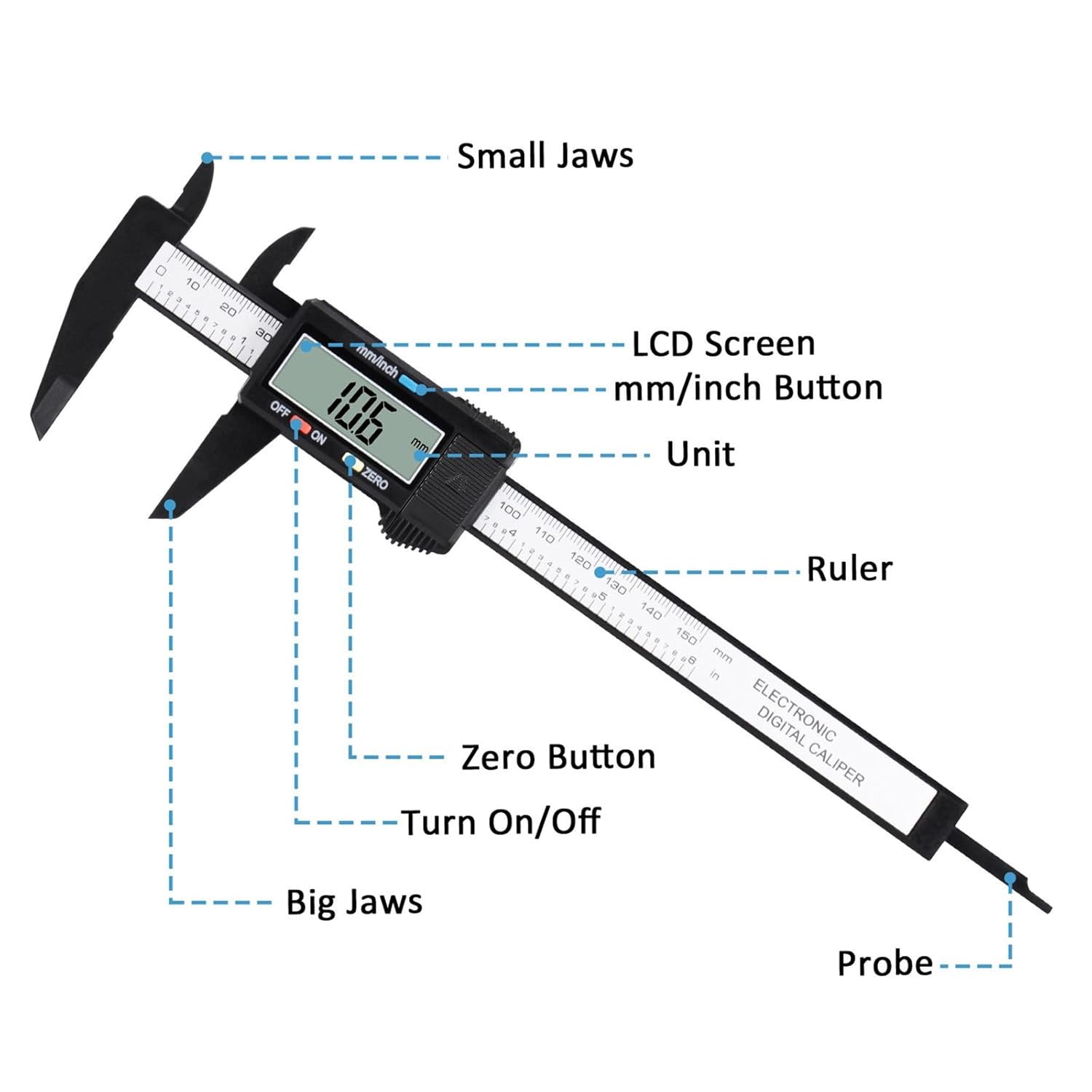
- Big Jaws: Used for external measurements.
- Small Jaws: Used for internal measurements.
- Probe: Used for depth measurements.
- Ruler: Provides a linear scale for reference.
- LCD Screen: Displays measurement readings.
- mm/inch Button: Toggles between millimeter and inch units.
- Zero Button: Resets the display to zero at any point.
- ON/OFF Button: Manually turns the caliper on or off.
Setup
Battery Installation
The digital caliper requires one LR44 button cell battery. A battery is typically pre-installed, but you may need to activate it or replace it.
- Locate the battery compartment on the back of the caliper.
- If a battery is already installed, gently pull out the white insulation film to activate the battery.
- If replacing the battery, unscrew the battery cover using a small screwdriver.
- Insert a new LR44 battery with the positive (+) side facing up.
- Replace the battery cover and secure it with the screw.


Operating Instructions
Power On/Off
- The caliper will automatically turn on when the sliding jaw is moved.
- Press the ON/OFF button to manually turn the unit on or off.
- The caliper will automatically shut down after 5 minutes of inactivity to save battery life.
Zero Setting
The zero setting function allows for differential measurements or setting a new reference point.
- Close the jaws completely or position them at your desired reference point.
- Press the ZERO button. The display will reset to 0.00.
- You can now take measurements relative to this new zero point.
Unit Conversion
Easily switch between metric and imperial units.
- With the caliper powered on, press the mm/inch button.
- The display will switch between millimeters (mm) and inches (in).

Measurement Modes
The Adoric Digital Caliper supports four distinct measurement modes:
- External Measurement: Use the large jaws to measure the outer dimensions of an object.
- Internal Measurement: Use the small jaws to measure the inner dimensions of an object.
- Depth Measurement: Use the depth probe to measure the depth of holes or steps.
- Step Measurement: Use the step feature to measure the height difference between two surfaces.


Maintenance
- Cleaning: Wipe the caliper with a clean, dry cloth after each use. Avoid using solvents or harsh chemicals, as these can damage the plastic components and electronic display.
- Storage: Store the caliper in a dry, clean environment, away from direct sunlight and extreme temperatures. Keep the jaws closed to protect them from damage.
- Battery Replacement: Replace the LR44 battery when the display becomes dim or erratic. Refer to the "Battery Installation" section for instructions.
Troubleshooting
| Problem | Possible Cause | Solution |
|---|---|---|
| Display is blank or dim | Low or dead battery; Insulation film not removed. | Replace the LR44 battery; Remove the white insulation film. |
| Inaccurate readings | Jaws not fully closed before zeroing; Debris on measuring surfaces; Caliper not held correctly. | Ensure jaws are clean and closed, then press ZERO; Clean measuring surfaces; Hold the caliper firmly and squarely to the object. |
| Buttons (mm/inch, ZERO) unresponsive | Low battery; Internal electronic issue. | Replace the battery; If the issue persists, contact customer support. |
| Caliper turns on/off unexpectedly | Loose battery connection; Environmental interference. | Check battery seating; Move to a different environment away from strong electromagnetic fields. |
Specifications
| Feature | Detail |
|---|---|
| Brand | Adoric |
| Model | KC24 |
| Material | Plastic |
| Measurement Range | 0-6 inches / 0-150 mm |
| Resolution | 0.01 inches / 0.1 mm |
| Accuracy | ±0.01 inches / ±0.2 mm |
| Product Dimensions (L x W) | 9.45" x 3.07" |
| Item Weight | 0.07 Kilograms |
| Battery Type | 1 x LR44 (button cell) |
| Measuring Modes | External, Internal, Depth, Step |
| Features | Large LCD screen, Auto-Off, Zero Setting, Inch/mm Conversion |
Warranty & Support
For warranty information or technical support, please refer to the product packaging or contact Adoric customer service directly. Keep your purchase receipt as proof of purchase for any warranty claims.