
1. Product Overview
The CACAZI A10 Wireless Doorbell Kit provides a convenient and reliable solution for your home, office, or store. Featuring a long operating range, multiple chime options, and adjustable volume, this doorbell ensures you never miss a visitor.
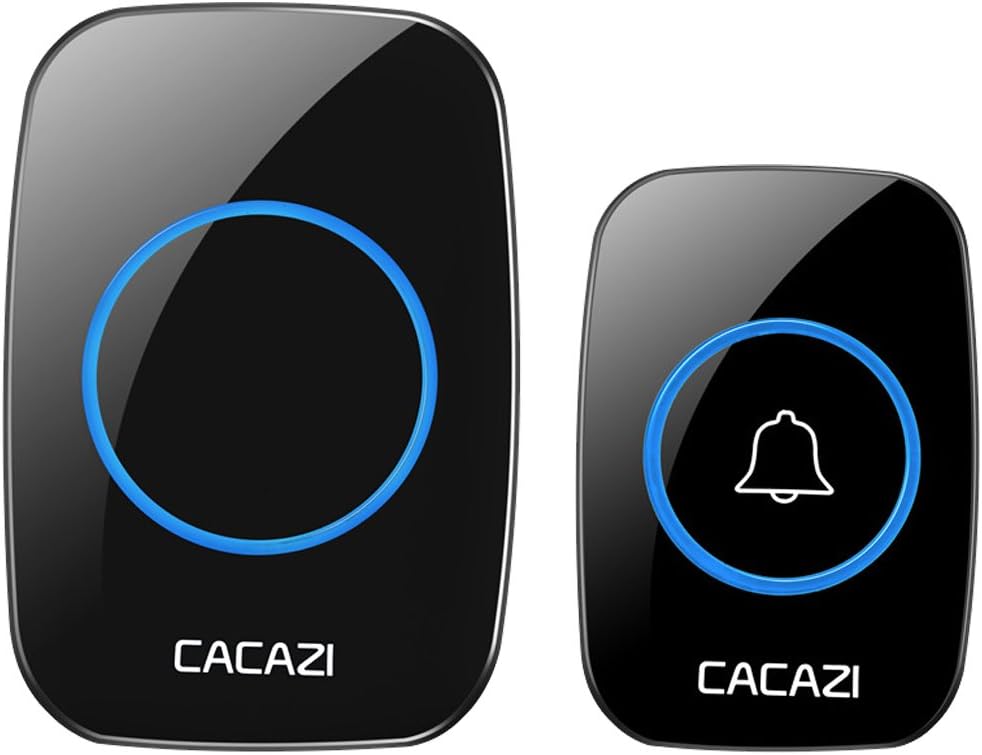
Image 1.1: The CACAZI A10 Wireless Doorbell Kit, featuring the black plug-in receiver and the push button transmitter.
Key Features:
- Extended Operating Range: Up to 1000 feet (300 meters) in open areas.
- Multiple Chimes: Choose from 38 distinct melodies.
- Adjustable Volume: 3 levels of volume control (20 - 85 dB).
- LED Indicator: Blue LED flashing alert for visual notification, ideal for the hearing impaired.
- Waterproof Transmitter: IP44 rated for outdoor use.
- Easy Installation: No wiring required, simple setup with adhesive tape or screws.
2. Package Contents
Please verify that all items are included in your package:
- 1 x Wireless Doorbell Push Button (Transmitter)
- 1 x Plug-in Doorbell Receiver
- 1 x Double-sided Adhesive Tape
- 1 x Screw Kit (screws and anchors)
- 1 x 12V 23A Alkaline Battery (pre-installed in transmitter)
3. Specifications
| Feature | Specification |
|---|---|
| Model Number | A10 |
| Operation Range | 1000 Feet (300m) in open area |
| Melody Options | 38 Chimes |
| Volume Levels | 3 levels (20 - 85 dB) |
| Transmitter Battery Type | 12V 23A Alkaline Battery (included) |
| Receiver Power Source | AC 100 - 240 V (Plug-in) |
| Transmitter Size | 75 x 51 x 20 mm |
| Receiver Size | 95 x 65 x 24 mm |
| Waterproof Grade | IP44 (for transmitter) |
| Applicable Temperature | -30°C to 70°C |
| Material | ABS Plastic |
| Item Weight | 160 g |
| Average Battery Life | 2 years (transmitter) |

Image 3.1: Performance characteristics of the CACAZI A10 Doorbell, highlighting signal strength and chime options.

Image 3.2: Illustration of the doorbell's wireless range, extending up to 300 meters from the transmitter to the receiver.
4. Setup
The CACAZI A10 Wireless Doorbell is designed for easy, wire-free installation.
4.1. Receiver Installation
- Plug the receiver into any standard electrical outlet within the desired operating range of the transmitter.
- Ensure the outlet is easily accessible and not obstructed.
4.2. Transmitter (Push Button) Installation
You have two options for mounting the push button:
- Using Double-sided Adhesive Tape:
- Clean the mounting surface thoroughly to ensure it is free of dust and moisture.
- Peel off one side of the protective film from the double-sided adhesive tape and firmly attach it to the back of the transmitter.
- Peel off the other side of the protective film and press the transmitter firmly onto the desired mounting location (e.g., door frame, wall) for at least 30 seconds.
- Using Screws and Anchors:
- Open the back cover of the transmitter.
- Mark the positions for drilling holes on the mounting surface using the transmitter's screw holes as a guide.
- Drill the holes and insert the provided anchors if necessary.
- Secure the transmitter's back cover to the wall using the provided screws.
- Snap the front part of the transmitter onto the secured back cover.

Image 4.1: Visual guide for installing the push button using either adhesive tape or screws.
Note: The push button transmitter comes with a pre-installed 12V 23A alkaline battery. The receiver plugs directly into a wall circuit and does not require batteries.
5. Operating Instructions
5.1. Changing the Chime Melody
Follow these steps to select your preferred chime:
- Press the Forward (▲) or Back (▼) button on the receiver to cycle through the available melodies. The receiver will play the tune as you select it.
- Once you have found your desired tune, hold the Volume Control button (bell icon) on the receiver for approximately 5 seconds. Release the button when you hear a "Ding dong" sound and the LED indicator begins flashing.
- Press the push button on the transmitter to send a signal to the receiver. The receiver will play the newly selected tune automatically, confirming the setting is successful.

Image 5.1: Features of the receiver, including chime selection and volume adjustment buttons.
5.2. Adjusting Volume
Press the Volume Control button (bell icon) on the receiver repeatedly to cycle through the 3 available volume levels (20 dB, 50 dB, 85 dB). Select the level that best suits your needs.
5.3. LED Flashing Alert
When the push button is pressed, the transmitter will flash a blue light. Simultaneously, the receiver will ring the selected chime and flash a blue light. This visual alert provides an additional notification, particularly useful for individuals with hearing impairments.

Image 5.2: Demonstration of the blue LED light flashing on the receiver when the doorbell is activated.
6. Maintenance
6.1. Transmitter Battery Replacement
The transmitter uses a 12V 23A alkaline battery. If the doorbell push button stops working or the LED light on the transmitter does not illuminate when pressed, it may be time to replace the battery.
- Carefully open the back cover of the transmitter.
- Remove the old battery.
- Insert a new 12V 23A alkaline battery, ensuring correct polarity (+/-).
- Close the back cover securely.
6.2. Cleaning
To maintain the appearance and functionality of your doorbell, wipe both the transmitter and receiver with a soft, dry cloth. Avoid using abrasive cleaners or solvents, as these can damage the surface.

Image 6.1: The transmitter's waterproof design, meeting IP44 standards for outdoor use.
7. Troubleshooting
If you encounter issues with your CACAZI A10 Wireless Doorbell, please refer to the following common problems and solutions:
- No Sound from Receiver:
- Ensure the receiver is properly plugged into a live electrical outlet.
- Check if the volume is set to the lowest level or muted. Adjust the volume using the volume control button.
- Verify the transmitter battery. Replace if necessary (refer to Section 6.1).
- Re-pair the transmitter and receiver (refer to Section 5.1, step 2 and 3 for re-pairing process).
- Short Operating Range:
- The operating range can be affected by obstacles such as thick walls, metal structures, or other electronic devices. Try relocating the receiver or transmitter to minimize interference.
- Ensure the transmitter battery is not low.
- Transmitter LED Not Lighting Up:
- Replace the 12V 23A battery in the transmitter.
- Chime Melody Does Not Change:
- Ensure you are following the chime selection steps correctly (refer to Section 5.1). Make sure to hold the volume button until the LED flashes and then press the transmitter button to confirm.
8. Warranty and Support
For warranty information, technical support, or any product-related inquiries, please contact the seller or manufacturer directly. Retain your proof of purchase for warranty claims.
Manufacturer: CHAOXINGLI


